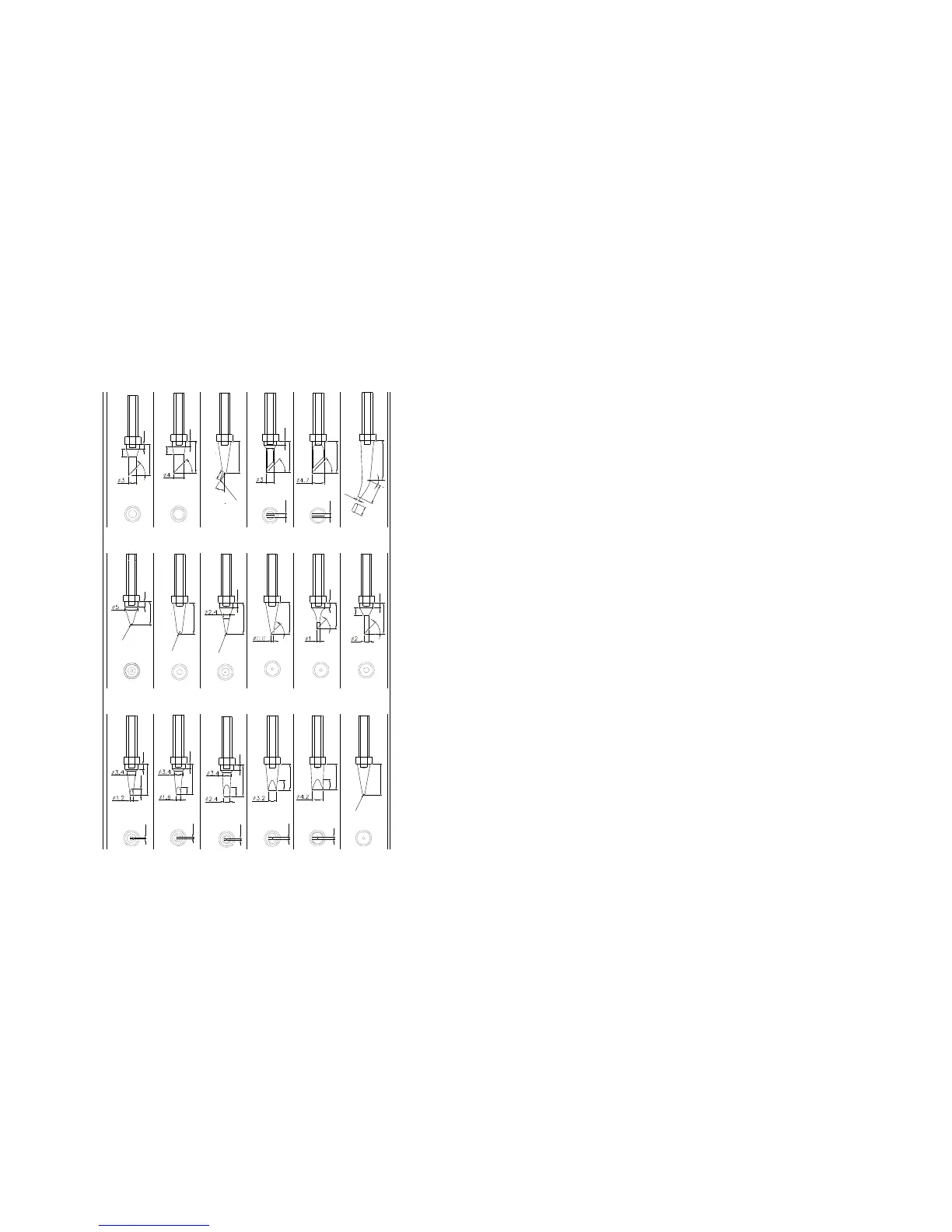
Ⅺ. TIPS
200-2.4D
200-1.6D
200-1.2D
200-3.2D
200-4.2D
200-SB
200-B
0.5
0.5
3
.
5
4
5
°
15
2
5
°
4
5
°
2
10
1.5
10
4
R
0
.
5
9
2
R
0
.
5
200-2C
7
.
5
2
12
3
4
5
°
1
.
2
3
.
5
200-H
10
3.7
200-1C
12
3.5
2
200-0.8C
4
5
°
12
200-K
1.5
200-SK
R
0
.
2
12
4
5
°
12
4
5
°
1.5
12
4
5
°
200-2B
200-3C
R
1
R
0
.
2
200-I
2
12
3
2.5
12
2
200-4C
2
12
200-J
12
3
2
4
5
°
12
12
2
3
12
1
0.8
0.8
Table of Contents
Ⅰ. Safety Instruction……………………………………………………………1
Ⅱ. Specification…………………………………………………………………3
Ⅲ. Characteristic…………………………………………………………………4
Ⅳ. Connection & Operation the Soldering Iron………………………………4
4.1 Iron Holder………………………………………………………………4
4.2 Connection……………………………………………………………5
4.3 Operation of the Soldering Station…………………………………6
4.3.1 Favorite Temperature Setting…………………………………6
4.3.2 Temperature Setting……………………………………………7
4.3.3 Turn On / Turn Off the Sound…………………………………7
4.3.4 Sleeping and Resume…………………………………………8
Ⅴ. Parameter Setting……………………………………………………………8
5.1 Input Right Password…………………………………………………9
5.1.1 Into the Parameter Setting……………………………………9
5.1.2 Input the Password……………………………………………9
5.2 Parameter Menu………………………………………………………10
5.3 Sleeping Time Set……………………………………………………10
5.4 Work Mode Set………………………………………………………11
5.5 Password Set…………………………………………………………12
Ⅵ. Temperature Calibration…………………………………………………12
Ⅶ. Select a Correct Tip………………………………………………………13
Ⅷ. Use and Maintenance of the Tip…………………………………………14
8.1 Use of the Tip…………………………………………………………14
8.2 Maintenance of the Tip………………………………………………14
Ⅸ. Error messages……………………………………………………………16
Ⅹ. Check and Replace the Soldering Iron…………………………………16
10.1 Check the Soldering Iron……………………………………………17
10.2 Disassembling the Iron Handle……………………………………17
10.3 Measure the Resistance before Replacing…………………………18
10.4 Measure the Resistance after Replacing…………………………18
Ⅺ. TIPS…………………………………………………………………………19
Page 19



 To Next Page