Wake-Up type
UICKO
OL
E
D T
1
2 QU
I
C
KO H
E
AT
I
N
G SO
LDE
R
I
NG STA
TI
O
N
1 -9
5
T
MENU
4.BOOSTDURATION
5.BOOS TDE GR EE
6.WAKEUPMET HO D
UICKO
OL
E
D T
1
2 QU
I
C
KO H
E
AT
I
N
G SO
LDE
R
I
NG STA
TI
O
N
1 -9
5
T
POWEROFFW AK EU P
ENCODER& HA ND LE
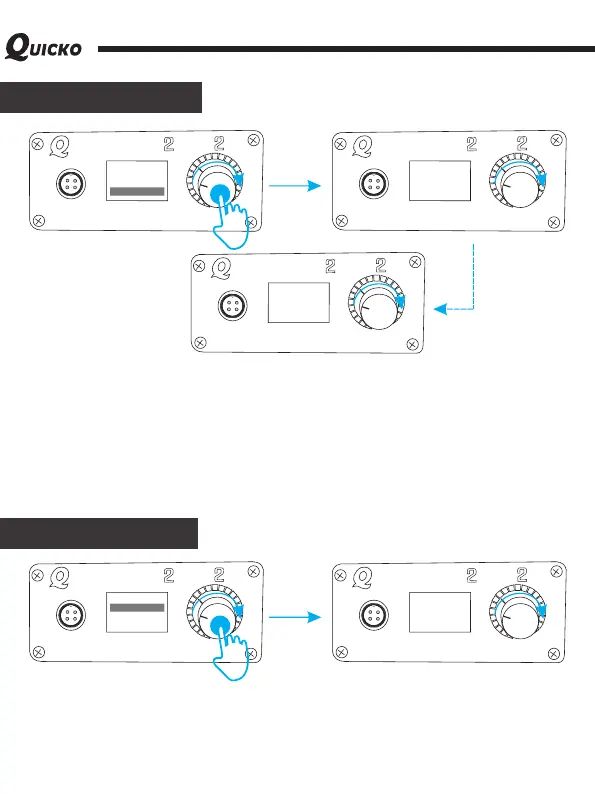
After selecting the wake-up function, short press the encoder, enter setting of wake-up
type, the system provides two kinds of wake-up type: encoder together with handle or just
encoder. When choosing encoder + handle, the soldering station is automatic power off,
shaking handle or short press or rotary encoder, all can wake-up the host!
When choosing the encoder, the automatic shutdown state, short press or rotary encoder
can wake-up the host, but shaking handle cannot wake-up the host!
The default setting is: encoder + handle, which can be set according to actual needs.
U
I
C
K
O
O
L
ED T
1
2 QUIC
KO HE ATI
NG SO
L
D
E
R
IN
G STA
T
IO
N
1 -
95
T
POWEROFFWAK EU P
[ENCODERO NL Y]
UICK
O
OL
E
D T
1
2 QU
I
C
KO H
EATI
NG SO
L
DE
R
I
NG STA
T
I
O
N
1 -9
5
T
MENU
7.BUZZERSWITCH
8.BATT ER YGU AR D
9.FIRMWARE
UICK
O
OL
E
D T
1
2 QU
I
C
KO H
EATI
NG SO
L
DE
R
I
NG S
T
A
T
I
O
N
1 -9
5
T
BUZZERSWI TC H
[ON]
This version OLED controller integrates with a buzzer, and the sound prompts the host
state. The buzzer will beep when the host encounters an error or sets the appropriate
function.
Buzzer switch



 To Next Page