Battery guard
U
I
C
K
O
OL
ED T
1
2 QU
IC
KO H
EATI
NG SO
L
DE
R
I
N
G STA
T
IO
N
1 -
95
T
MENU
7.BUZZERSWITCH
8.BATT ER YGU AR D
9.FIRMWARE
U
I
C
K
O
OL
ED T
1
2 QU
IC
KO H
EATI
NG SO
L
DE
R
I
N
G STA
T
IO
N
1 -
95
T
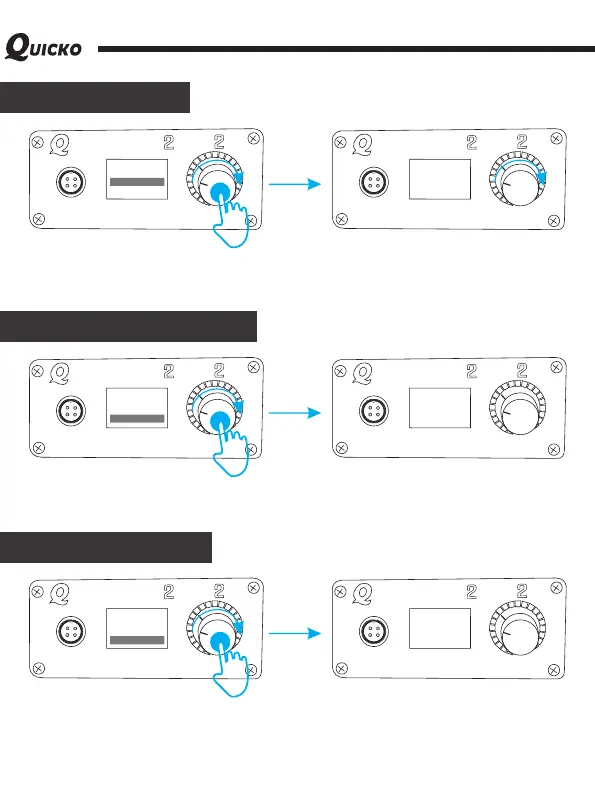
BATTERYPR OT EC T
AT[12.0V]
According to the voltage environment of the host, built-in battery guard function of this
soldering station, and the default voltage is 12V. When the voltage is not stable, the power
supply will be supercharged according to the setting. Usually don't need to set it. The
setting range is 12V-24V.
Version information
UICKO
OL
E
D T
1
2 QU
I
CKO H
E
A
T
I
N
G SO
LDER
I
NG ST
A
TI
ON
1 -9
5
T
MENU
7.BUZZERSWITCH
8.BATT ER YGU AR D
9.FIRMWARE
UICKO
OL
E
D T
1
2 QU
I
CKO H
E
A
T
I
N
G SO
LDER
I
NG ST
A
TI
ON
1 -9
5
T
FIRMWARE
[V1.4@20 17 06 18 ]
It shows the information of this version controller.
Restore default
UICKO
OL
E
D T12 Q
U
I
CKO H
E
A
T
I
N
G S
OLDE RI
NG S
T
A
TI
ON
1 -9
5
T
MENU
8.BATT ER YGU AR D
9.FIRMWARE
UICKO
OL
E
D T12 Q
U
I
CKO H
E
A
T
I
N
G S
OLDE RI
NG S
T
A
TI
ON
1 -9
5
T
RESTORESE TT IN G
[NO]
A.FACT OR YRE SE T
Restore the parameters of the soldering station to the factory default. Note: please back-up
your usual important parameters before you restore factory Settings to prevent data loss.
For example: temperature calibration value, strengthening time and temperature, etc.



 To Next Page