Menu use
UICKO
O
LE
D T12 Q
U
I
C
KO HE
ATI
NG S
OL
DE
R
IN
G ST
AT
I
ON
S
ET
:3 0
0
℃
13 %
25
℃
24
V
3
0
0℃
1 -9
5
T
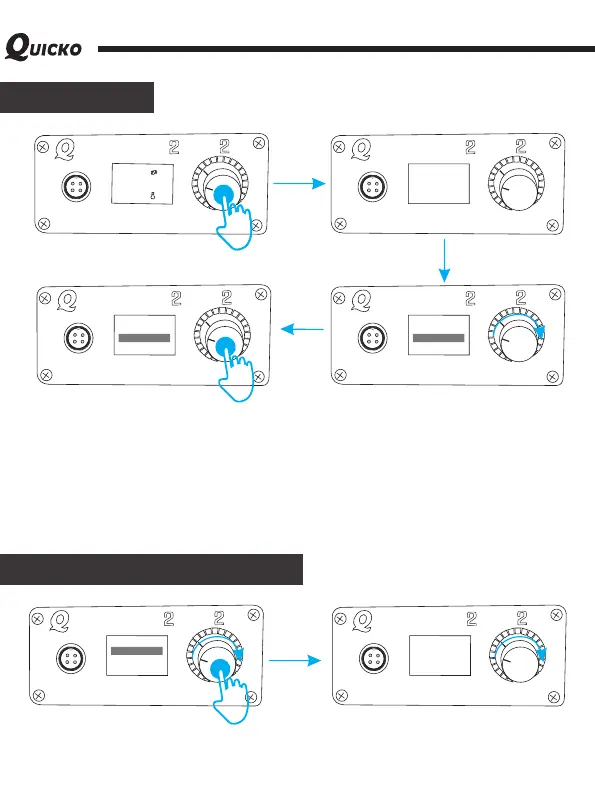
Enter the menu setting interface: under the normal working temperature interface, long
press the encoder button (about 3s). Enter the host setup mode! Exit menu settings
interface: at the menu setting interface, long press the encoder button (about 3s), exit the
host setup mode!
Setting menu:
Enter the function item: rotate the encoder to the corresponding function, and short press
the button to enter the function item.
Exit setting function item: after setting the corresponding parameters with the encoder rotary
knob, short press the button to confirm exit the function item.
UICKO
OL
E
D T12 Q
U
I
CKO H
E
A
T
I
N
G SO
LDER I
NG ST
A
TI
ON
1 -9
5
T
MENU
1.CALIBRATION
2.AUTOS LE EP
3.AUTOPOWER OF F
U
I
C
KO
O
L
ED T12 Q
UI
CKO HE
A
T
I
N
G S
OLD
ERIN G S
T
A
TION
1 -
9
5
T
MENU
1.CALIBRATION
2.AUTOS LE EP
3.AUTOPOWER OF F
U
I
C
KO
O
L
ED T12 Q
UI
CKO HE
A
T
I
N
G S
OLD
ERIN G S
T
A
TION
1 -
9
5
T
MENU
1.CALIBRATION
2.AUTOS LE EP
3.AUTOPOWER OF F
Temperature calibration
UICKO
O
L
E
D T12 Q
UI
CKO H
E
A
T
I
N
G S
OLD
ERIN G S
T
A
TI
ON
1 -9
5
T
MENU
1.CALIBRATION
2.AUTOS LE EP
3.AUTOPOW ER OF F
UICKO
O
L
E
D T12 Q
UI
CKO H
E
A
T
I
N
G S
OLD
ERIN G S
T
A
TI
ON
1 -9
5
T
CURRENT35 0℃
RATIO[10 0% ]
After selecting the temperature calibration function, short press the encoder to enter the
temperature calibration setting, the adjustable temperature ratio: 70%-130%, if there is no
professional measurement instrument, please set the ratio value to 100%.



 To Next Page