EasyManua.ls Logo

RAB Lighting Mini Sensor - User Manual

RAB Lighting Mini Sensor
10 pages
Print Icon
To Next Page IconTo Next Page
Loading...
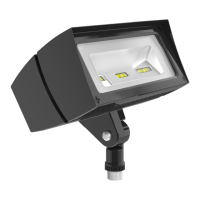
FFLED18 INSTALLATION INSTRUCTIONS
IMPORTANT
READ CAREFULLY BEFORE INSTALLING FIXTURE. RETAIN THESE INSTRUCTIONS FOR FUTURE REFERENCE.
RAB xtures must be wired in accordance with the National Electrical Code and all applicable local codes. Proper
grounding is required for safety. THIS PRODUCT MUST BE INSTALLED IN ACCORDANCE WITH THE APPLICABLE
INSTALLATION CODE BY A PERSON FAMILIAR WITH THE CONSTRUCTION AND OPERATION OF THE PRODUCT
AND THE HAZARDS INVOLVED.
WARNING: Make certain power is OFF before installing or maintaining xture. No user serviceable
parts inside.
Thank you for buying RAB lighting xtures. Our goal is to design the best quality products to get the job done right. We’d like to hear your comments.
Call the Marketing Department at 888-RAB-1000, or email: marketing@rabweb.com
LOCATION
1. Seal arm thread using te on tape or silicone sealant.
2. Secure the LED Flood to a 1/2” NPS hole in a
junction box or landscape post.
3. Plug all unused holes and seal threads with silicone.
4. The swivel arm on the LED Flood allows 140º - 150º
of vertical aiming adjustment depending on mounting
location.
GUARD or SHIELD INSTALLATION
Wire Guard and Poly Shield mount with (4) #8-32
Stainless Steel Screws. Screws are provided with
accessory. See gure 1 for Guard. See gure 2
for Shield
1. Line up guard with pre-existing, pre-drilled holes in
frame as shown, tighten screws.
GUARD & SHIELD INSTALLATION
The Wire Guard and Poly Shield can be mounted on the
same xture with (4) #8-32 screws as shown below.
Stainless
Steel Screws
Stainless
Steel Screws
Figure 1
Figure 2
WIRING
Universal voltage drivers permit operation at 120V to
277VAC, 50 or 60 Hz except xtures factory ordered
with a 120V photocell (/PC)
1. Connect the BLACK xture lead to the
(+) LINE supply lead.
2. Connect the WHITE xture lead to the
(-) COMMON supply lead.
3. Connect the bare copper Ground wire from xture
to supply ground.
Question and Answer IconNeed help?

Do you have a question about the RAB Lighting Mini Sensor and is the answer not in the manual?

Summary

LOCATION

Seal arm thread

Seal arm thread using teflon tape or silicone sealant for proper installation.

Secure the LED Flood

Secure the LED Flood to a 1/2" NPS hole in a junction box or landscape post.

Plug unused holes

Plug all unused holes and seal threads with silicone for weatherproofing.

Swivel arm adjustment

The swivel arm allows 140°-150° of vertical aiming adjustment depending on mounting.

WIRING

Connect black fixture lead

Connect the black fixture lead to the (+) LINE supply lead.

Connect white fixture lead

Connect the white fixture lead to the (-) COMMON supply lead.

Connect ground wire

Connect the bare copper ground wire from fixture to supply ground.

GUARD or SHIELD INSTALLATION

Mount guard;shield

Mount wire guard and poly shield with #8-32 screws; align pre-drilled holes.

TROUBLESHOOTING

Check line voltage

Verify line voltage at the fixture is correct according to wiring directions.

Check grounding

Ensure the fixture is properly grounded for safety.

Check photocell function

Verify if the photocell, if installed, is functioning properly.

CLEANING & MAINTENANCE

Clean glass lens

Clean the glass lens using a non-abrasive glass cleaning solution.

Do not open fixture

Do not open the fixture to clean the LED; do not touch the LED.

SPECIFICATIONS

Switching Capacity & Models

Details on switching capacity for Relay On/Off and Hi/Lo models.

Power & Voltage

Information on voltage requirements and power consumption.

Detection & Timing Features

Covers detection zone, time adjustment, and auto-testing features.

Durability & Protection

Features like severe conditions, vandal resistance, surge protection.

WHY RAB SENSORS ARE BEST

Smaller sensor design

Mini Sensor uses SMT for reliability, RF immunity, and compact size.

Wider detection view

180° view detects movement along the entire side of a building effectively.

Molded, sealed construction

Vandalproof, rainproof, and bugproof design with a molded hard lens.

CAUTIONS AND INSTALLATION GUIDELINES

Wiring compliance and safety

All wiring must comply with local codes and be done by a qualified electrician.

Power safety before installation

Turn off power by removing fuse or circuit breaker before installation.

Lighting load limits

Details on maximum lighting load for different models.

Incompatible systems

Avoid installing on circuits with Line Carrier Remote Control Systems.

Circuit load restrictions

Do not install on circuits feeding motor loads like HVAC or garage openers.

Optimal sensor aiming

Sensor functions best when movement crosses its pattern, not towards it.

ASSEMBLY AND WIRING STEPS

Mount sensor arm

Screw sensor arm into mounting plate for wall or ceiling mount.

Connect wiring leads

Bring power and sensor leads into the box, connect ground, strip insulation.

Secure assembly and test

Twist on wire nuts, seal gasket, fasten plate, screw in bulbs, turn on power.

WIRING DIAGRAMS AND CONSIDERATIONS

Manual switch override

Diagram for overriding sensor with a manual switch.

Auxiliary relay for high loads

Wiring diagram for switching loads exceeding sensor rating using a relay.

Multiple sensor wiring

Considerations for wiring multiple sensors together.

Power quality impact

Avoid installing on circuits with motor loads or voltage variations.

HOW THE MINI SENSOR WORKS

Infrared detection

Sensor detects small temperature changes from motion to turn on lights.

Light duration control

Lights stay on as long as motion is detected, adjustable from 5 seconds to 15 minutes.

Animal detection

Sensor may detect large animals; masking can limit detection.

ADJUSTING SENSOR CONTROLS

Time, Sensitivity, Photocell

Adjustments for light duration, responsiveness, and daylight deactivation.

Manual Override Function

Keep lights on by flipping the wall switch twice; resets to auto at dawn.

PICKING A LOCATION

Location considerations

Choose locations where the sensor can see all illuminated paths of movement.

Detection pattern explained

Describes the 180° detection zone and how to adjust range/width.

AIMING AND WALK TESTING

Test period

A 3-minute test period allows aiming and walk testing of the sensor.

Walk test procedure

Steps to check and adjust the sensor's coverage pattern.

Control panel adjustments

Guidance on adjusting Sensitivity, Time Control, and Photocell.

TECHNICAL TIPS: LIGHTS DO NOT TURN OFF

Avoid false triggers

Ensure sensor is not aimed at heat sources or moving objects.

Address car activation

Mask lens or adjust sensor to avoid passing car triggers.

TECHNICAL TIPS: RANGE APPEARS LIMITED

Sensor positioning and height

Ensure sensor is level and mounted at an optimal height for range.

Adjusting for detection

Check for paint on lens, consider movement direction, and adjust zones.

TECHNICAL TIPS: LIGHTS DO NOT TURN ON

Verify power and wiring

Check lamps, fixtures, wiring, and power supply are correct.

Photocell and test period settings

Ensure photocell is set for darkness and test period is understood.

Address external light interference

Check for adjacent lights or reflections affecting sensor operation.

TECHNICAL TIPS: LIGHTS TURN OFF TOO QUICKLY

Minimize reflected light

Adjust photocell or mask lens to prevent reflections from causing early shutoff.

Use appropriate lamp types

Avoid specific lamp types that may cause premature shutoff due to stray light.

TECHNICAL TIPS: INCORRECT ON;OFF CYCLING

Ensure dedicated circuit

Install sensor on a dedicated circuit, free from motor loads.

Avoid parallel wiring

Do not wire sensors in parallel; test them separately.

Check sensor placement and environment

Ensure proper distance from lights, avoid reflections, roads, and environmental triggers.

TECHNICAL TIPS: UNKNOWN ACTIVATIONS

Address environmental triggers

Mount sensor in a protected area to avoid weather-related triggers.

Prevent animal triggers

Adjust aiming or mask lens to reduce nuisance triggering by animals.

Avoid radio signal interference

Check for strong local radio signals that might activate the sensor.

LIMITED WARRANTY

Repair or replacement

Sensor will be replaced or repaired if defective within 5 years of purchase.

Out-of-warranty service

Service for out-of-warranty units requires a description and fee.

Liability limitations

RAB Electric is not liable for incidental or consequential damages.

Product purpose

Sensor is designed for detection, not crime prevention; RAB not liable for damages.

TOLL FREE TECHNICAL ASSISTANCE

Re-read technical tips

Review the Technical Tips sections of the manual before calling.

Call Tech Help Line

Call 888 RAB-1000 with unit catalog number and circuit information.

Summary

LOCATION

Seal arm thread

Seal arm thread using teflon tape or silicone sealant for proper installation.

Secure the LED Flood

Secure the LED Flood to a 1/2" NPS hole in a junction box or landscape post.

Plug unused holes

Plug all unused holes and seal threads with silicone for weatherproofing.

Swivel arm adjustment

The swivel arm allows 140°-150° of vertical aiming adjustment depending on mounting.

WIRING

Connect black fixture lead

Connect the black fixture lead to the (+) LINE supply lead.

Connect white fixture lead

Connect the white fixture lead to the (-) COMMON supply lead.

Connect ground wire

Connect the bare copper ground wire from fixture to supply ground.

GUARD or SHIELD INSTALLATION

Mount guard;shield

Mount wire guard and poly shield with #8-32 screws; align pre-drilled holes.

TROUBLESHOOTING

Check line voltage

Verify line voltage at the fixture is correct according to wiring directions.

Check grounding

Ensure the fixture is properly grounded for safety.

Check photocell function

Verify if the photocell, if installed, is functioning properly.

CLEANING & MAINTENANCE

Clean glass lens

Clean the glass lens using a non-abrasive glass cleaning solution.

Do not open fixture

Do not open the fixture to clean the LED; do not touch the LED.

SPECIFICATIONS

Switching Capacity & Models

Details on switching capacity for Relay On/Off and Hi/Lo models.

Power & Voltage

Information on voltage requirements and power consumption.

Detection & Timing Features

Covers detection zone, time adjustment, and auto-testing features.

Durability & Protection

Features like severe conditions, vandal resistance, surge protection.

WHY RAB SENSORS ARE BEST

Smaller sensor design

Mini Sensor uses SMT for reliability, RF immunity, and compact size.

Wider detection view

180° view detects movement along the entire side of a building effectively.

Molded, sealed construction

Vandalproof, rainproof, and bugproof design with a molded hard lens.

CAUTIONS AND INSTALLATION GUIDELINES

Wiring compliance and safety

All wiring must comply with local codes and be done by a qualified electrician.

Power safety before installation

Turn off power by removing fuse or circuit breaker before installation.

Lighting load limits

Details on maximum lighting load for different models.

Incompatible systems

Avoid installing on circuits with Line Carrier Remote Control Systems.

Circuit load restrictions

Do not install on circuits feeding motor loads like HVAC or garage openers.

Optimal sensor aiming

Sensor functions best when movement crosses its pattern, not towards it.

ASSEMBLY AND WIRING STEPS

Mount sensor arm

Screw sensor arm into mounting plate for wall or ceiling mount.

Connect wiring leads

Bring power and sensor leads into the box, connect ground, strip insulation.

Secure assembly and test

Twist on wire nuts, seal gasket, fasten plate, screw in bulbs, turn on power.

WIRING DIAGRAMS AND CONSIDERATIONS

Manual switch override

Diagram for overriding sensor with a manual switch.

Auxiliary relay for high loads

Wiring diagram for switching loads exceeding sensor rating using a relay.

Multiple sensor wiring

Considerations for wiring multiple sensors together.

Power quality impact

Avoid installing on circuits with motor loads or voltage variations.

HOW THE MINI SENSOR WORKS

Infrared detection

Sensor detects small temperature changes from motion to turn on lights.

Light duration control

Lights stay on as long as motion is detected, adjustable from 5 seconds to 15 minutes.

Animal detection

Sensor may detect large animals; masking can limit detection.

ADJUSTING SENSOR CONTROLS

Time, Sensitivity, Photocell

Adjustments for light duration, responsiveness, and daylight deactivation.

Manual Override Function

Keep lights on by flipping the wall switch twice; resets to auto at dawn.

PICKING A LOCATION

Location considerations

Choose locations where the sensor can see all illuminated paths of movement.

Detection pattern explained

Describes the 180° detection zone and how to adjust range/width.

AIMING AND WALK TESTING

Test period

A 3-minute test period allows aiming and walk testing of the sensor.

Walk test procedure

Steps to check and adjust the sensor's coverage pattern.

Control panel adjustments

Guidance on adjusting Sensitivity, Time Control, and Photocell.

TECHNICAL TIPS: LIGHTS DO NOT TURN OFF

Avoid false triggers

Ensure sensor is not aimed at heat sources or moving objects.

Address car activation

Mask lens or adjust sensor to avoid passing car triggers.

TECHNICAL TIPS: RANGE APPEARS LIMITED

Sensor positioning and height

Ensure sensor is level and mounted at an optimal height for range.

Adjusting for detection

Check for paint on lens, consider movement direction, and adjust zones.

TECHNICAL TIPS: LIGHTS DO NOT TURN ON

Verify power and wiring

Check lamps, fixtures, wiring, and power supply are correct.

Photocell and test period settings

Ensure photocell is set for darkness and test period is understood.

Address external light interference

Check for adjacent lights or reflections affecting sensor operation.

TECHNICAL TIPS: LIGHTS TURN OFF TOO QUICKLY

Minimize reflected light

Adjust photocell or mask lens to prevent reflections from causing early shutoff.

Use appropriate lamp types

Avoid specific lamp types that may cause premature shutoff due to stray light.

TECHNICAL TIPS: INCORRECT ON;OFF CYCLING

Ensure dedicated circuit

Install sensor on a dedicated circuit, free from motor loads.

Avoid parallel wiring

Do not wire sensors in parallel; test them separately.

Check sensor placement and environment

Ensure proper distance from lights, avoid reflections, roads, and environmental triggers.

TECHNICAL TIPS: UNKNOWN ACTIVATIONS

Address environmental triggers

Mount sensor in a protected area to avoid weather-related triggers.

Prevent animal triggers

Adjust aiming or mask lens to reduce nuisance triggering by animals.

Avoid radio signal interference

Check for strong local radio signals that might activate the sensor.

LIMITED WARRANTY

Repair or replacement

Sensor will be replaced or repaired if defective within 5 years of purchase.

Out-of-warranty service

Service for out-of-warranty units requires a description and fee.

Liability limitations

RAB Electric is not liable for incidental or consequential damages.

Product purpose

Sensor is designed for detection, not crime prevention; RAB not liable for damages.

TOLL FREE TECHNICAL ASSISTANCE

Re-read technical tips

Review the Technical Tips sections of the manual before calling.

Call Tech Help Line

Call 888 RAB-1000 with unit catalog number and circuit information.

RAB Lighting Mini Sensor Specifications

General IconGeneral
BrandRAB Lighting
ModelMini Sensor
CategorySecurity Sensors
LanguageEnglish

Related product manuals