EasyManua.ls Logo

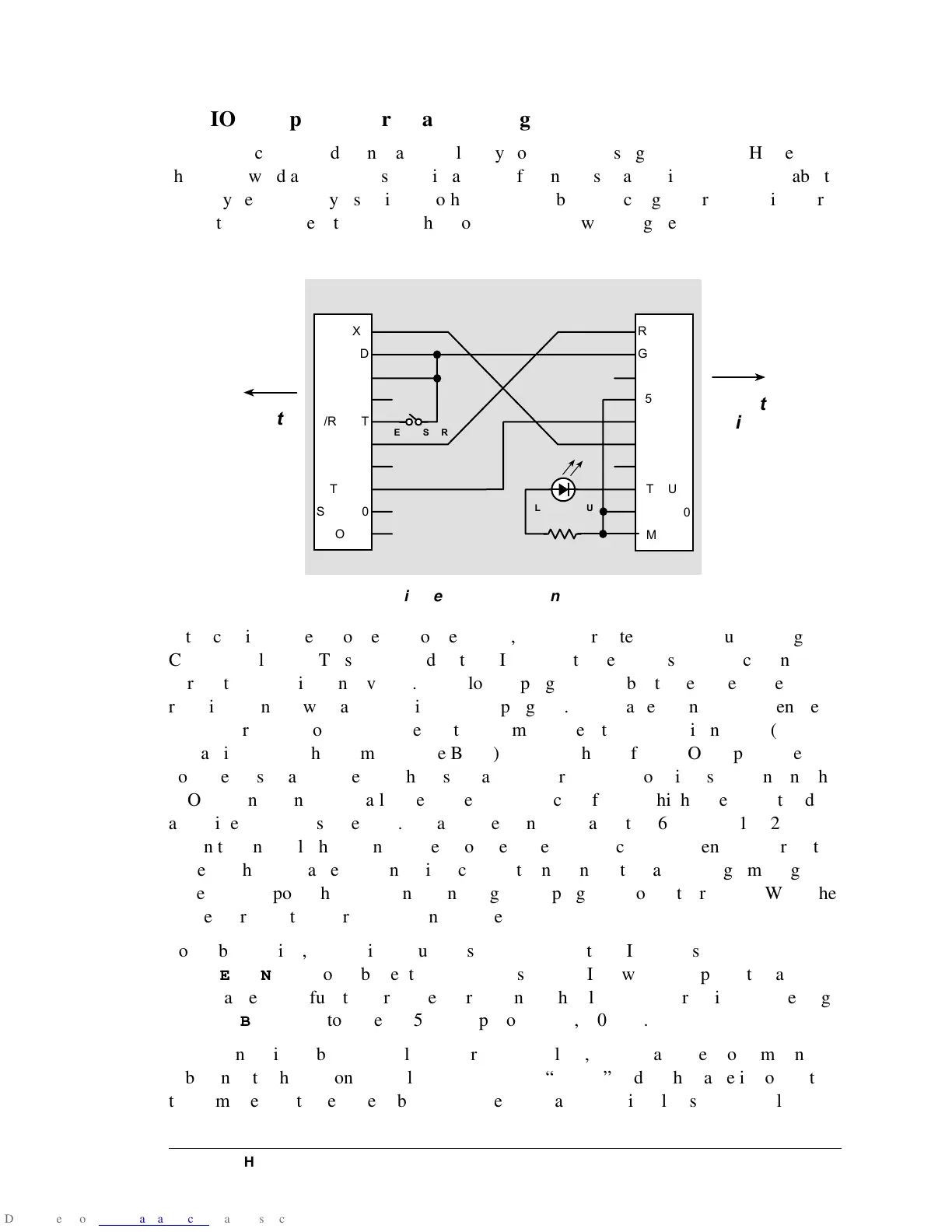
Rabbit 2000 - 7 BIOS Support for Program Cloning

Rabbit 2000
45 pages
Print Icon
To Next Page IconTo Next Page
To Previous Page IconTo Previous Page
Loading...
Designer’s
Handbook 27
7.
BIOS
Support
for
Program
Cloning
A
program
can
be
loaded
into
a
controller
by
compiling
it
using
Dynamic
C.
However,
this
is
awkward
and
slow
in
some
situations.
If
cloning
is
enabled
in
the
BIOS,
a
Rabbit-
based
system
can
copy
itself
into
another
controller
by
connecting
the
programming
ports
of
the
two
controllers
together
in
the
proper
way
as
shown
in
Figure
6.
Figure
6.
Programming
Cable
If
the
cloning
cable
is
connected
to
the
master,
the
master
detects
this
because
the
signal
CLKA
is
held
low.
This
is
detected
in
the
BIOS
after
the
reset
ends,
and
the
cloning
sup-
port
of
the
BIOS
is
then
invoked.
The
cloning
program
cold-boots
the
target
system
by
resetting
it
and
downloading
a
primary
boot
program.
The
master
then
sends
the
entire
BIOS
over
to
the
clone,
where
the
boot
program
receives
it
and
stores
it
in
RAM
(just
like
Dynamic
C
does
when
compiling
the
BIOS).
A
CRC
check
of
the
BIOS
is
performed
on
both
the
master
and
clone,
and
the
results
are
compared.
The
clone
is
reset
again,
and
the
BIOS
begins
running.
Finally,
the
master
sends
blocks
of
data
at
high
speed,
and
the
data
are
written
to
the
flash
memory.
Data
transfer
can
take
place
at
57,600
bps
or
115,200
bps.
When
the
entire
flash
contents
(except
for
the
system
ID
block)
have
been
transferred,
the
target
flashes
the
cable
LED
in
a
distinctive
pattern
to
indicate
that
the
programming
is
done.
At
that
point
the
cable
can
be
unplugged
and
plugged
into
another
target.
When
the
master
is
reset,
it
will
program
the
next
target.
To
enable
cloning,
two
options
must
be
set
at
the
top
of
the
BIOS.
First,
ENABLECLONING
should
be
set
to
1.
If
this
is
set,
the
BIOS
will
take
up
additional
mem-
ory
because
of
the
functions
required
for
cloning.
The
cloning
baud
rate
is
set
by
setting
CLONINGBAUDRATE
to
either
0
(57,600
bps)
or
1
(115,200
bps).
Once
cloning
is
enabled,
compile
your
program
to
flash,
then
detach
the
programming
cable
and
attach
the
cloning
cable.
Make
sure
the
“master”
end
of
the
cable
is
connected
to
the
master
controller
(the
cable
is
not
reversible)
and
that
pin
1
lines
up
correctly
on
J1
J2
RXA
GND
CLKA
+5 V
/RESET
TXA
N/C
STATUS
SMODE0
SMODE1
RXA
GND
CLKA
+5 V
/RESET
TXA
N/C
STATUS
SMODE0
SMODE1
RESET MASTER
CLONE STATUS
470
Master
Target
Being
Cloned

Other manuals for Rabbit 2000