Racelogic Ltd PerformanceTools Software
02/05/2014 Page 48
Analysing Your Data In PerformanceTools
PerformanceBox Tools has three main features which will allow you gather results from data
you have logged. Many of these results are available to view on the PerformanceBox itself,
but the software allows for more detailed analysis.
This section is divided into two subject areas: Lap Time Results, and Performance (ie
Accel/Decel) Results. It also describes additional features which enhance the analysis but
which have uses within each main function, such as the G-Circle.
Lap Timing
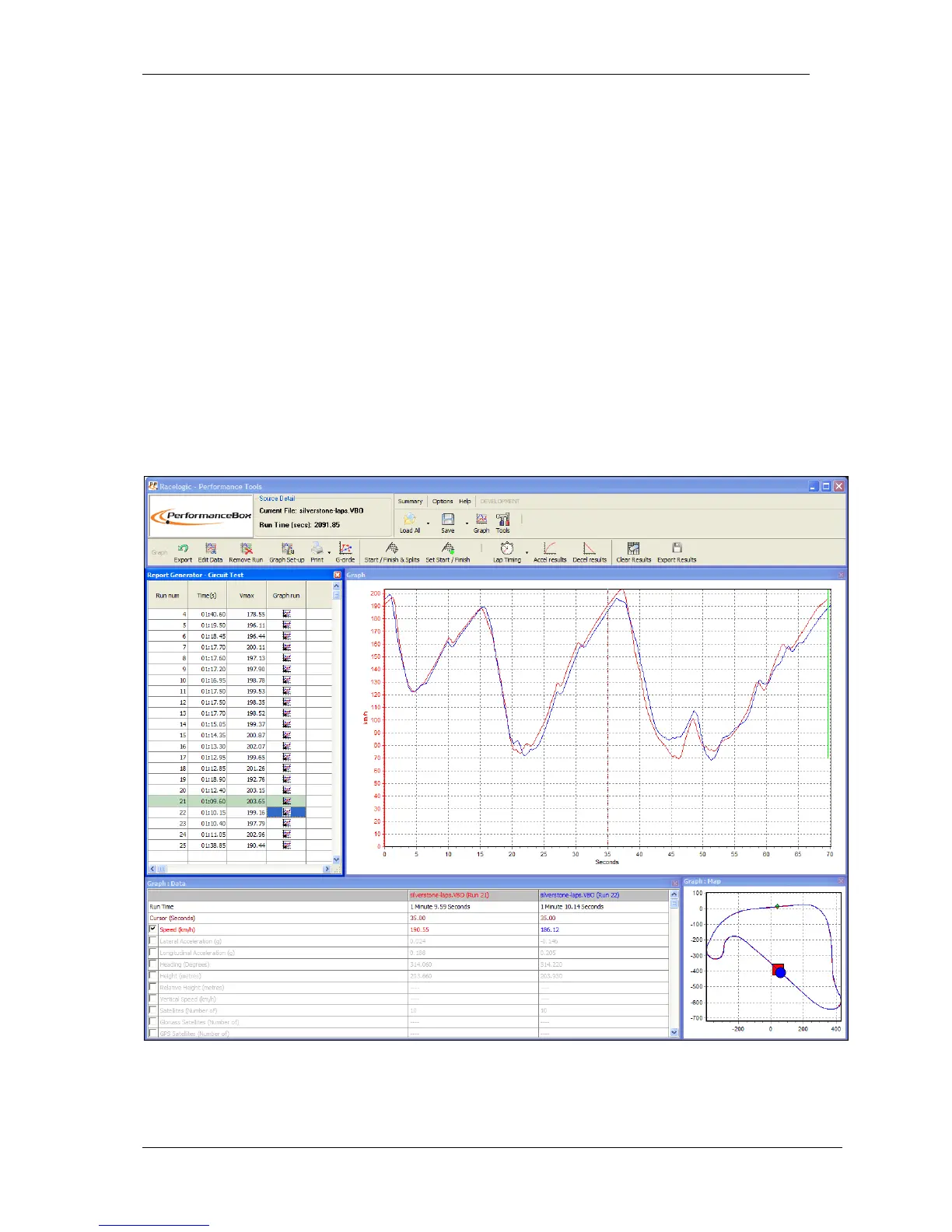
Pressing the Lap timing button in the Toolbar causes the software to scan the loaded file and
apply loaded split file information to produce a table of Lap times, with a V Max for each lap
and with the fastest lap highlighted.
This facility also allows individual laps from the loaded file to be loaded and compared in the
main Graph window. In addition a circuit overlay can be loaded into the Graph:Map window
to aid with drive-line analysis.


 To Next Page