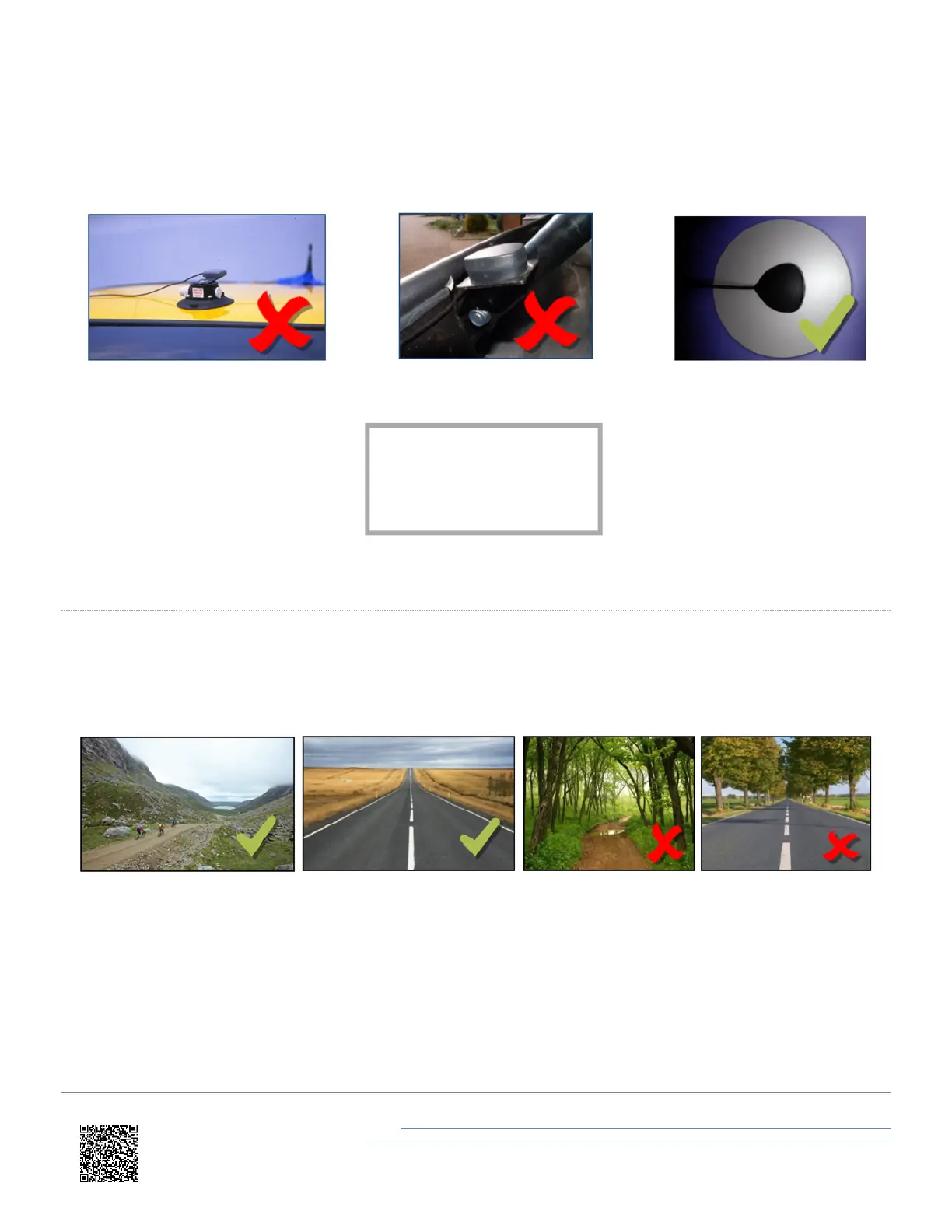
If the vehicle you use does not have a metal roof, you should place the GPS antenna on a flat piece of metal (at least 10
cm in diameter). If this is not possible, you can use copper or aluminium foil to create a shaped ground plane
underneath the antenna. For example, on a fibreglass roof, mount the antenna on top of the roof and place some
adhesive-backed metal foil underneath (on the inside of the roof).
Acquiring satellite lock
Tall buildings or trees can block GPS signals, causing a reduction in the number and quality of satellites being tracked,
leading to inaccurate position measurements and a noisy velocity signal.
GPS works best in open areas/ Avoid tree-lined roads
GPS Coldstart
If your VBOX LapTimer is struggling to acquire a satellite lock, you may have to perform a GPS coldstart. This may be
necessary if the unit has not been in use for a number of days or it has moved location dramatically since its last use.
You can perform a coldstart by selecting MENU > GNSS OPTIONS > COLDSTART.
Media, iframe, embed and
object tags are not
supported inside of a PDF.
https://en.racelogic.support//Product_Info/Lap_Timing_and_Pit_Timing/VBOX_LapTimer/
User_Guide_%E2%80%93_VBOX_LapTimer/02_Installing_VBOX_LapTimer_in_Your_Vehicle
7


 To Next Page