Configuring Radiant POS terminals 12
NOTE: Do not specify a Device ID for the Card reader device.
23. If you are using an external pole display, enter 1220 in the Device code field for the
Display device, and then enter COM2 in the corresponding Device ID field.
If your P1220 includes a built-in line display, enter 1220 in the Device code field for the
Display device, and then enter COM5 in the corresponding Device ID field.
24. Press Enter at the Field number to change ? prompt to save your changes, and then
press ESC to close the Registers screen and return to the main menu.
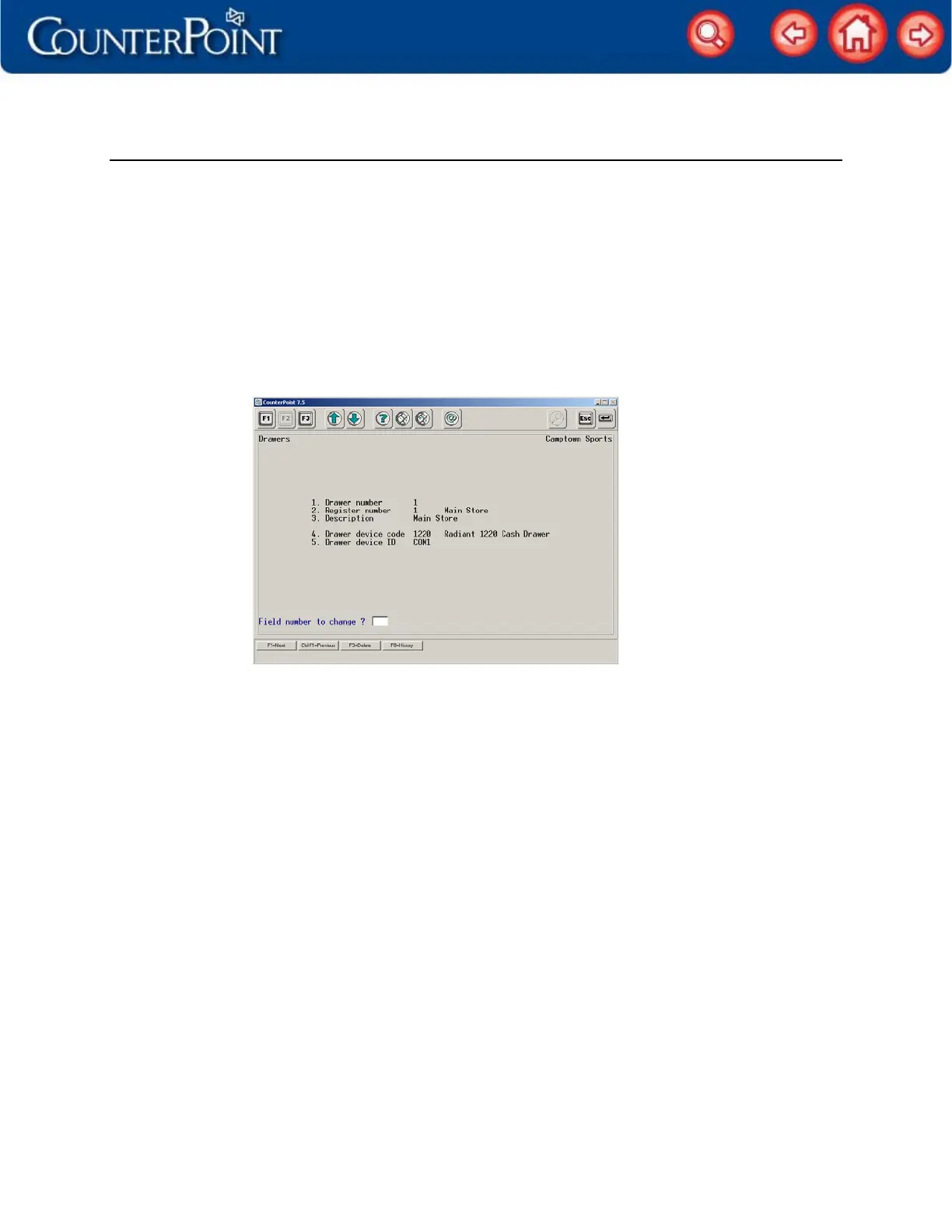
25. Select Setup / Point of Sale / Drawers, specify a Drawer number and Register number for the
POS terminal’s cash drawer, and then enter a Description for the drawer.
26. Enter 1220 in the Drawer device code field, and then enter COM1 in the Drawer device ID
field.
27. Press Enter at the Field number to change ? prompt to save your changes, and then
press ESC to close the Drawers screen and return to the main menu.
Your P1220 POS terminal is ready to use! Start Ticket Entry or Touchscreen Ticket Entry and
enter some sample tickets to try out each device. If you encounter any problems with
your devices, test each device in Setup / Point of Sale / Device codes.


 To Previous Page