EasyManua.ls Logo

Radio Shack 360° Laser Radar Detector - User Manual

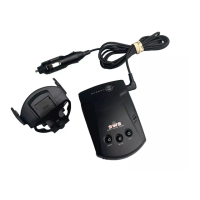
Radio Shack 360° Laser Radar Detector
24 pages
Print Icon
To Next Page IconTo Next Page
Loading...
Owner’s Manual
Please read before using this equipment.
360° Laser Radar Detector
with VG-2 Guard

Questions and Answers

  • A
    Alexander SmithJul 31, 2025
    What to do if my Radio Shack 360° Laser Radar Detector does not turn on?
    • S
      Scott HudsonJul 31, 2025
      If your Radio Shack Radar Detector does not turn on, ensure all power connections are secure. The cigarette-lighter socket might be dirty, so clean it with fine emery cloth to ensure a good, clean connection. Also, check the fuse in the power cord’s cigarette-lighter plug and the fuse that controls power to your vehicle’s cigarette-lighter socket.
  • M
    Matthew EllisAug 10, 2025
    Why does my Radio Shack Radar Detector give false alerts with vehicle accessories?
    • A
      Antonio BrownAug 10, 2025
      If your Radio Shack Radar Detector gives a false alert when you use vehicle accessories, check the vehicle's electrical system for loose connections, including the main battery cable and alternator connections. You can also install a filter capacitor 1000 µF, 35 Volts, on the back of the cigarette-lighter socket, across the power connections.
  • M
    Megan MartinezAug 20, 2025
    How to improve laser detection range on Radio Shack 360° Laser?
    • B
      brandonpittsAug 20, 2025
      To improve the laser detection range of your Radio Shack Radar Detector, first ensure that the laser detection lens is not blocked. Also, be sure the detector is properly mounted. Finally, clean the laser detection lens using a lens-cleaning solution.

Summary

Features

Radar and Laser Signal Detection

Warns of X-, K-, Ka-band radar and laser signals with distinct tones.

Installation

Selecting a Mounting Location

Guides on choosing an optimal spot for the detector for best performance.

Windshield Mounting

Instructions for mounting the detector using the provided suction-cup windshield bracket.

Hook-and-Loop Mounting

Method for attaching the detector to a surface using hook-and-loop tape.

Connecting Power

Details on how to connect the detector to the vehicle's power source.

Operation

Troubleshooting

Care and Maintenance

Replacing the Fuse

Step-by-step instructions for replacing the fuse in the power cord's cigarette-lighter plug.

Radio Shack 360° Laser Radar Detector Specifications

General IconGeneral
Laser DetectionYes
360° DetectionYes
Audio AlertsYes
Display TypeLED
Voice AlertsNo
City/Highway ModeYes
Auto MuteYes
Mounting TypeWindshield
Detection BandsX, K, Ka
Power Source12V DC

Related product manuals