DTMF Encode Sending
Basic Operations Basic Operations
Channel Mode and Frequency Mode SwitchCommercial FM Radio Broadcast Reception Functions (Long Press Button 0)
Frequency Sweep Function / Copy Frequency
1.Long press the button 0 to turn on the FM RADIO; the screen will display the current frequency.
2.Use the UP/DOWN keys or the channel knob to adjust the frequency. You can also input a
frequency directly via the keypad. Press the OK button to switch the FM RADIO band between
65-76 MHz and 76-108 MHz.
3.Simultaneously press the # key to enter automatic channel search mode. Long press the button
0 again to turn off the FM RADIO.
Press VFO/MR button to switch channel mode and frequency mode.
(Define PF2/PF3 buttons as SEARCH from Menu 22-24)
This function is used to seek the frequencies and sub-tones of nearby radios for immediate
communication.
After defining the side keys (PF buttons) as SEARCH, press the button until the LCD displays
"SEARCH/SEEK…". Press the Menu button to select the frequency band from UHF/VHF/200M/300M.
After capturing a frequency, it will continue to seek sub-tone CTCSS/DCS. If no sub-tone is found,
the LCD will display "NONE." At this point, you can press the [MENU] key to save the frequency to a
specified channel, or press the UP or DOWN key to start the next frequency scan.
Weather Forecast NOAA Function
(Define PF button as NOAA from Menu 22-24)
Press the designated side key to activate this function. The radio has 10 built-in fixed frequencies.
You can press the UP/DOWN keys to select the frequency you want to listen to.
Note: The NOAA weather forecast function is available only in countries and regions that support
the NOAA channels.
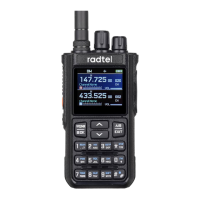
Fast Operation: Press and hold the PTT button while entering the number keys 0-9, MENU, UP,
DOWN, EXIT, *, and #. The radio will transmit DTMF codes 0-9, A, B, C, D, *, and #. Release the
button to stop sending codes.
Editing DTMF Code: In standby mode, long press the DTMF button to enter the DTMF code editing
interface. You can enter codes 0-9, OK, UP, DOWN, Exit, *, and # via the keypad. Press PTT to send
the DTMF code.
PTT-ID Function
Transmit identity codes or call codes via DTMF. There are 15 sets of call codes, configurable through
"Programming Software → Edit → DTMF". Each signal or A/B band can independently select the call
code group to be sent. Configure identity code parameters via "Programming Software → Edit →
DTMF → Local ID Code". There are three transmission methods:
Send on Press: After pressing the PTT, the call code/identity code is sent first, followed by the voice
signal.
Send on Release: After releasing the PTT, the call code/identity code is sent, then the transmission
ends.
Send Both: The call code/identity code is sent both when the PTT is pressed and released.
Note: Since the identity code operation is independent of the call code, if there is a conflict
between the identity code and the call code settings, the identity code will be sent.
09 10


 To Next Page
 Loading...