Icon Description Icon Description
DescriptionIcon DescriptionIcon
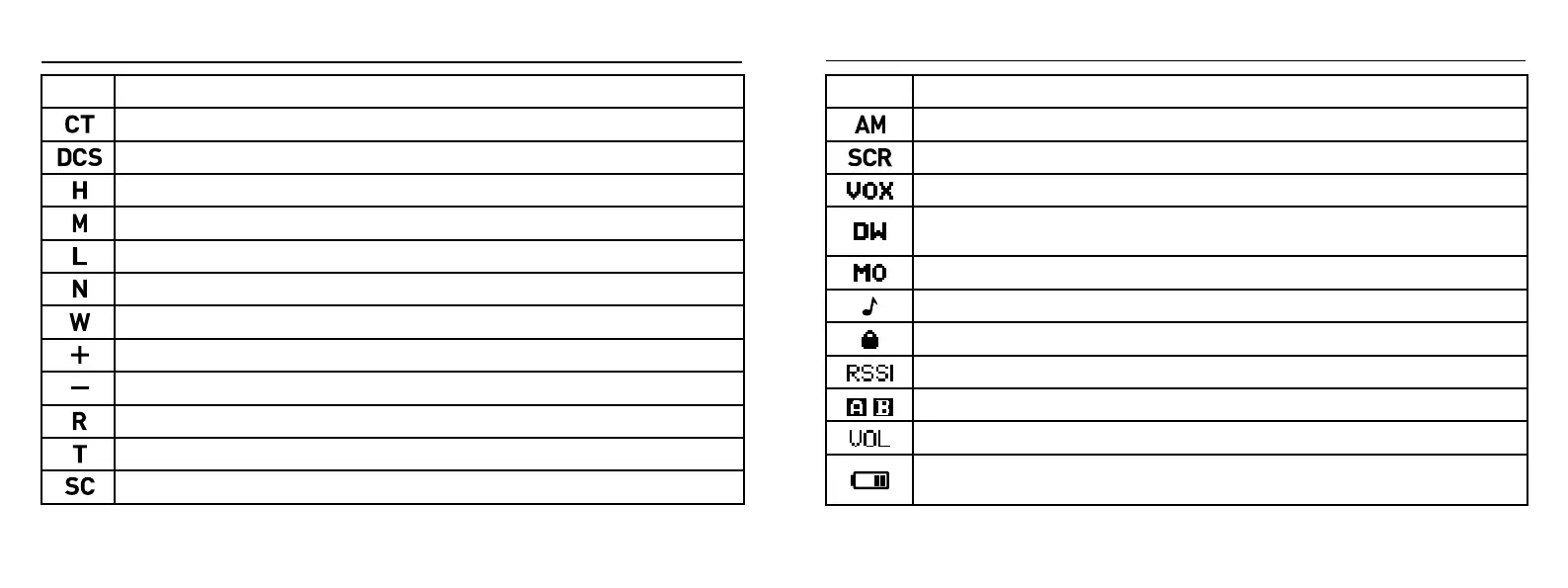
Analog Sub-audio Tone Indicator.This symbol indicates that the current sub-audio tone is an analog tone. When
this symbol appears during transmission, it signifies that an analog sub-audio signal is being transmitted.
Digital Sub-audio Tone Indicator. This symbol indicates that the current sub-audio tone is a digital tone. When
this symbol appears during transmission, it signifies that a digital sub-audio signal is being transmitted.
Frequency Mode (+ Frequency Offset) This symbol appears in frequency mode, indicating that the
transmission frequency is the reception frequency plus a frequency offset.
Frequency Mode (- Frequency Offset) This symbol appears in frequency mode, indicating that the
transmission frequency is the reception frequency minus a frequency offset.
Frequency/Channel Mode Inverted Frequency. This symbol appears when the reception and
transmission frequencies are inverted in frequency or channel mode.
High Power Indicator. This symbol indicates that the current transmission power is set to high.
Medium Power Indicator. This symbol indicates that the current transmission power is set to medium.
Low Power Indicator. This symbol indicates that the current transmission power is set to low.
Simplex Mode. In simplex mode, the reception and transmission frequencies are adjusted to be the
same.
SC (Encryption) Indicator. The appearance of “SC” indicates that the encryption function is enabled.
Narrowband Mode Indicator. This symbol appears when the channel is operating in narrowband mode.
Wideband Mode Indicator. This symbol appears when the channel is operating in wideband mode.
AM Modulation Indicator: Displays this symbol to indicate that the current frequency is in AM
modulation mode.
Scrambler Function: Indicates that the scrambler function is active.
VOX (Voice-Operated Transmission): Indicates that the VOX function is enabled. Transmission starts
when the microphone's sound pressure level reaches the set threshold.
Dual Standby: Indicates that the dual-band standby function is set and active, allowing
simultaneous monitoring of the two frequency points displayed on the screen.
Monitor Function Enabled: Indicates that the monitor function is enabled.
Side Tone Enabled: Indicates that the side tone function is active, producing a tone sound when
transmitting DTMF.
Keypad Lock: Appears when the keypad is locked. Long press the # key to unlock.
Signal Strength: Indicates the strength of the received signal.
A/B Band: Indicates whether the A band or B band is active.
Transmit Audio Volume: Indicates the volume level of the transmitted audio.
Battery Status: Displays the remaining battery power. When the battery is nearly depleted, the
outer frame of this symbol flashes, and transmission is prohibited. When the outer frame is green,
the device is in super power-saving mode.
05 06


 To Next Page
 Loading...