Dashboard
___________________________________________________________________________________________________________________________________________
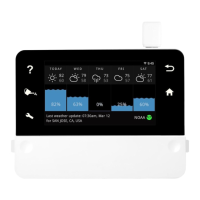
Thedashboardscreenallowsyoutoviewpastandfutureweather
andwaterconsumptionstatistics.Taporswipeleft/rightoneach
graphtoviewdetailedinfo.
WeatherChartshowsyouweatherstatuswithhightemperatures
andrainamountforeachday.
ProgramsChartshowstheoutputofwateringforthatrespective
program.Eachprogramhasagraphshowingyoubothrecorded
andforecastedwateroutput.
UsingtheWeek/Month/Yeartabsyoucanchangethetimespanof
theDashboardgraphs.Settings>Dashboardallowsyoutotoggle
variousgraphs.
NOTE:Bypressingtheupperright“Edit”button,youcanrearrangethe
graphsorder,orhidethemfromtheDashboardscreenview.
WeatherData


 To Next Page