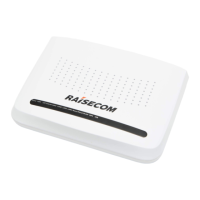
The ISCOM HT803G-WS2 (T) is an integrated device designed for various communication needs, offering a range of functionalities for both home and office environments. It serves as a crucial component in network infrastructure, facilitating connectivity and data transmission.
Function Description
The ISCOM HT803G-WS2 (T) is primarily a PON (Passive Optical Network) interface device, enabling high-speed internet access through fiber optic connections. It supports both 2.4G and 5G dual-frequency Wi-Fi, providing flexible wireless connectivity options for multiple devices. The device includes multiple LAN ports (LAN1-LAN4), allowing for wired connections to computers, smart TVs, gaming consoles, and other network-enabled devices. It also features Phone1 and Phone2 interfaces for voice services, indicating its capability to support VoIP (Voice over Internet Protocol) or traditional telephone connections. A USB port is integrated for connecting removable storage devices, enabling file sharing or other USB-related functionalities within the network. The device's optical interface is designed to connect to a PON optical splitter, which then links to the broader fiber optic network.
Usage Features
The ISCOM HT803G-WS2 (T) is designed for ease of use and offers several features to enhance user experience.
- Power Management: The device is powered by an external 12 VDC, 1.5 A power adapter, which connects to a standard 100-240 VAC (50/60 Hz) power socket. It includes an ON/OFF button for convenient power control. The Power LED (green) indicates the power supply status, glowing green when normal and off when abnormal.
- Network Connectivity Indicators: A series of LEDs provide clear visual feedback on the device's operational status.
- PON LED (green): Indicates the registration status with the PON network. A solid green light signifies complete registration, while blinking green indicates ongoing registration. If the LED is off, registration is incomplete.
- LOS LED (red): This LED is crucial for optical signal monitoring. Blinking red indicates that the Rx optical power of the PON interface is below the sensitivity threshold, suggesting a potential issue with the fiber connection or signal strength. If the LED is off, the optical power is normal.
- Internet LED (green): Shows the status of the Ethernet interface connection. A solid green light means the interface is properly connected, and blinking green indicates data transmission. If the LED is off, the Ethernet interface is improperly connected.
- LAN1-LAN4 LEDs (green): Each LAN port has its own LED. A solid green light signifies a proper LAN interface connection, and blinking green indicates data transmission. If the LED is off, the LAN interface is disconnected.
- Phone1-Phone2 LEDs (green): These LEDs indicate the status of voice services. A solid green light means the voice interface is successfully registered to the soft switch, while blinking green indicates services are being transmitted. If the LED is off, registration to the soft switch has failed.
- WLAN LED (green): Indicates the status of the wireless LAN. A solid green light means WLAN is enabled, and blinking green indicates WLAN is working. If the LED is off, WLAN is disabled.
- USB LED (green): Shows the status of the USB link. A solid green light indicates an established USB link without traffic, while blinking green indicates an established link with traffic. If the LED is off, the USB link is not established.
- WPS LED (green): Indicates the status of WPS (Wi-Fi Protected Setup). A solid green light means WPS is enabled and complete, while blinking green indicates WPS is enabled and ongoing. If the LED is off, WPS is disabled.
- Wireless Control: The device features a dedicated WLAN button to enable or disable Wi-Fi functionality. A WPS button is also available for quick and secure wireless connections within a 2-minute window.
- LED ON/OFF Button: For user convenience, an LED ON/OFF button allows users to stop or start the display of all LEDs, which can be useful in environments where LED lights might be distracting.
- Reset Functionality: A RESET button is included, which can be pressed for 2-5 seconds to restart the device or for over 5 seconds to restore factory settings.
- Installation Flexibility: The ISCOM HT803G-WS2 (T) can be installed on a stable workbench or mounted on a wall. Wall-mount installation is recommended to prevent damage from collisions or falling objects. The wall-mount process involves knocking two cement nails into the wall with a specific spacing (155 mm) and diameter (8 mm) and then hanging the device.
- Web-based Management: The device can be accessed and configured via a web browser. Users can enter the device's IP address (found on the label) to access the login interface and manage settings using the provided username and password.
Maintenance Features
The device is designed with maintenance in mind, offering clear indicators and troubleshooting steps for common issues.
- Self-Test and Initialization: Upon powering on, the ISCOM HT803G-WS2 (T) performs a Power-On Self-Test (POST) and initialization before entering its working status.
- Power Troubleshooting: If the Power LED is off, users are advised to check if the ON/OFF button is pressed, verify that the original power adapter is used, ensure firm connections of the power adapter and power outlet, and if necessary, use a voltmeter to check the adapter's output voltage (12 V).
- PON Connectivity Troubleshooting: If the PON LED is off, users should check the fiber's functionality and connection, ensure the fiber connector is clean, verify normal optical attenuation, and confirm that the SN or MAC address matches the OLT (Optical Line Terminal).
- Optical Signal Troubleshooting: If the LOS LED is blinking, users should check if the fiber connector is properly inserted and clean.
- LAN Connectivity Troubleshooting: If the LAN LED is off, users should check if the Ethernet cable meets the standard and is properly connected, and verify that the Network Interface Card (NIC) LED is lit up. If the NIC is not working properly, troubleshooting steps include checking device manager for errors, reinstalling drivers, or trying a different slot or NIC.
- Safety Precautions: The manual emphasizes several safety measures to ensure the longevity and safe operation of the device. These include avoiding severe shock, collision, and vibration, not disassembling or repairing the device without expert guidance, maintaining a clean and dust-free environment, keeping it away from heat/fire sources and strong magnetic/electric fields, and using only the original or Raisecom-provided power adapter.
- Laser Safety: Specific warnings are provided regarding laser safety, advising trained personnel for fiber operation, avoiding excessive bending of the fiber, and not staring into optical interfaces to prevent eye injury.
- General Precautions: Users are advised to power off and disconnect the device immediately if any abnormality (smoking, abnormal sound, peculiar smell) occurs and contact technical support. Preventing objects from entering heat dissipation holes and avoiding scraping the device shell are also recommended to prevent malfunction or human allergy. Children should not play with the device or its components to avoid hazards.

 Need help?
 General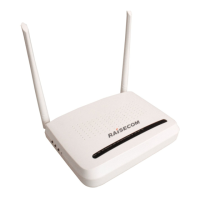

 To Next Page