180 MULTIMEDIA
UCONNECT INTRODUCTION
SYSTEM OVERVIEW
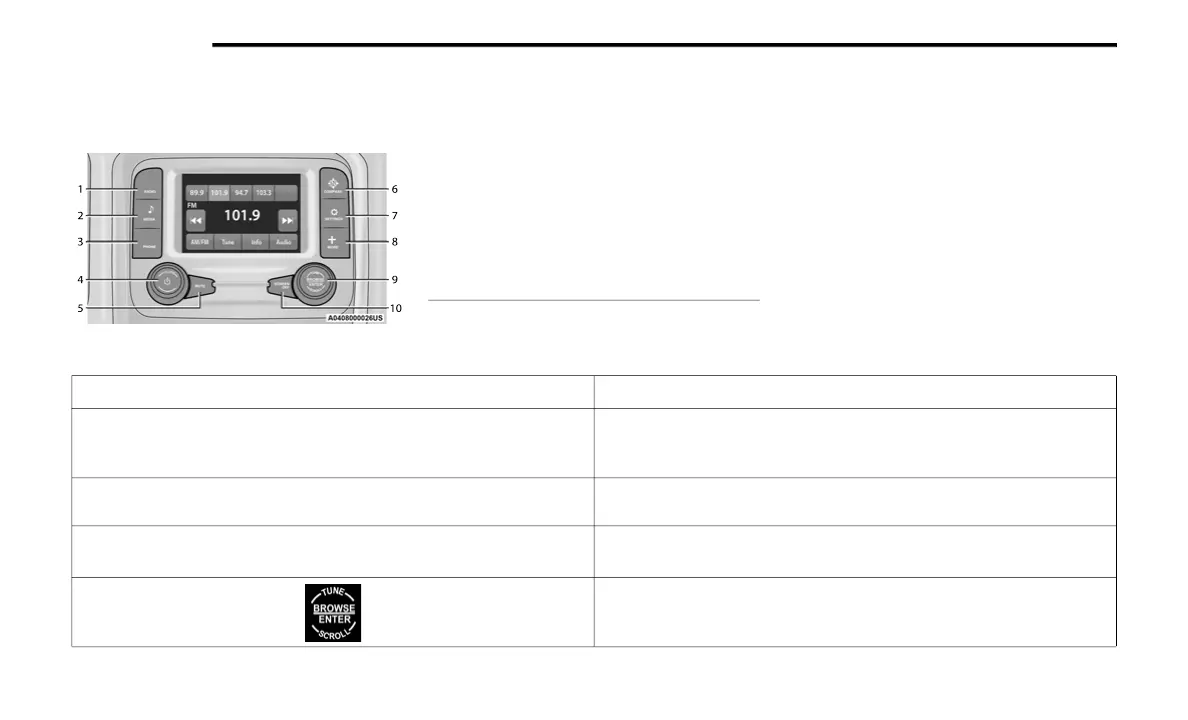
Uconnect 3 With 5-inch Display
NOTE:
Uconnect screen images are for illustration
purposes only and may not reflect exact soft-
ware for your vehicle.
1 — Radio Button
2 — Media Button
3 — Phone Button
4 — Volume & On/Off Button
5 — Mute Button
6 — Compass Button
7 — Settings Button
8 — More Button
9 — Enter/Browse & Tune/Scroll Knob
10 — Screen Off Button
Feature Description
Radio/Media
Press the Radio button or Media button to enter Radio Mode/Media
Mode and access the radio functions and external audio sources
Ú page 183.
Phone
Press the Phone button to enter Phone Mode and access the hands-free
phone system Ú page 195.
Settings
Press the Settings button to access the Uconnect Settings
Ú page 166.
Push the Enter/Browse button on the faceplate to accept a highlighted
selection on the screen. Rotate the Tune/Scroll rotary knob to scroll
through a list or tune a radio station.
21_DS_OM_EN_USC_t.book Page 180



 To Next Page