GETTING TO KNOW YOUR INSTRUMENT PANEL 15
Speed Warning
Push and release the up or down arrow
button until the Speed Warning Menu icon/title is
displayed in the instrument cluster display.
Push and release OK to enter speed warning. Use
the up or down arrow button to select a
desired speed, then push and release OK to set
the speed. The white passive speed limiter telltale
will light up with a notification text message (Speed
Warning Set to XX, followed by the selected unit).
When the set speed is exceeded, an audible chime
will sound until the speed is no longer exceeded.
The white passive speed limiter telltale will turn
yellow and will flash, and a pop-up message of
“Speed Warning Exceeded” will display.
NOTE:
You can turn the Speed Warning off by using the
up /down arrow button to scroll through
speed list and select OFF at the bottom of the list.
Settings
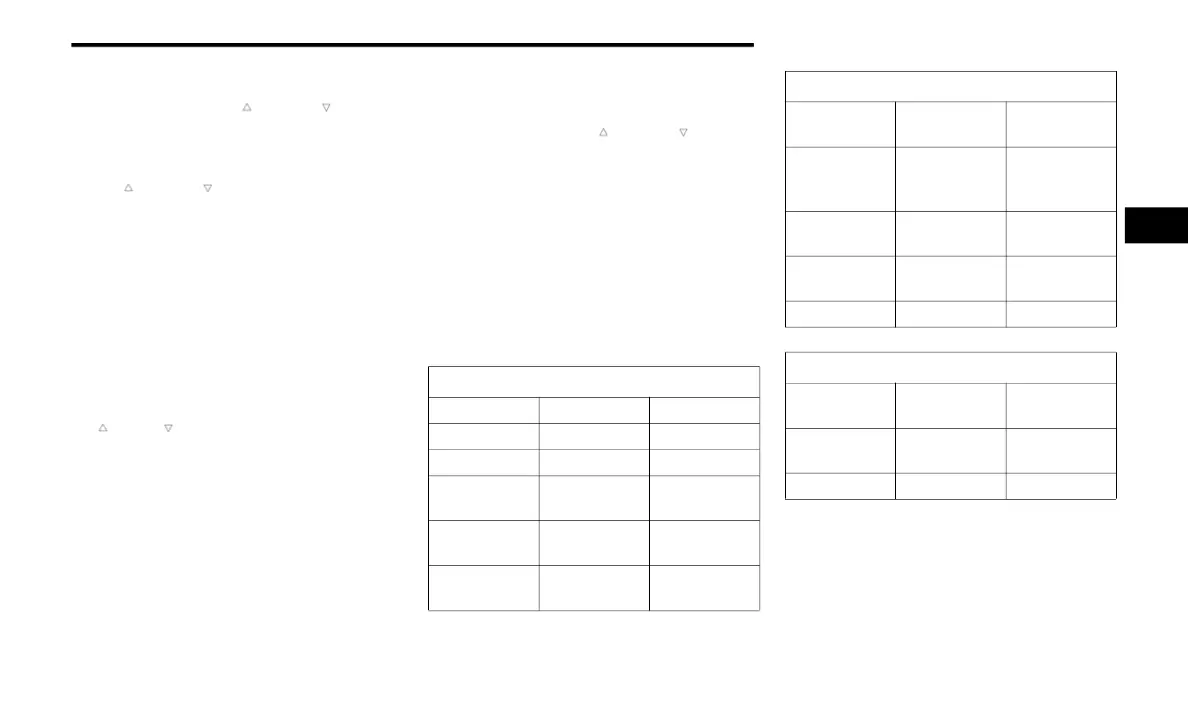
Screen Setup Driver Selectable Items
Push and release the up or down arrow
button until the Settings Menu Icon/Title is
highlighted in the instrument cluster display. Push
and release the OK button to enter the submenus
and follow the prompts on the screen as needed.
The Settings feature allows you to change what
information is displayed in the instrument cluster
as well as the location that information is
displayed.
NOTE:
The Settings feature is only available when the
vehicle speed is less than 5 mph (8 km/h).
Upper Left or Right
None Compass Outside Temp
Time Range Average Econ
Current Econ Trip A Distance Trip B Distance
Trailer Trip –
If Equipped
Trailer Brake –
If Equipped
Oil Pressure
Coolant Temp
Battery
Voltage
Oil Life
Oil
Temperature
Transmission
Temperature
Favorite Menus
Speedometer Vehicle Info
Performance
Show/Hide
Off Road
Show/Hide
Driver Assist
(show/hide) –
If Equipped
Fuel Economy
(show/hide)
Trip Info
(show/hide)
Trailer Tow
(show/hide)
Audio (show/
hide)
Diagnostics Settings
Messages
(Stored)
Navigation
Left and Right Side
None
Transmission
Temp
Oil Temp
Range To
Empty
Coolant Temp Menu Icon
Average Econ Oil Life
3
23_DT_TRX_SU_EN_USC_t.book Page 15


 To Next Page