EasyManua.ls Logo

Ramsa WS-A550-W - WS-A500 INPUT CONNECTIONS; WS-A500 Full-Range Operation; WS-A500 Bi-Amp Operation; WS-A550 INPUT CONNECTIONS

Default Icon
30 pages
Print Icon
To Next Page IconTo Next Page
To Previous Page IconTo Previous Page
Loading...
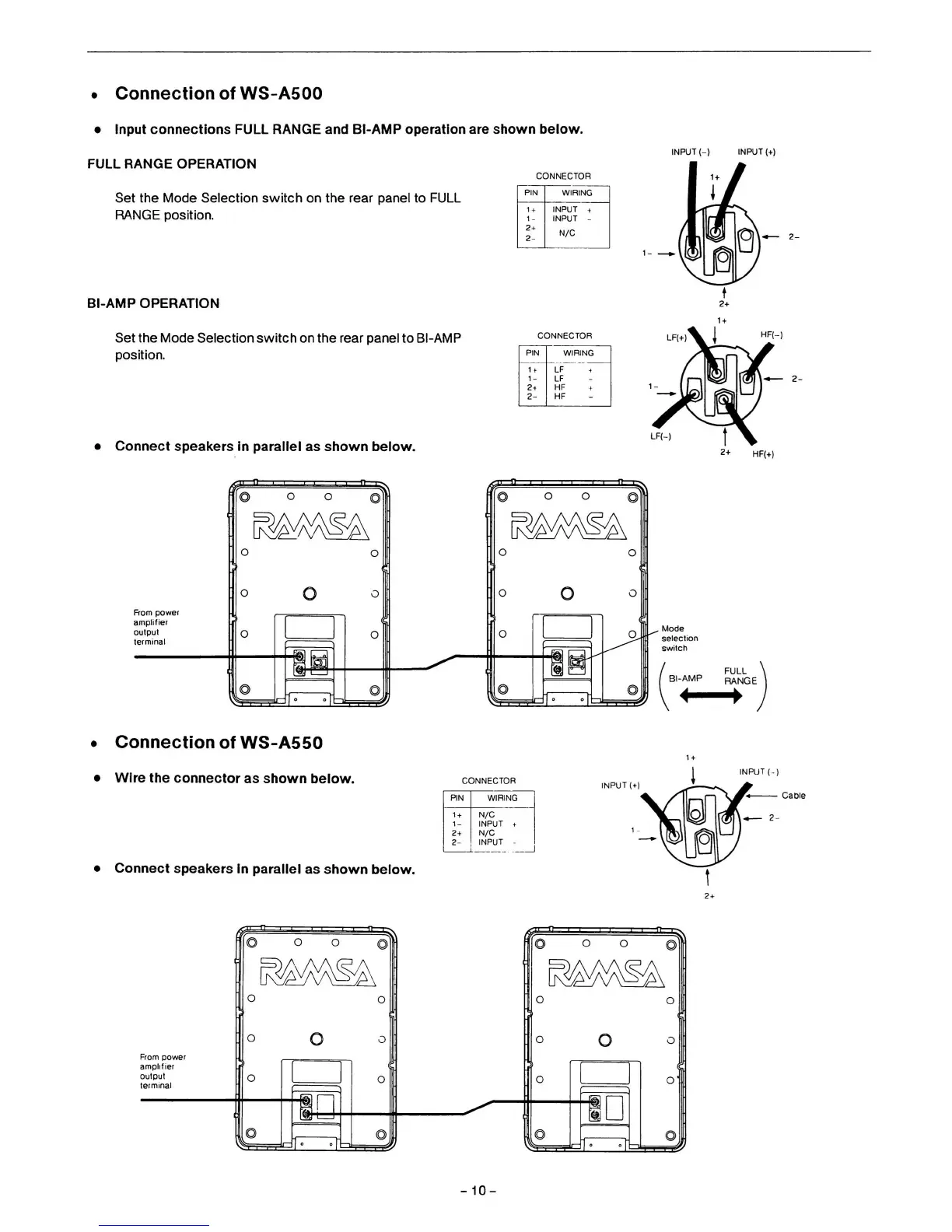
Connection of WS-A500
Input connections FULL RANGE and BI-AMP operation are shown below.
FULL RANGE OPERATION
INPUT (-) INPUT (+)
CONNECTOR
Set the Mode Selection switch on the rear panel to FULL
RANGE position.
BI-AMP OPERATION
Set the Mode Selection switch
on
the rear panel to BI-AMP
position.
PIN
1 +
1-
2+
2-
WIRING
INPUT +
INPUT
-
N/C
CONNECTOR
Connect speakers
In
parallel as shown below.
Rom power
amplifier
output
terminal
i i I
I—"~
O O
AA\^A\
^U^^S
Connection
of
WS-A550
Wire the connector as shown below.
Connect speakers in parallel as shown below.
From power
amplifier
output
terminal
•T"—O I
c
O O
^
O
SP
PIN
1
f
1-
^^
2-
WIRING
LF
<
LF
HF +
HF
HF(-)
HR+)
Vlode
selection
switch
FULL
31-AMP
F^NGE
INPUT (•]
PIN
1 +
1-
2+
2-
WIRING
N/C
INPUT t
N/C
INPUT
-
I
NPUTI
10-

Related product manuals