Here’s an example of the screen display for the program as written, showing
the results for an entry of “146865” and ready for the next frequency to be
entered as 6 digits:
For example: 146.52 MHz. = 146520. Enter here >>> ? 146865
The FX146 or FX220 N number for binary conversion is: 29373
32768 - 0
16384 - 1
8192 - 1
4096 - 1
2048 - 0
1024 - 0
512 - 1
256 - 0
128 - 1
64 - 0
32 - 1
16 - 1
8 - 1
4 - 1
2 - 0
1 - 1
>> The Binary Equivalent of N looks like this:
———————————————————-
0 1 1 1 0 0 1 0 1 0 1 1 1 1 0 1
>>> Enter Next Frequency for Programming:
Enter Receiver Frequency as 6 digits with NO decimal!
For example: 146.52 MHz. = 146520. Enter here >>> ?
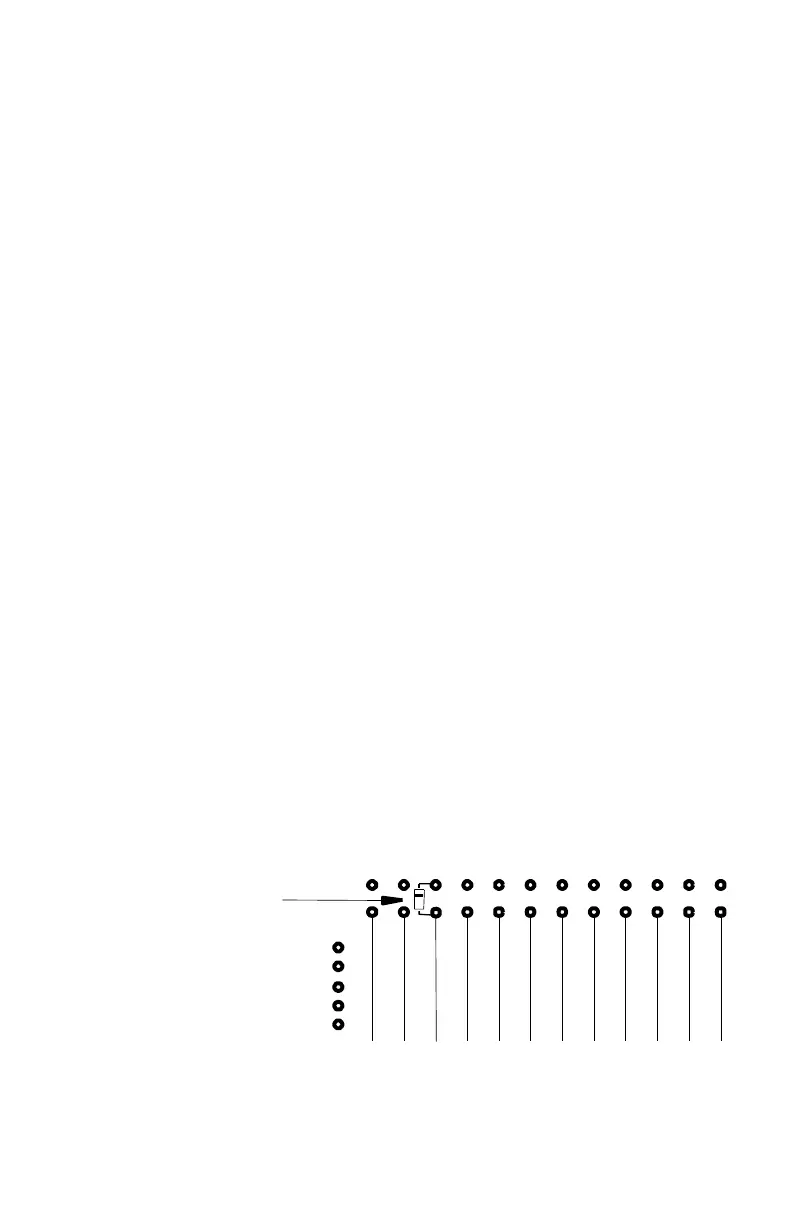
HOW TO ACTIVATE AN AUXILIARY OFFSET:
1. Install NO diode in SIMP, -RPT or +RPT for the channel that gets a non-
standard offset.
2. Program the AUX matrix row for the desired offset, following our
published instructions.
3. Connect the channel row to the AUX matrix row by installing a diode as
shown below. The cathode end is soldered to the diode programming
bridge. In this example, Channel 3 uses the auxiliary offset:
16 K
32 K
+RPT
-RPT
SIMP
FRONT EDGE OF PC BOARD
3
4
6
7
0
1
2
DIODE JUMPER FOR CHANNEL 3
PER MARKINGS ON PC BOARD



 To Next Page