INSTALLATION
Check the appliance is electrically safe when you have nished.
32
Art No 215-0028 - Handrail fascia fixings
ArtNo.350-0010 - Fitting the plinth 1 (Kitchener)
ArtNo.350-0011 - Fitting the plinth 2 (Kitchener)
Outer plinth
Outer plinth xing screw
Inner plinth
Final fitting
Fitting the handles and handrail
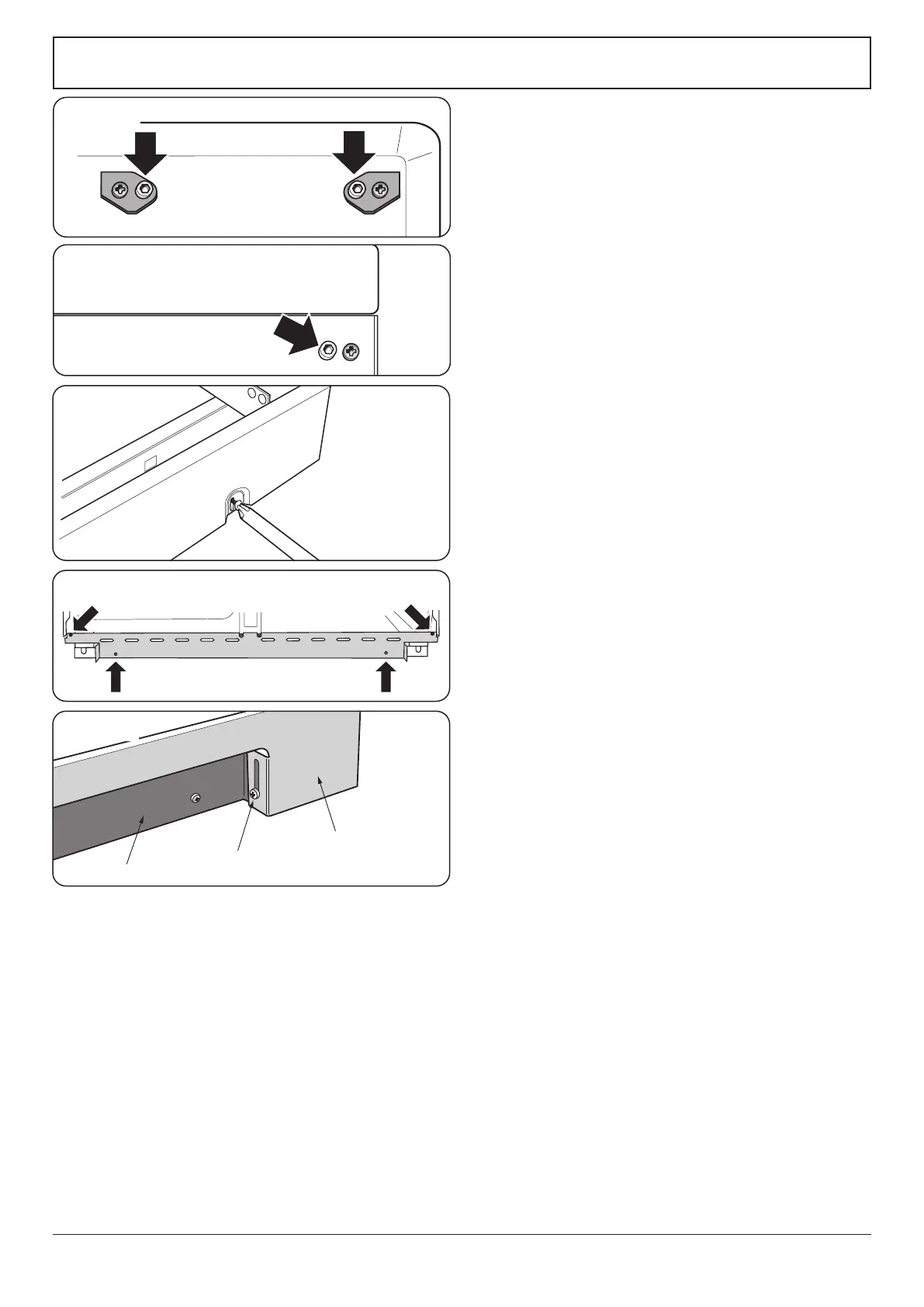
Remove the 4 mm Allen screws from the doors (Fig. 11.13).
Fit the door handles and secure using the 4 mm screws.
n
The handles should be above the xings.
Remove the 4 mm Allen screws from the top corners of the
fascia (Fig. 11.14). Fit the front handrail in position and
secure using the 4 mm screws.
Fitting the 1-piece plinth
Loosen the three screws along the front bottom edge of the
cooker. Hook the central keyhole over the central screw. Twist
and t each end keyhole over their respective screws. Tighten
the xing screws (Fig. 11.15).
Fitting the 2-piece plinth
Fit the inner plinth to the bottom front of the cooker using
the 4 screws provided (Fig. 11.16).
Fit the outer plinth (2 screws, 1 each end) to the inner plinth.
The height of the outer plinth can be adjusted by sliding it up
or down via the slotted hole (Fig. 11.17).
Fitting the splashback
Position the splashback on the rear of the hotplate and secure
with the screws supplied.
n
WARNING: When moving the cooker ensure that the
front outer plinth is removed. Failure to do so may
result in damage to plinth and oor.
Customer care
Installer: Please complete your details in this guide, inform
the user how to operate the cooker and hand over the
instructions.
Thank you.
ArtNo.215-0026 - Handle gaskets fixed
Fig. 11.13
Fig. 11.14
Fig. 11.15
Fig. 11.16
Fig. 11.17


 To Next Page