14
6. When the program starts the Multifunction Oven, the
‘Cooking’ symbol will appear on the display. Once the
specied time has elapsed it will emit an alarm and the
Multifunction Oven will stop working. The ‘Cooking’
symbol on the display will disappear and the word
‘AUTO’ will ash (Fig. 2.31).
7. Once the specied time has elapsed it will emit an alarm.
There are two ways to cancel the alarm refer to “Cancel
the Timer Alarm” on page 12
Reset to Manual Cooking
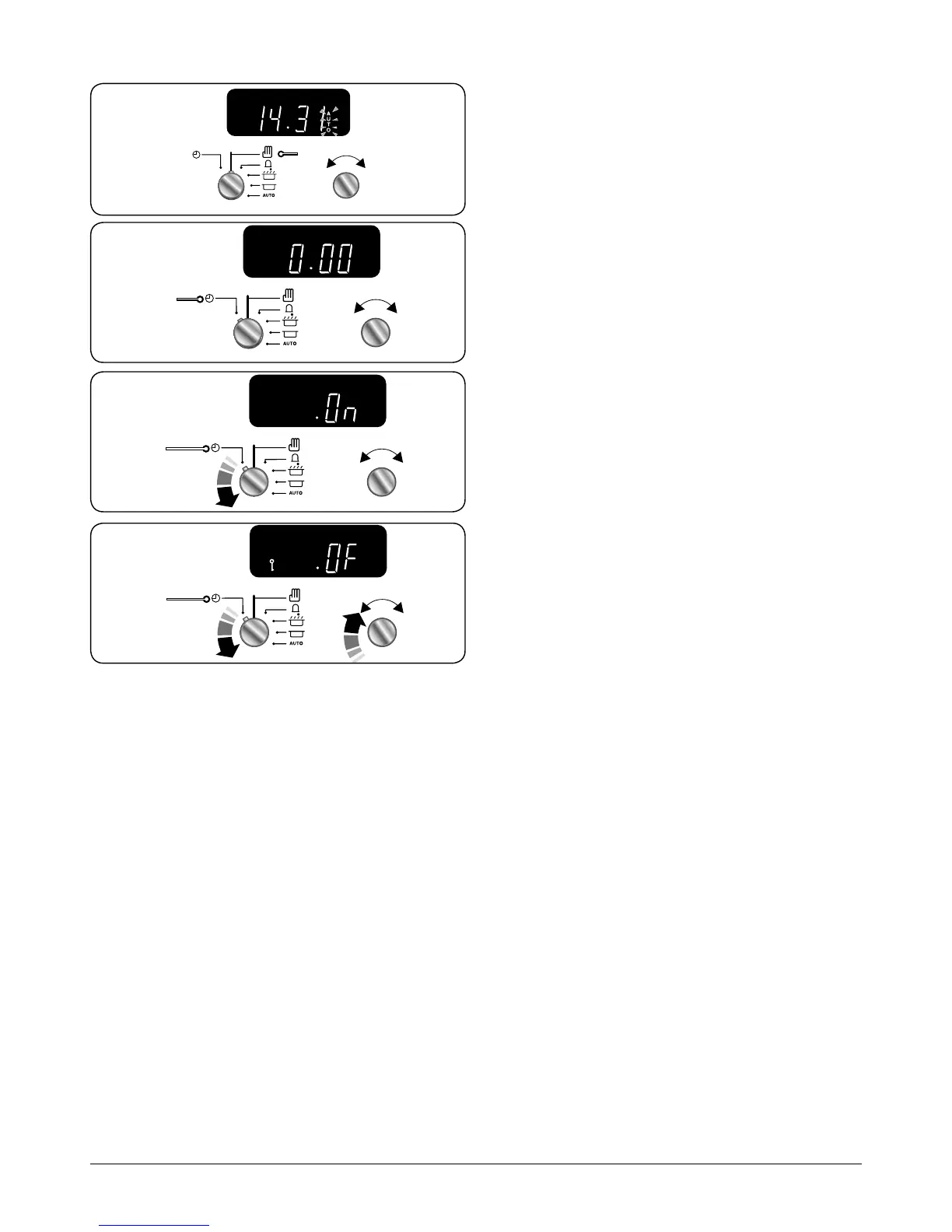
To cancel any automatic settings turn the Timer (A) knob to
the Clock (C) setting and release (Fig. 2.32).
Key Lock
The Key Lock will activate and deactivate the left-hand oven.
1. Cancel any active programs. Refer to “Reset to Manual
Cooking” on page 14.
2. Turn the Timer (A) knob to the Clock (C) setting and hold
for approx 8 seconds. The display will show ‘ON’ (Fig.
2.33).
3. Continue to hold the Timer (A) knob onto the Clock (C)
setting, turn the Adjusting (B) knob clockwise, the ‘OF‘
and the ‘Key’ symbol will display (Fig. 2.34). The oven is
now locked.
4. To activate repeat steps 1 to 2 and continue to hold
the Timer (A) knob onto the Clock (C) setting, turn the
Adjusting (B) knob clockwise to ‘ON’, the ‘Key’ symbol
will disappear and the oven is enabled.
ArtNo.301-0007 2BC
Stopping the oven 1
D
A B
Fig. 2.31
ArtNo.301-0007 2BC
Stopping the oven 1
A B
C
Art No. 301-0011 2BC
Activating the key lock 1
A B
C
ArtNo.301-0012 2BC
Activating the key lock 2
A B
C
Fig. 2.32
Fig. 2.33
Fig. 2.34



 To Next Page