16
AUTO is Showing, You want to Reset to Manual Cooking
To return to manual cooking from any automatic setting,
the ‘cook period’ must be cancelled. Press and hold the [
]
button and then press the [–] button until the display reads
( 0.00 ).
Press the [
] button to return to manual cooking.
Key Lock
Activating the key lock will lock the left-hand oven and it will
not come on.
The right-hand oven can be operated as usual.
To Activate the Key Lock
Make sure that the clock is in manual mode and cancel
any active programs.
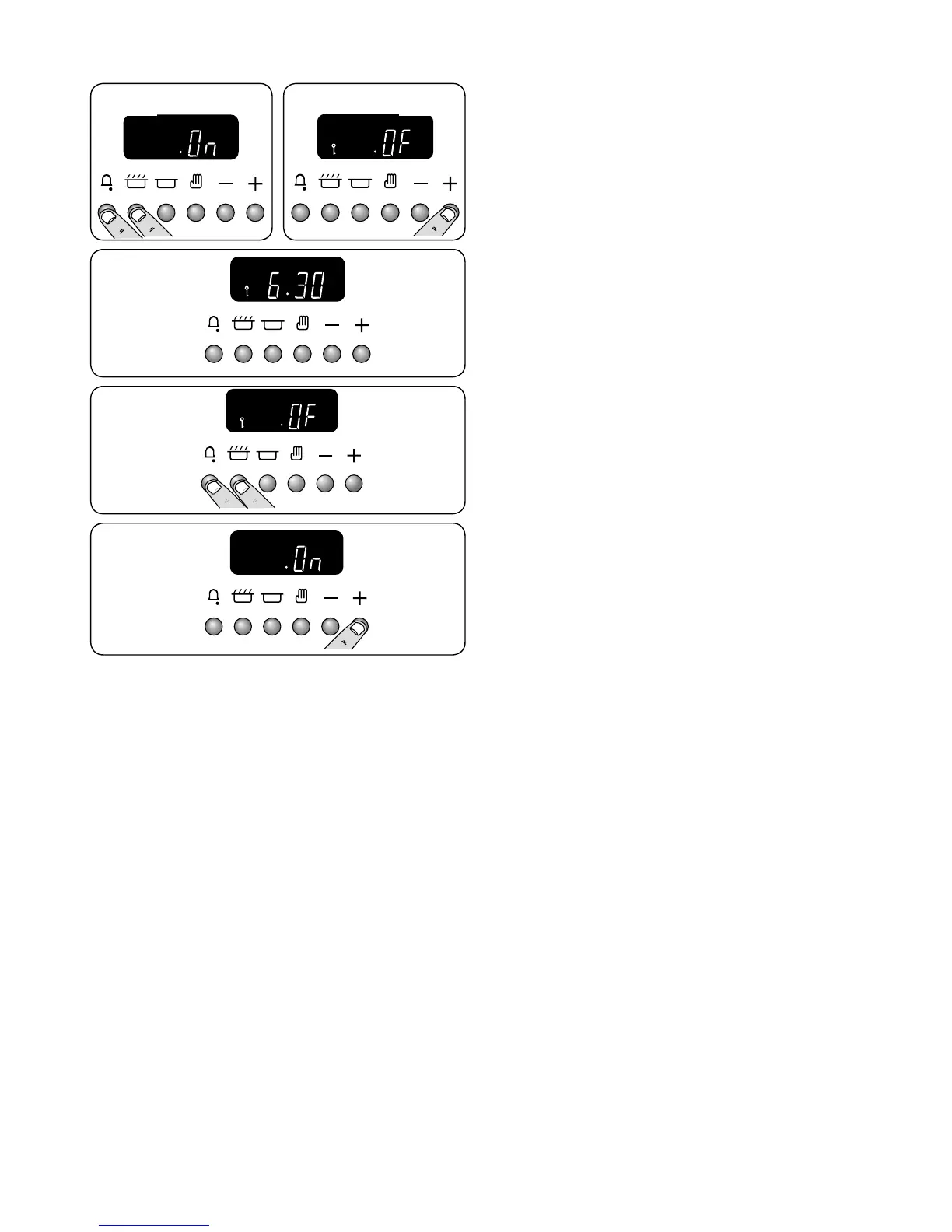
Hold the [
] and [
] buttons. When ‘On’ appears on the
display (Fig. 2.45) press the [+] button once. The key symbol
[
] and ‘OF’ will now show on the display (Fig. 2.46). Release
the buttons.
The left-hand oven is now locked, as conrmed by the display
showing the time of day alongside the key symbol (Fig. 2.47).
To Turn O the Key Lock
Hold the [
] and [
] buttons. When ‘OF’ appears on the
display (Fig. 2.48) press the [+] button once. The key symbol
[
] will go out and ‘On’ will show on the display (Fig. 2.49).
Release the buttons.
After a few seconds the display will revert to show the time of
day.
The oven can now be used normally.
ArtNo.302-0010 -
Activating the key lock 3
ArtNo.302-0009 - Activating
the key lock 2
ArtNo.302-0011 - 6BC
Deactivating the key lock 1
ArtNo.302-0012 -
Deactivating the key lock 2
Fig. 2.45 Fig. 2.46
Fig. 2.47
Fig. 2.48
Fig. 2.49



 To Next Page