15
Check how much time you have left
Beeper tone adjustment
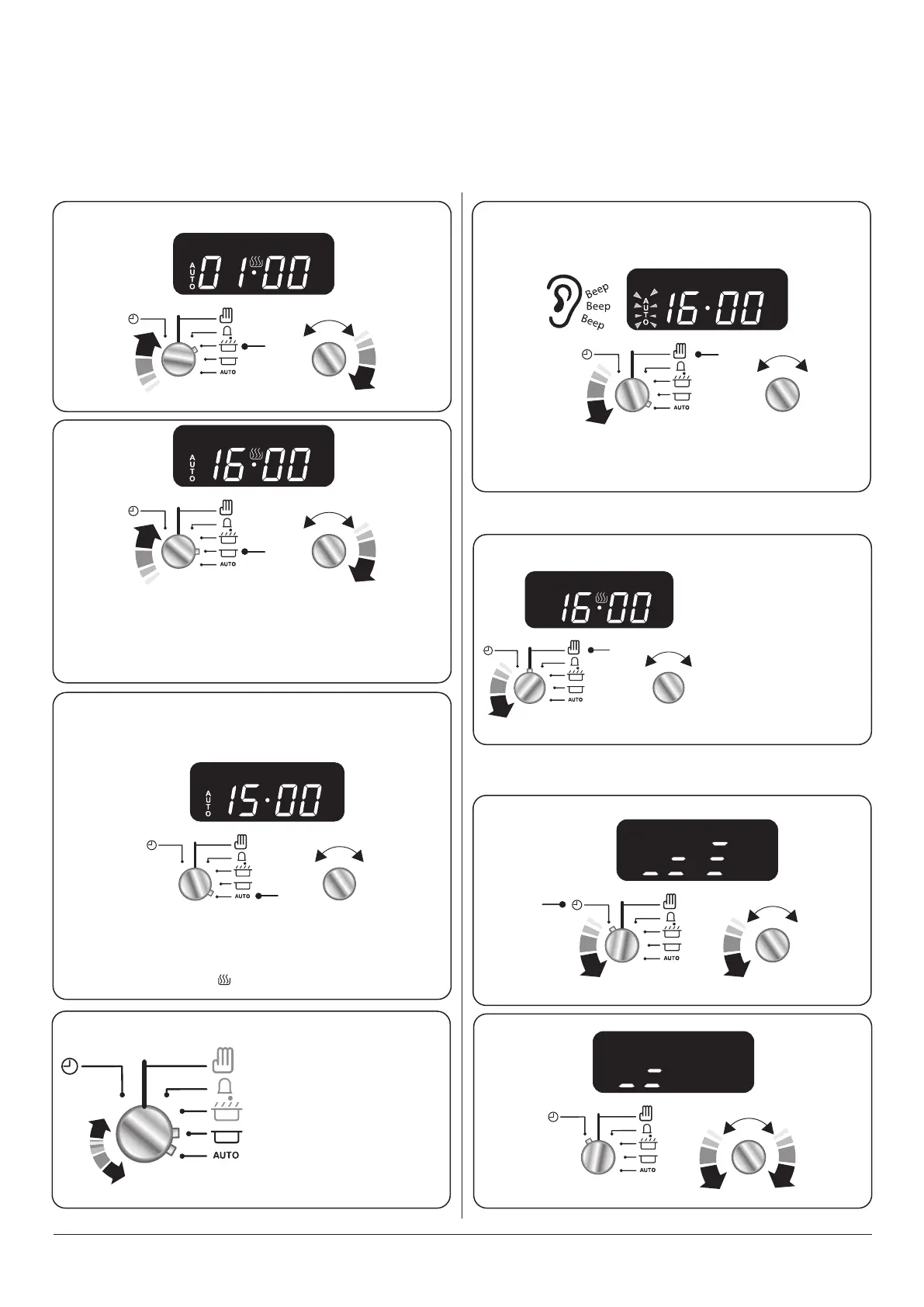
To start and stop the oven automatically (main oven only)
The timer allows you to automatically start and stop by a combination of the length of the cooking time and the stop time.
Giving you the exibility to cook casseroles etc while you are out. You cannot set the actual start time.
Step. 1
1. The display will show the current time of day
plus the ‘cook time’ you just set.
2. Turn knob (2) to set the time of day you want
the oven to stop cooking
Current time will be displayed along with the
word ‘AUTO’. Set the oven to the required cooking
temperature and function.
Set the cook time
Alarm will sound when cooking has nished, to
cancel follow this step
In this example the oven will come on automatically at
16.00 and switch o at 17.00.
Note: The cook symbol [ ] will be visible once in operation.
Step. 2
Step. 3
Step. 4.
Note: Whilst this
operation cancels all
automatic program
settings, it does not cancel
the minute minder.
Adjust the
beeper tone
using this knob.
Step. 1
Step. 2
n
REMEMBER Turn the oven control knob(s) to 0.
Switch between these two.
To cancel any automatic settings



 To Next Page