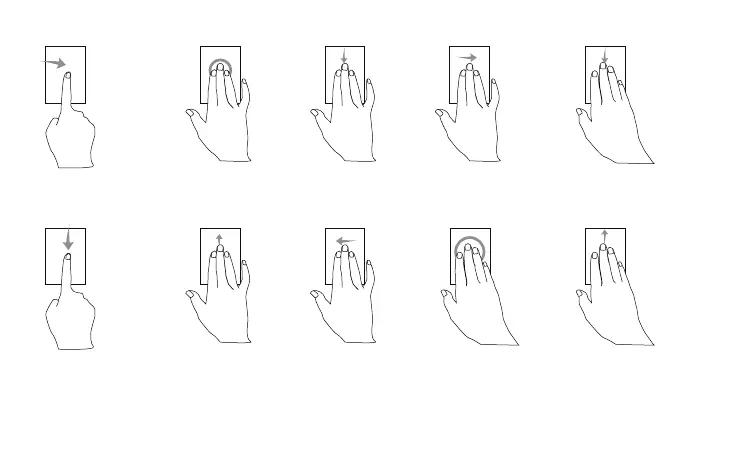
Windows shift to the right side of
the screen:
Swipe from the left edge using a
single finger(win+→)
Applications order:
Swipe from the top edge using
a single finger(Windows +
CTRL+ F23)
Search: Click using three
fingers
Tasks view:
Swipe up using three
fingers(Win+Tab)
Show/Hide desktop:
Swipe down using three
fingers (windows+D)
Switch between opened
windows: Swipe left
using three fingers(
ALT+TAB+←)
Switch between opened
windows: Swipe right using
three fingers(ALT+TAB+→)
Pop-up operation center
window: Click using four
fingers(win+A)(Support
Windows 10 only)
Maximize Windows:
Swipe up using four fingers
(shift+windows+m)
Minimize Windows:
Swipe down using four fingers
(windows+m)
1 2
3 4
5 6
7 8


 To Next Page