EasyManua.ls Logo

Rath 2100 Series - User Manual

Rath 2100 Series
7 pages
Print Icon
To Next Page IconTo Next Page
Loading...
N56W24720 N. Corporate Circle Sussex, WI 53089
800-451-1460 262-246-4828 (fax)
www.rathmicrotech.com www.area-of-refuge.com www.rathsecurity.com
RP8500SIP
Ver. 6
09/16
Made in the USA
3 Year Warranty
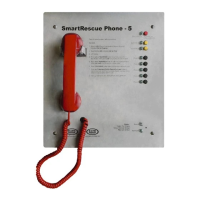
Installation & Operations Manual
2100 Series VoIP Phone

Other manuals for Rath 2100 Series

Questions and Answers

  • G
    gbaileyAug 19, 2025
    Why is my Rath IP Phone not showing as registered?
    • B
      bhayesSep 12, 2025
      If your Rath IP Phone isn't showing as registered, here are a few things to check: * Verify the SIP extension settings entered into the Phone match the SIP Server. * Double check the authentication password, making sure it meets complexity requirements. * Make sure the IP address isn’t being blacklisted or blocked by the network. * Confirm nothing else on the network shares the same IP address as the Phone. * Check that you can see both the SIP Server and the Phone on your PC when connected to the network.
  • A
    anthonysanchezAug 21, 2025
    What to do if my Rath 2100 is dead and won't call or program?
    • A
      Albert BurkeAug 22, 2025
      If your Rath IP Phone is completely unresponsive, try the following: * Make sure the phone is connected and receiving POE from the Network Switch. * Confirm the voltage switch on the POE adapter is set to 12v. * Check the LEDs on all components, including the POE adapter, IP board, and yellow circuit board. * Verify that the phone does not exceed the 320’ distance limitation from the Network Switch. * It's possible the POE Switch can't handle the power requirements; POE+ or POE++ is recommended. * You can also try resetting the phone.
  • W
    wheelermichaelAug 23, 2025
    What to do if Rath IP Phone dials out but goes busy?
    • R
      Rebecca RoseAug 23, 2025
      If your Rath IP Phone dials out but immediately goes to a busy signal, consider these possibilities: * Log into the VoIP Phone and verify that it still shows registered under Line 1. * Verify the dialing string is programmed into the Phone, especially if an 8 or 9 is needed to dial out. * The Phone may need to dial an extension rather than a standard 11 digit number.
  • L
    Lisa SmithAug 26, 2025
    Why won't my Rath 2100 IP Phone call out and just sits with a dial tone?
    • C
      christine04Aug 26, 2025
      If your Rath IP Phone only provides a dial tone but won't complete the call, try these solutions: * Follow the steps in Phone Programming to verify the dial out number programmed into the phone. * Verify the phone is in Standard Mode by pressing ENTER, 1, 9, ENTER, 1, then press and hold STOP for 3 seconds. * Ensure the number being programmed into the phone is a valid, routable number.
  • D
    David CamachoAug 27, 2025
    What to do if my Rath 2100 doesn’t respond when the call button is pushed?
    • B
      brendan34Aug 28, 2025
      If your Rath IP Phone doesn't respond when the call button is pushed, and there's no LED or audio, check the following: * Verify that the line cord from the RJ11 jack on the yellow circuit board is connected to the RJ11 jack on the VoIP board. * Check that the voltage switch on the POE adapter is set to 12v. * The push button may be non-functional. Remove the black switch JST connector from the yellow circuit board and short across the 2 pins on the board in the connector using a flat metal screwdriver. * Verify that the phone is still connected and getting POE from the Network Switch. * Verify that the phone still shows as Registered. * You can also try to reset the phone.
  • J
    juan24Aug 30, 2025
    How to fix distorted or low audio on Rath 2100 IP Phone?
    • M
      mariah01Aug 30, 2025
      If the audio on your Rath IP Phone is distorted or very low, here are some troubleshooting steps: * Adjust VR1 and VR2 potentiometers on the yellow circuit board. * Make sure nothing is blocking the speaker or microphone holes on the face plate. * Verify network traffic isn’t slow.
  • E
    Eric ClarkSep 1, 2025
    What to do if Rath 2100 IP Phone unit will not call out?
    • H
      heather22Sep 1, 2025
      If your RATH IP Phone doesn't seem to be calling out and the LED turns off quickly, ensure the phone line is connected to the Ethernet port on the VoIP board. Also, the VoIP phone may not be recognized on the network. You can verify if the VoIP phone is showing on the network by pinging the IP address of the VoIP phone through command prompt, using a laptop on the same IP scheme of VoIP phone. Also, the settings on the VoIP phone may differ from SIP Server and need to be changed.
  • A
    Amy WalshSep 3, 2025
    How to troubleshoot non-functional Rath 2100 IP Phone?
    • D
      Donna WellsSep 3, 2025
      If the RATH IP Phone appears non-functional, with no LED flash or audio when the button is pushed, check that the SmartPhone is connected to the FXS port on the VoIP board. Also, verify 12v or POE power to SmartPhone circuit board. The push button may be non-functional, remove black switch JST connector from SmartPhone board and short across the 2 pins to check board.
  • K
    Krystal WelchSep 5, 2025
    How to fix no dial tone on RATH IP Phone?
    • J
      Jessica FischerSep 5, 2025
      If you experience a lack of dial tone on your RATH IP Phone when the button is pushed, verify the network connection going into unit and ensure the SmartPhone is connected to the Ethernet port on the VoIP board.
  • J
    James FlynnSep 7, 2025
    What to do if RATH IP Phone call stays connected?
    • H
      haleywardSep 7, 2025
      If the called party hangs up, but the call stays connected on your RATH IP Phone, it could be that the phone company or system isn't sending a disconnect signal. In this case, the operator needs to press *, # to disconnect the call. Also, the disconnect time on the phone may need to be lowered.

Summary

Installation & Operations Manual

Setup and Prerequisites

Items Needed

Lists all required components and information for setup.

Setting Up VoIP Phone for Static IP Address

Provides step-by-step instructions for initial setup and IP configuration.

Phone Programming

On-Site Programming

Explains how to configure emergency numbers and messages locally.

Remote Programming

Covers remote configuration steps for emergency numbers and messages.

Testing and Verification

VoIP Phone Testing

Outlines procedures to verify phone functionality after setup.

Adjusting Controls

Adjusting the Microphone

Guides users on adjusting microphone sensitivity for better voice input.

Adjusting the Speaker

Provides steps to increase the speaker volume for clearer audio output.

Troubleshooting Guide

Rath 2100 Series Specifications

General IconGeneral
BrandRath
Model2100 Series
CategoryIP Phone
LanguageEnglish

Related product manuals