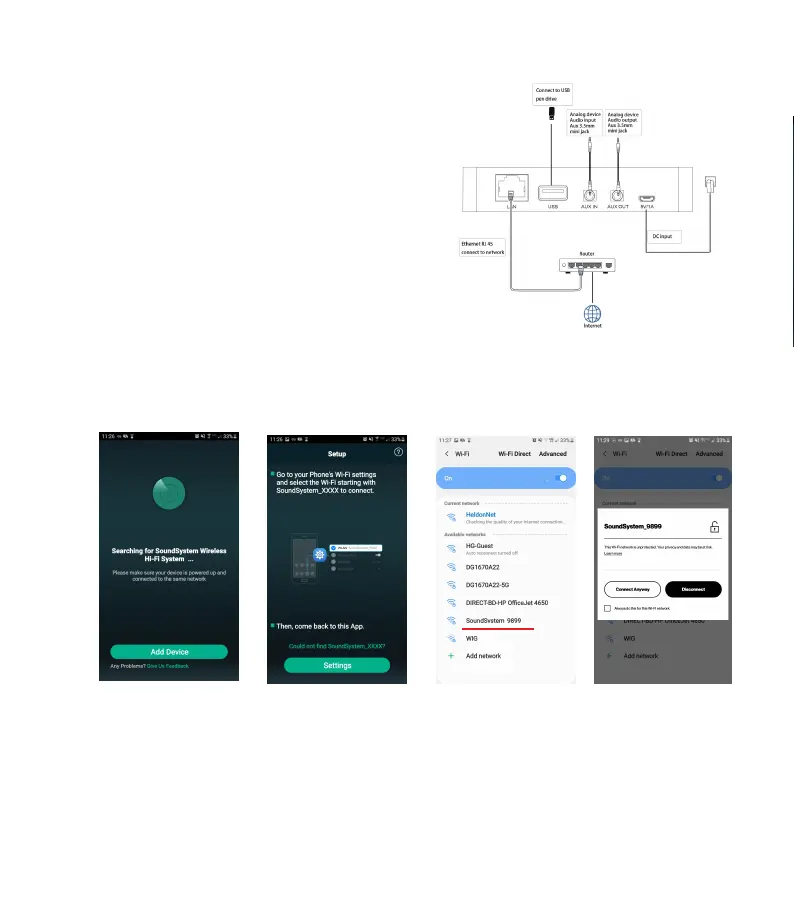
1. Make the audio connections according to the
diagram.
2. Install the RSS CONNECT APP on your
Android or iOS device.
3. Power on the RSS-WB by connecting the
power supply to the power input on the
device. When the device is ready for use you
will hear piano chime sound.
4. For Wi-Fi connection launch the APP and
follow the instructions.
**Attention Android users**
You may be
asked to allow use of this device on your Wi-Fi network, please select yes
or connect anyway. RSS will not connect properly otherwise.
LAN CONNECTION
Plug i
n the wired cable to the RJ45 Ethernet, the device will automatically connect
with the RSS CONNECT APP (All devices must be connected to the same network)


 To Next Page