
 Need help?
Do you have a question about the Rave RSS-WB and is the answer not in the manual?
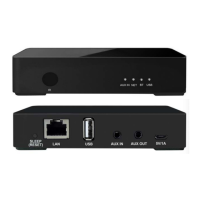
Details the front and rear panel ports for connectivity and control.
Explains the buttons and operations of the included IR remote control.
Guide to making audio connections, installing the app, and powering the device.
Instructions for connecting the device to your network via Ethernet.
Steps to establish a wireless connection using the RSS CONNECT app.
Grant necessary Wi-Fi network permissions on Android devices for proper connection.
Detailed steps for choosing and connecting to available Wi-Fi networks.
Learn how to assign custom names to your devices within the app.
How to stream music from your Mac or Windows PC.
Instructions for streaming audio from Apple devices using AirPlay.
Pairing and streaming music wirelessly via Bluetooth.
Using AUX input and playing music from your mobile device.
Sharing music from NAS drives with DLNA support.
Adjusting name, EQ, presets, and sleep timer settings for the device.
Guide to grouping devices for synchronized multi-room audio.
How to link two devices for stereo sound output.
Saving and recalling favorite audio sources and playlists.
Instructions on how to check for and install firmware updates.
Methods to restore the device to its original factory settings.
Comprehensive list of the device's technical features and capabilities.
Details on the product's five-year limited warranty terms and conditions.

 To Next Page
 General