13
Multi-Room Audio
G
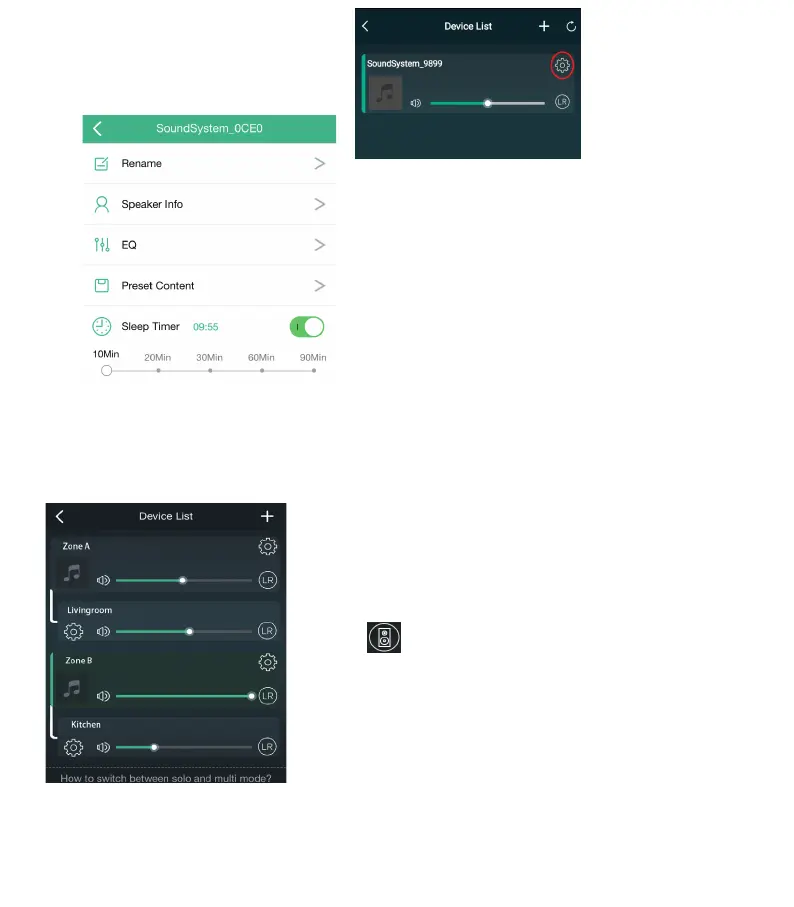
roup devices together for Multi-Room audio. Press and hold the device, slide while pressing to
group with another device. You will see the connection link, see examples below.
Rename
:
Customize Device Name
S
peaker I
nfo: Speaker Settings and Details
EQ
:
Bass and Treble Tone Controls
P
reset Content: Select Preset to Play
Sleep
Timer: Set to turn off music off automatically
Device Settings
Press the gear icon next to the
device to change settings.
Left and Right channel
Us
ers can choose the right channel or left channel
or stereo mode on the application, or choose left
channel on device A and choose right channel on
device B, and group them together and play in sync
to make stereo.
Presets
You can save you favorite stations or playlist for
easy recall by setting a preset. Only stations or
playlists with the speaker icon can be saved as a
preset. 10 presets can be saved and recalled using
the application, the IR remote control can recall
presets 1-6.


 To Next Page