Wuhan Raycus Fiber Laser Technologies Co., Ltd.
User Guide of RFL-C3300W~RFL-C15000W
31
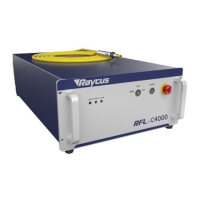
Figure 17 Inteface 2 of the RAYCUS laser client control software.
Verify that the settings are correct (if the signal is sent from front and rear
panel, the corresponding status signal will be ticked) and there is no alarm
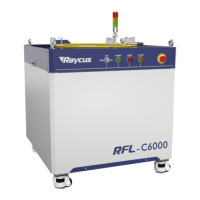
information. Users can adjust the light control interface to control the laser light.
After entering the light control interface, the light mode and power can be set on
the left side:
Figure 18 Inteface 3 of the RAYCUS laser client control software



 To Next Page