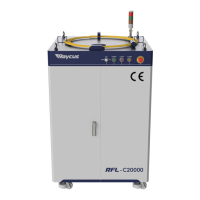
To Next Page
Е
ЕвгенийJul 28, 2026
Приветствую! У меня проблема с лазером: указка светит, но не режет. Ошибок на панели нет. Лазер только водит головой, но не выполняет резку. Что делать?

Приветствую! У меня проблема с лазером: указка светит, но не режет. Ошибок на панели нет. Лазер только водит головой, но не выполняет резку. Что делать?
Explains warning and caution symbols used in the document.
Details Class 4 laser classification and potential exposure risks.
Illustrates and describes various safety labels affixed to the product.
Covers precautions for optical path and lens care to prevent damage.
Details electrical safety, grounding, and voltage connection requirements.
Lists important safety practices for proper and safe laser operation.
Highlights main features and typical applications of the CW fiber laser.
Details available laser models and their power configurations.
Guides on checking delivered items and performing initial product inspection.
Specifies environmental conditions for optimal product operation.
Lists essential precautions to follow before and during product usage.
Provides detailed technical parameters for the laser models.
Shows physical dimensions and views for different laser models.
Describes output cable types and their connection procedures.
Details cooling capabilities, flow rates, and water specifications.
Provides a step-by-step guide for installing the laser unit.
Details the controls and indicators on the front panel.
Describes the ports and connectors on the rear panel.
Specifies AC power supply requirements and connection details.
Guides on connecting and configuring interfaces like SERVICE, RS-232, Ethernet.
Guides on final physical installation and laser startup sequence.
Explains control modes, sequences, and red light control.
Provides steps for safely powering down the laser.
Shows how alarms are displayed on the software and front panel.
Lists common alarms and their corrective actions.
Outlines Raycus's standard warranty policy for products.
Specifies conditions and parts not covered by the warranty.
Provides instructions for maintenance and contacting service.
 General
| Brand | Raycus |
|---|---|
| Model | RFL-C2000 |
| Category | Measuring Instruments |
| Language | English |