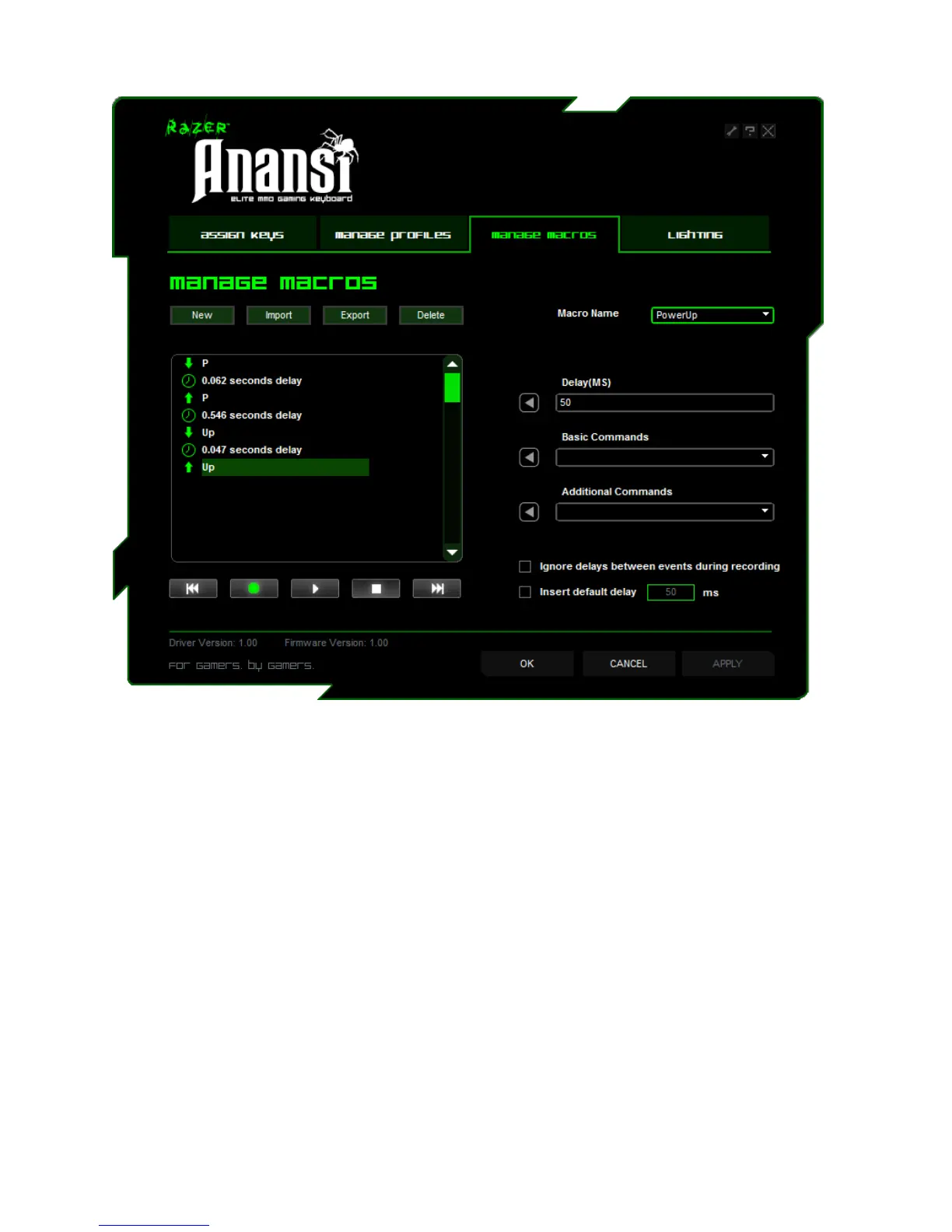
MANAGE MACROS TAB
A macro is a sequence of keystrokes executed in a particular order and timing. It allows you to execute a
chain of commands, with the press of just one button, to optimize your gameplay.
In the Manage Macros tab, you can record unlimited keystrokes (dependent on your storage resources).
These macros can also be imported and exported onto your hard disk for future usage.
A. Macro Entry: Enter your macro in the Macro Entry box. You can even choose to insert a delay
time and/or a mouse-button press.
B. Delay (ms): Choose the amount of delay to be inserted between keystrokes of your macro.
C. Basic Commands: A list of basic commands in Windows OS that can be inserted between
keystrokes of your macro.
D. Additional Commands: A list of additional commands in Windows OS that can be inserted
between keystrokes of your macro.
You can ignore delays between events of a macro by clicking on the respective checkbox before
recording.
You can specify a fixed default delay timing to be used in between events of a macro by clicking on the
respective checkbox before recording.






 To Next Page