5. GETTING STARTED
CHARGING YOUR RAZER BASILISK ULTIMATE
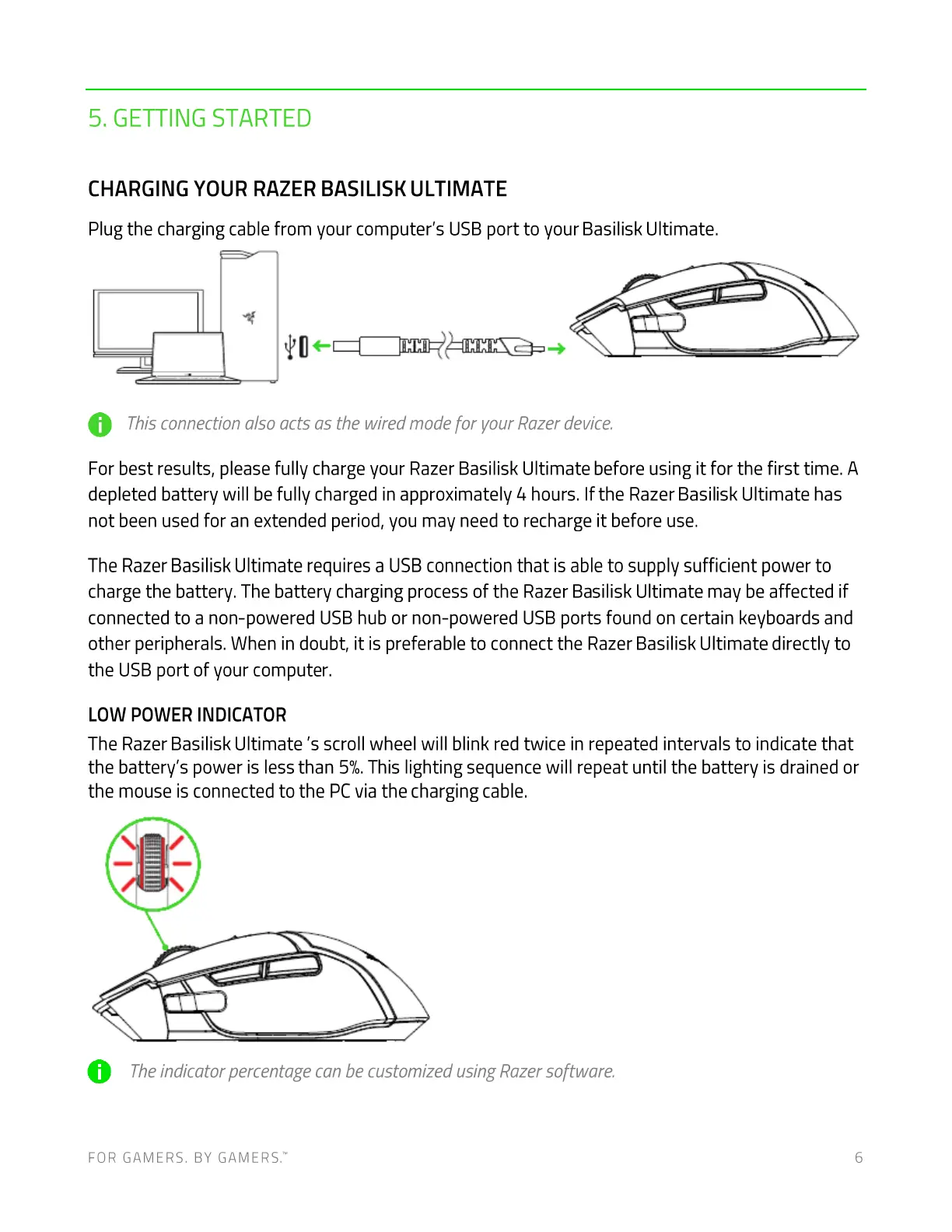
Plug the charging cable from your computer's USB port to your Basilisk Ultimate.
O ThisconnectionalsoactsasthewiredmodeforyourRazerdevice.
For best results, please fully charge your Razer Basilisk Ultimate before using it for the first time. A
depleted battery will be fully charged in approximately hours. If the Razer Basilisk Ultimate has
not been used for an extended period, you may need to recharge it before use.
The Razer Basilisk Ultimate requires a USBconnection that is able to supply sufficient power to
charge the battery. The battery charging process of the Razer Basilisk Ultimate may be affected if
connected to a non-powered USB hub or non-powered USB ports found on certain keyboards and
other peripherals. When in doubt, it is preferable to connect the Razer Basilisk Ultimate directly to
the USB port of your computer.
LOW POWER INDICATOR
The Razer Basilisk Ultimate 's scroll wheel will blink red twice in repeated intervals to indicate that
the battery's power is less than 5%.This lighting sequence will repeat until the battery is drained or
the mouse is connected to the PC via the charging cable.
0
Theindicator percentage can be customized usingRazersoftware.
FOR GAMERS. BY GAME-RS:
6













 To Next Page