Lighting
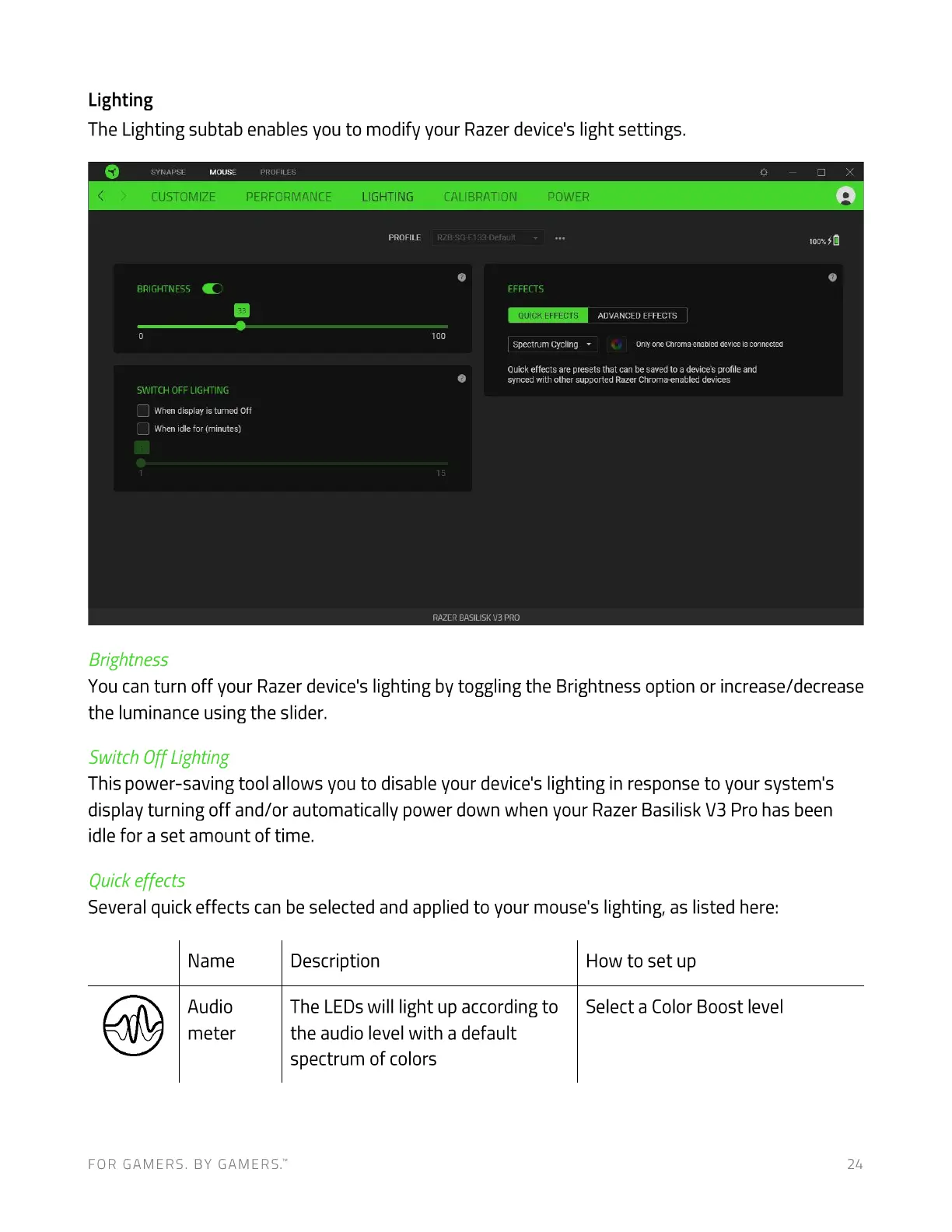
The Lighting subtab enables you to modify your Razer device's light settings.
SYNAPSE MOUSE PROFILES
CUSTOMIZE PERFORMANCE
BRIGHTNESS
SWITCH OFF LIGHTING
When display isturned Off
When idlefor (minutes)
Brightness
LIGHTING
PROFILE
CALIBRATION
RZB-SG-E133-Defauit
POWER
EFFECTS
QUICK EFFECTS
100
Spectrum Cycling
ADVANCED EFFECTS
Only one Chroma-enabled device is connected
Quick effects are presets that can be savedto adevice's profile and
synced with other supported Razer Chroma-enabled devices
RAZER BASILISK PRO
You can turn off your Razer device's lighting by toggling the Brightness option or increase/decrease
the luminance using the slider.
Switch Off Lighting
This power-saving tool allows you to disable your device's lighting in response to your system's
display turning off and/or automatically power down when your Razer Basilisk Pro has been
idle for a set amount of time.
Quick effects
Several quick effects can be selected and applied to your mouse's lighting, as listed here:
Name
Audio
meter
FOR GAMERS. BY GAMERS.W
Description
The LEDs will light up according to
the audio level with a default
spectrum of colors
How to set up
Select a Color Boost level
214





 To Next Page