Calibration
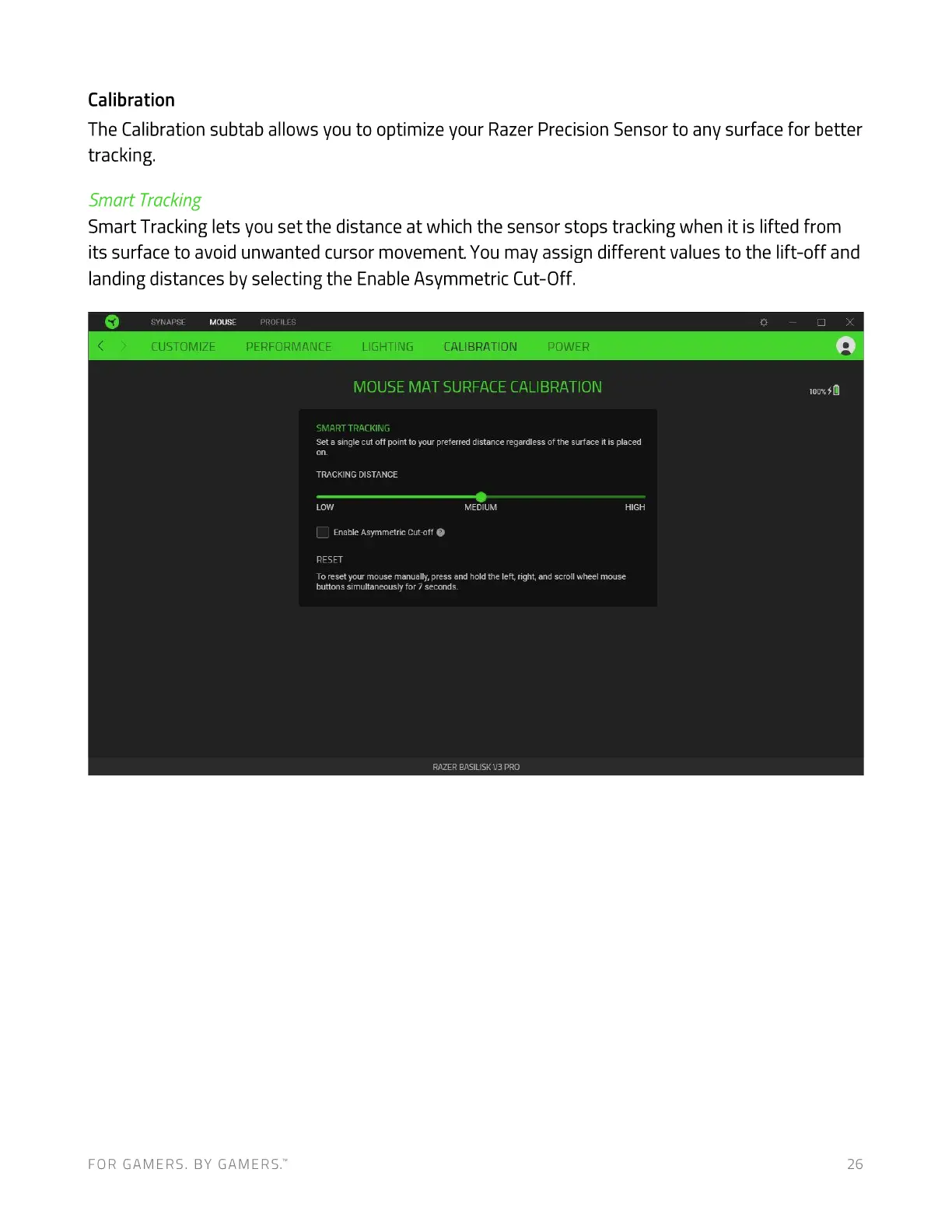
The Calibration subtab allows you to optimize your Razer Precision Sensor to any surface for better
tracking.
Smart Tracking
Smart Tracking lets you set the distance at which the sensor stops tracking when it is lifted from
its surface to avoid unwanted cursor movement. You may assign different values to the lift-off and
landing distances by selecting the Enable Asymmetric Cut-Off.
SYNAPSE MOUSE PROFILES
CUSTOMIZE PERFORMANCE LIGHTING CALIBRATION POWER
MOUSE MAT SURFACE CALIBRATION
SMART TRACKING
Set a single cut off point to your preferred distance regardless of the surface it is placed
TRACKING DISTANCE
LOW
EnableAsymmetric Cut-off O
RESET
MEDIUM HIGH
To reset your mouse manually, press and hold the left, right, and scroll wheel mouse
buttons simultaneously for 7 seconds.
RAZER BASILISK B PRO
FOR GAMERS. BY GAMERS.W 26



 To Next Page