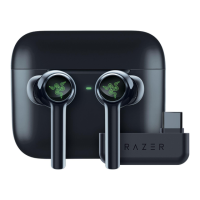
SETTING UP YOUR RAZER HAMMERHEAD HYPERSPEED
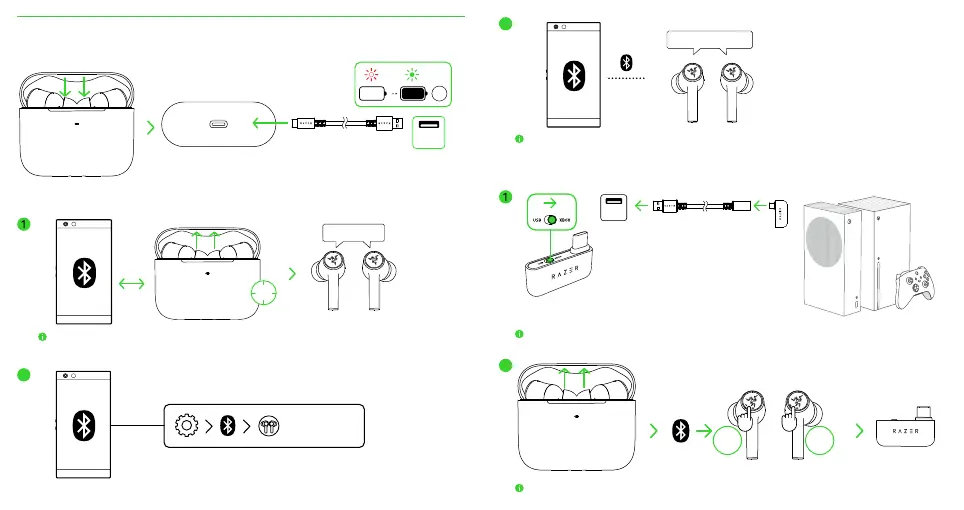
CHARGING YOUR EARBUDS
0%
100%
3H
USB
Type A
CONNECTING TO YOUR EARBUDS
A. Via Bluetooth
When trying to connect your Razer product, remember to keep it within 1 meter of your mobile device. By
default, the earbuds will first search for the USB Type C wireless dongle before activating pairing mode.
2
Razer Hammerhead
HyperSpeed (BT)
3
If the earbuds fail to connect to your device, the earbuds will stay in search mode and power off after
3 minutes. If this happens, place the earbuds back inside the charging case and repeat the steps above.
B. To an Xbox console via the USB Type C wireless dongle (2.4 GHz)
USB
Type A
Always use the USB Type A to USB Type C adapter cable when connecting the USB Type C wireless
dongle to an Xbox console. DON’T directly plug it into your Xbox wireless controller’s USB-C power port.
This step is only applicable if the earbuds are connected to your device via Bluetooth.
2
TAP
3X
TAP
3X
OR
Hammerhead HyperSpeed Xbox EU_AP_CHS IPIG 1116 ECR.indd 10-11Hammerhead HyperSpeed Xbox EU_AP_CHS IPIG 1116 ECR.indd 10-11 16/11/22 6:19 PM16/11/22 6:19 PM



 To Next Page