Disable
This option renders the assigned key unusable. Use Disable if you do not want to use the key or if it
interferes with your gaming.
PERFORMANCE TAB
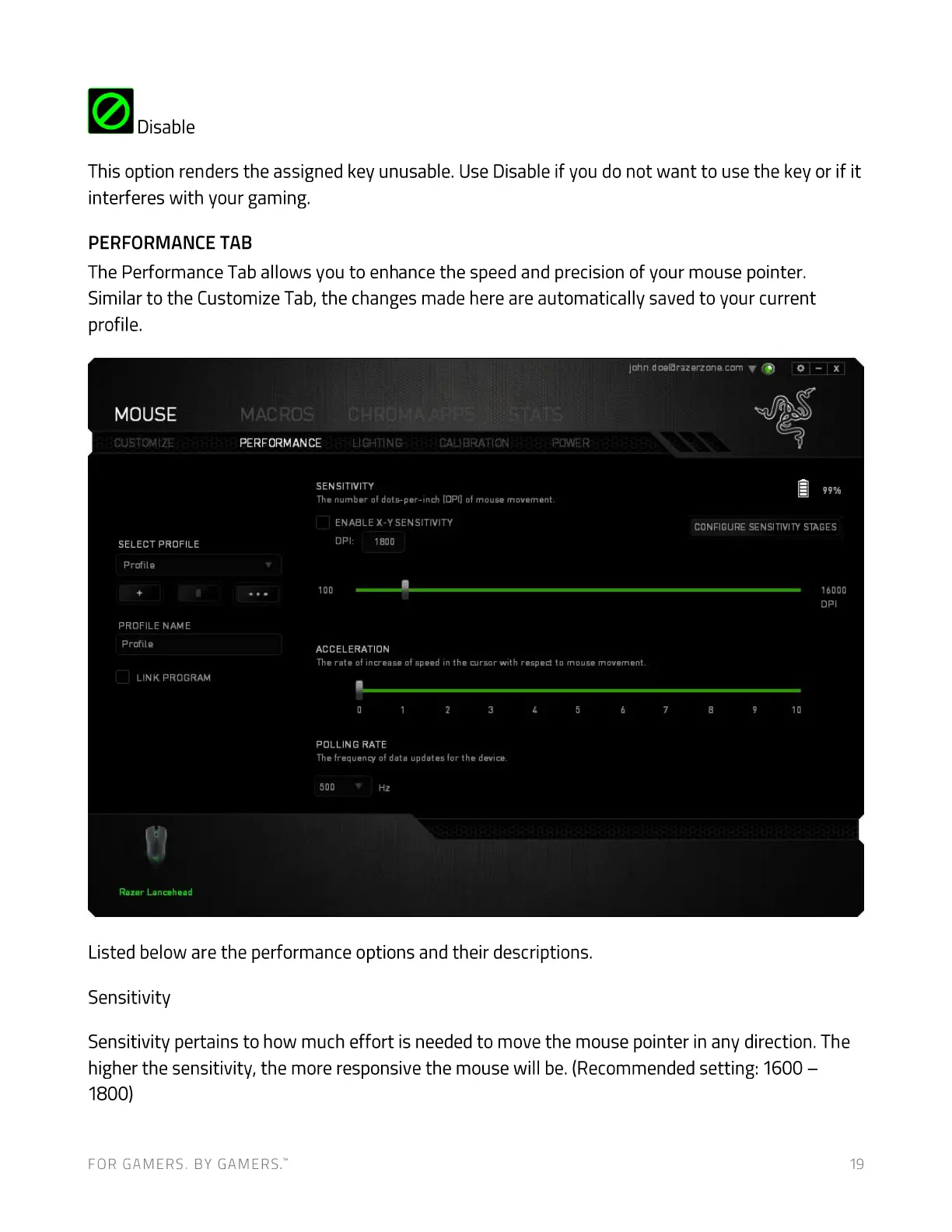
The Performance Tab allows you to enhance the speed and precision of your mouse pointer.
Similar to the Customize Tab, the changes made here are automatically saved to your current
profile.
MOUSE
CUSTOMIZE
SELECT PROFILE
Profile
PROFILE NAME
Profile
LINK PROGRAM
Razer Lancehead
MACROS
PERFORMANCE LIGHTING CALIBRATION POWER
SENSITIVITY
The number of dots-per-inch (DPI) of mouse movement.
ENABLE X-Y SENSITIVITY
OPI:
1800
100
ACCELERATION
john.doeßrazerzone.com
CONFIGURE SENSITIVITY STAGES
16000
DPI
The rate of increase of speed in the cursor with respect to moUSe movement.
10
POLLING RATE
The frequency of data updates for the device.
500
Listed below are the performance options and their descriptions.
Sensitivity
Sensitivity pertains to how much effort is needed to move the mouse pointer in any direction. The
higher the sensitivity, the more responsive the mouse will be. (Recommended setting: 1600 —
1800)
FOR GAMERS. BY GAMERS:


 To Next Page