LIGHTING TAB
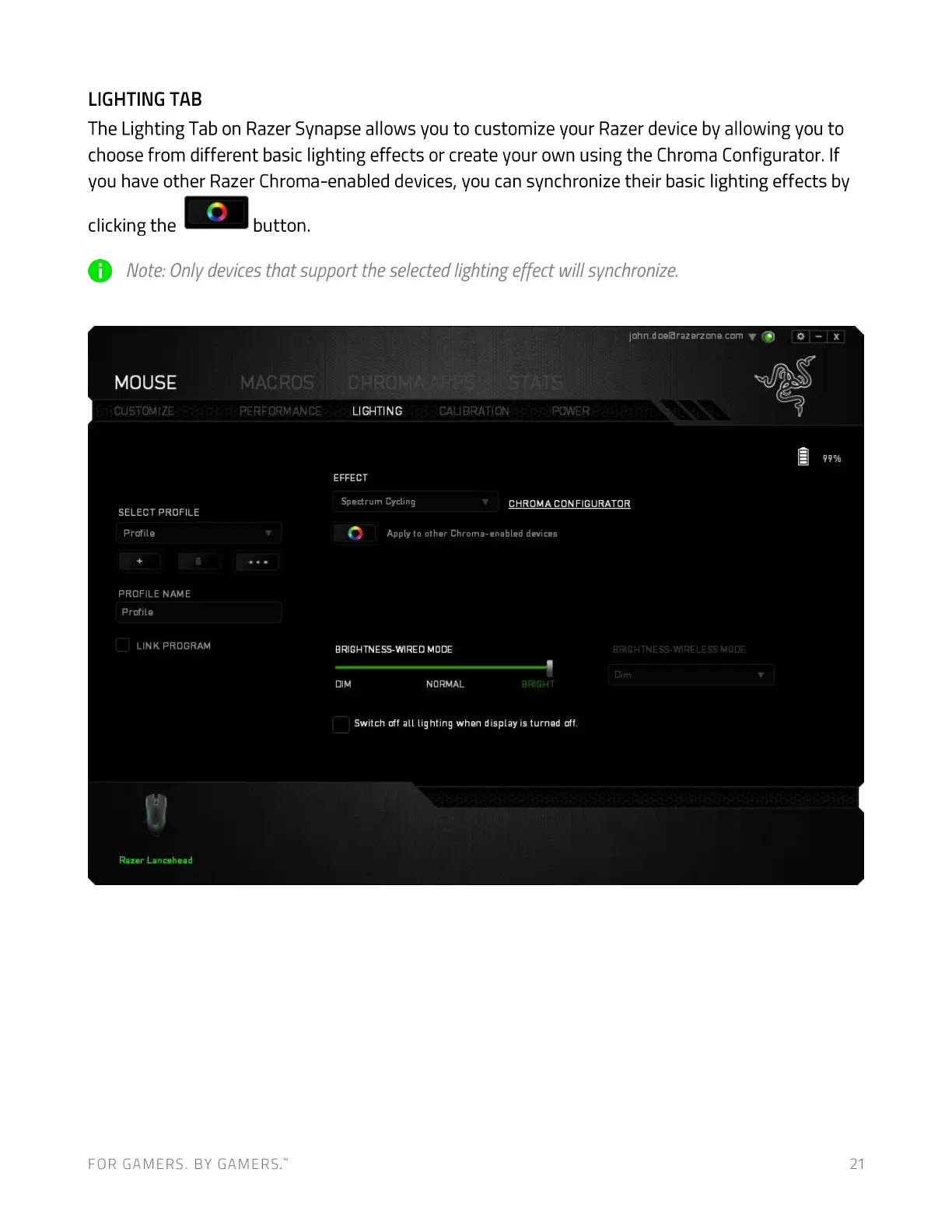
The Lighting Tab on Razer Synapse allows you to customize your Razer device by allowing you to
choose from different basic lighting effects or create your own using the Chroma Configurator. If
you have other Razer Chroma-enabled devices, you can synchronize their basic lighting effects by
clicking the
button.
O Note:Onlydevicesthatsupporttheselectedlightingeffectwillsynchronize.
john.doeßrazerzone.com O
MOUSE
CUSTOMIZE
SELECT PROFILE
Profile
PROFILE NAME
Profile
LINK PROGRAM
Razer Lancehead
MAC ROS
LIGHTING
EFFECT
Spectrum Cycling
CALIBRATION POWER
CHROMA CONFIGURATOR
Apply to other Chroma-enabled devices
BRIGHTNESS-WIRED MODE
DIM NORMAL
BRIGHT
Switch off all lighting when display is turned off.
FOR GAMERS. BY GAMERS:
21


 To Next Page