EasyManua.ls Logo

Razer Leviathan - Top Panel Controls and Indicators; Control Buttons and Functions; Indicator Light Meanings

Razer Leviathan
21 pages
Print Icon
To Next Page IconTo Next Page
To Previous Page IconTo Previous Page
Loading...
6 | For gamers by gamers™
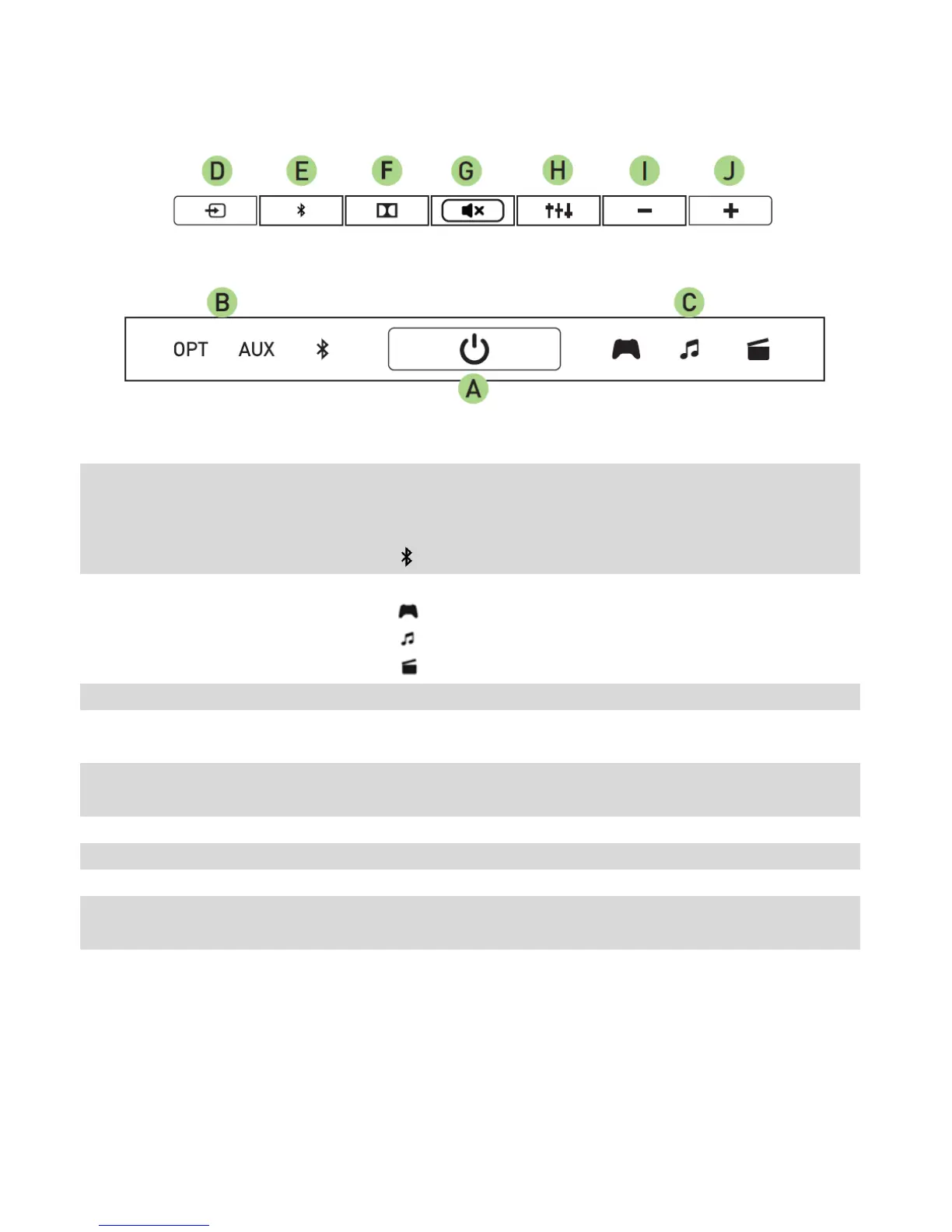
Top Panel
A.
Power button
Turns the sound bar on/off
B.
Input indicator LED
Indicates the current input audio source.
OPT: Optical
AUX: Analog
: Bluetooth
C.
Equalizer indicator
LED
Indicates the currently selected preset equalizer setting.
: Game
: Music
: Movies
D.
Input selector
Toggles between the 3 types of input
E.
Bluetooth Pairing
button
Activates Bluetooth
F.
Dolby® processing
toggle
Activates Dolby processing for optical audio inputs
G.
Mute/unmute button
Mutes / unmutes the sound bar
H.
Volume down
Decreases the overall audio volume
I.
Volume up
Increases the overall audio volume
J.
Equalizer preset
selector
Toggles between the 3 preset equalizer settings

Related product manuals