Is my Razer Nari Ultimate headset supported in Razer Synapse? What are the
features supported in Razer Synapse?
Yes, the Razer Nari Ultimate is supported in Razer Synapse 3. The following
features are supported in Synapse 3: Mixer, Enhancement, EQ, Mic, Lighting and
Power.
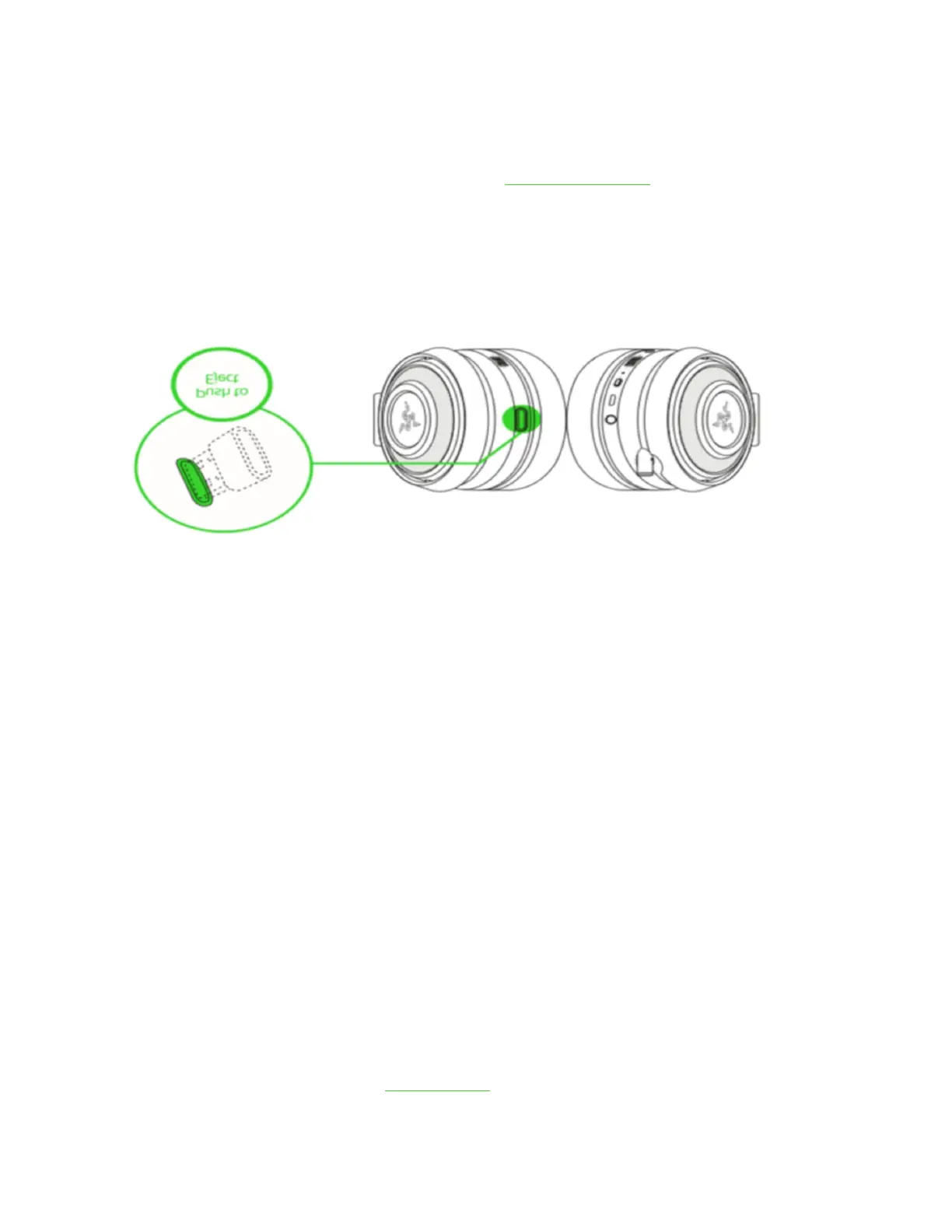
Where can I find the USB dongle for my Razer Nari Ultimate headset?
The USB dongle for the Razer Nari Ultimate can be found in its convenient storage
location, in the headset. Please see the image below for exact location.
Why is the Razer Nari Ultimate microphone not transmitting my voice?
Please ensure that the microphone is not muted in your operating system and that
the Razer Nari Ultimate is selected as the default recording device in the Audio
Control Panel or in the Software Microphone Options.
Why is the Razer Nari Ultimate not producing sound?
Please ensure the Razer Nari Ultimate is not muted in your operating system and
that the headset is set to be the default playback device in the Audio Control panel
or in the Software Audio Options.
What Synapse 3 Chroma lighting effects are supported by the Razer Nari
Ultimate?
Quick and Advanced Effects are supported in Synapse 3 with the Razer Nari
Ultimate. Quick Effects include Breathing, Spectrum Cycling and Static.
Why am I hearing myself speak on the Razer Nari headset? Can I turn it off?
Mic monitor is a built-in feature that allows you to hear your own voice via a
feedback loop, designed specifically to help gamers avoid repeating themselves or
shouting unnecessarily into the mic for fear that their teammates won't be able to
hear them.
You are able to configure the volume of the mic monitor in Razer Synapse 3.
The default setting for the mic monitor on the Razer Nari Ultimate is set to OFF.
How do I enable or disable the HyperSense on my Razer Nari Ultimate headset?
You can turn on/off HyperSense within Razer Synapse 3.



 To Next Page