Note: You will hear a notification tone when the headset port volume reaches its lowest or highest
setting.
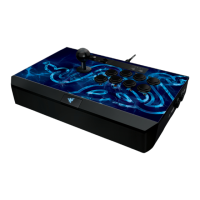
What form of modifications (modding) to the Razer Panthera Evo is covered
under Razer’s warranty?
The Razer Panthera Evo allows for the following forms of modding:
Swapping out the Sanwa joystick module
Swapping out the arcade pushbuttons
Swapping out the artwork beneath the top cover
These modifications should be performed with only a screwdriver. Physical or electrical damage
caused to the arcade stick as a result of these modifications is not covered under Razer’s warranty.
What will I need to remove the ball top of the Razer Panthera Evo?
You will need a flat head screwdriver to hold the shaft in place as you unscrew the ball top. Refer to
the online master guide for instructions.
Will I be able to mute my mic from the Razer Panthera Evo arcade controller?
Yes. Press the mic button to mute or unmute the mic. The button will light up red when the connected
headset’s microphone has been muted.
Is the USB cable on the Razer Panthera Evo detachable?
No. However, the Razer Panthera Evo arcade controller has a compartment to stow the USB cable.
What size are the buttons on the Razer Panthera Evo?
The main action buttons are 30 mm in diameter. The “Options” and “Share” buttons are 24 mm in
diameter.
Will the Razer Panthera Evo work with my PC?
Yes. make sure you are running Windows 7 operating system or later. You may also need to download
the Xinput driver.
How long is the USB cable on the Razer Panthera Evo?
The cable on the Panthera Evo is 3 meters long.
Does the Razer Panthera Evo have an audio input or output port?
Yes, the Razer Panthera Evo arcade controller has a 3.5mm audio port for stereo output and
microphone input.
Can I download a template and skins for the Razer Panthera Evo?
Yes, we have the template and skins available for download at http://www.razer.com/gaming-
controllers/razer-panthera-evo.
Can I use my Razer Panthera Evo on PC games outside of Steam?
Yes, you can play most of the PC games outside of Steam with the Razer Panthera Evo by installing the
Xinput driver. Restart your computer if necessary after the installation.
Can I use my Razer Panthera Evo on Steam as a PS4 controller?




 To Next Page