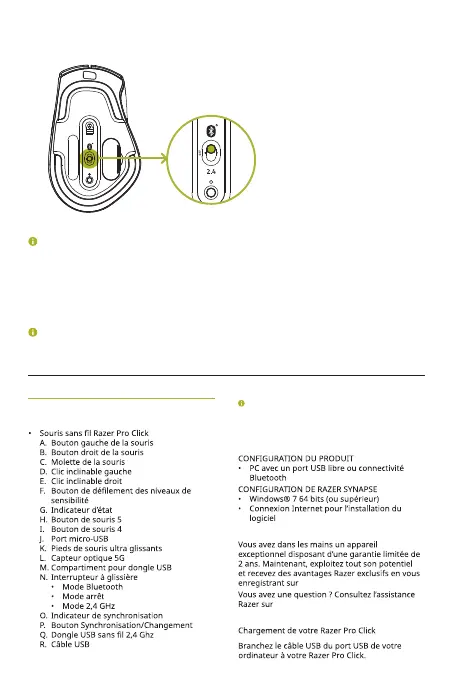
5. Wait until both devices are paired. When paired, the pairing indicator will change
to static for 3 seconds before turning off.
2.4
OFF
Keep the pairing devices within close proximity of each other for faster and more
stable connection.
Once both devices have been paired, your Razer Pro Click will automatically reconnect
to the device whenever it is in Bluetooth mode and the device is within range.
Download the Razer Synapse installer from razer.com/synapse or find out more
about your brand-new mouse at support.razer.com
FRANÇAIS
CE QUI VOUS ATTEND
Les niveaux de sensibilité sont les suivants : 800,
1800 (par défaut), 3200, 5000 et 10 000. Les
niveaux de sensibilité peuvent être personnalisés
grâce à Razer Synapse 3.
CE DONT VOUS AVEZ BESOIN
NOUS SOMMES LA POUR VOUS
razerid.razer.com
support.razer.com
POUR COMMENCER
ProClick_IPIG_200520.indd 10 26/5/20 10:30 AM



 To Next Page