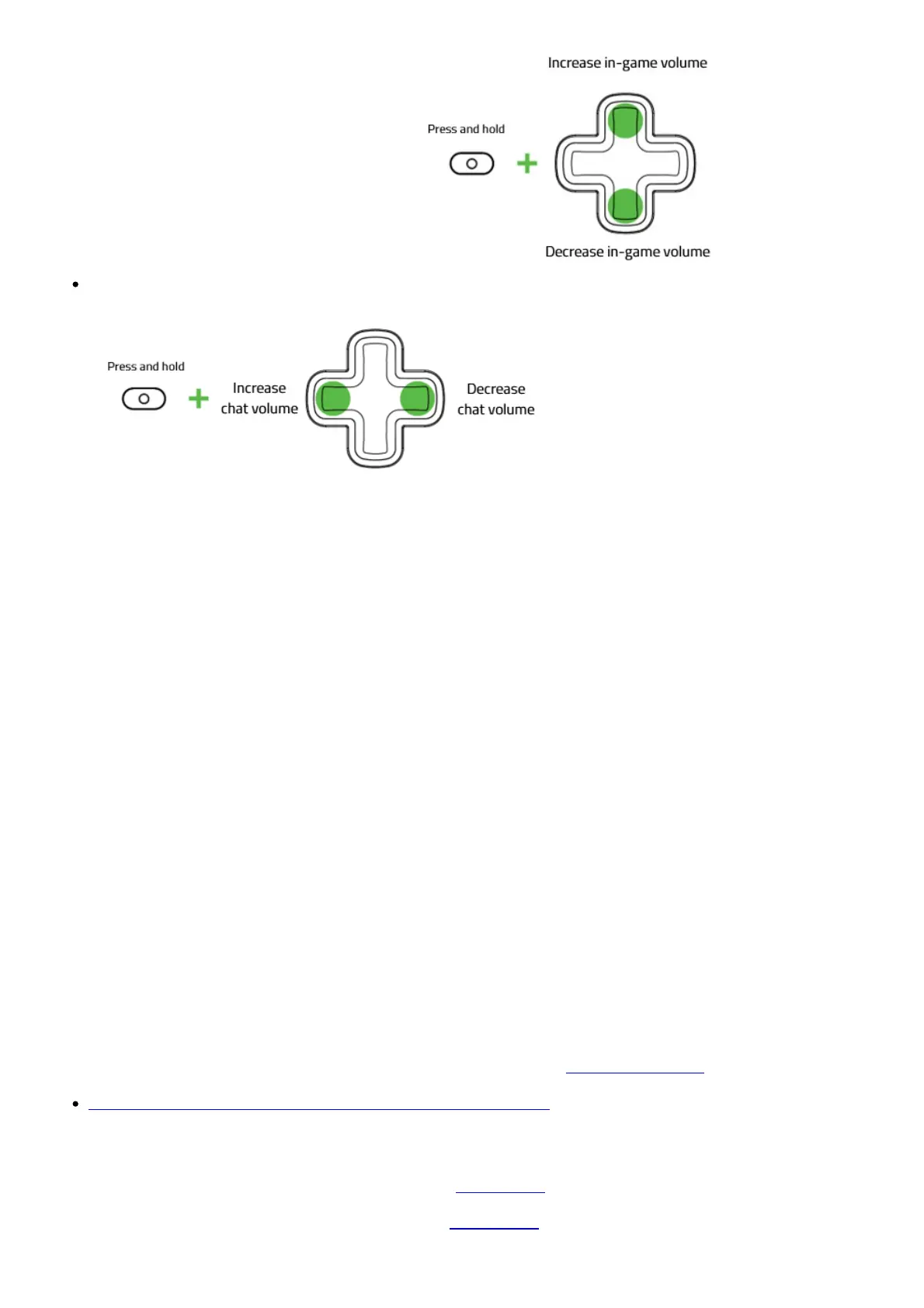
increase or decrease the master volume.
Press and hold the Audio Configuration button then press the left or right directional button to
increase or decrease the voice chat and game volume.
Note: Increasing the voice chat will decrease the game volume or vice versa.
How do I clean my Razer controller?
We cannot say with certainty what type of dirt and debris may be on your product, or how certain
cleaning products may react with it, but we have had good luck cleaning Razer products using
commonly available monitor cleaning wipes.
To clean the body of your Razer controller please take a monitor wipe and use gentle wiping motions.
Do not scrub the surface of your Razer controller.
Troubleshooting
How to fix an issue where switching profiles on the Razer Wolverine V2 does not
work
Unplug and re-plug your controller to recover the switch profile button.
Software & Downloads
What is Razer Controller Setup For Xbox app and where can I download it?
It is used to access countless customization options for your controller such as remapping the buttons
for each game and adjusting thumbsticks’ sensitivity for better aiming and handling.
Note: The Xbox button is not remappable.
You can download the Razer Controller Setup For Xbox app from Microsoft Store.
View software, drivers and updates for download >
Downloads
Razer Wolverine V2 Manual (Chinese Traditional) – Download
Razer Wolverine V2 Manual (Chinese Simplified) – Download










 To Next Page