15
7.3 NIMH / NICD - CYCLING
8. Pb (LEAD-ACID BATTERY) - PROGRAM
8.1 Pb (LEAD-ACID BATTERY) - CHARGING
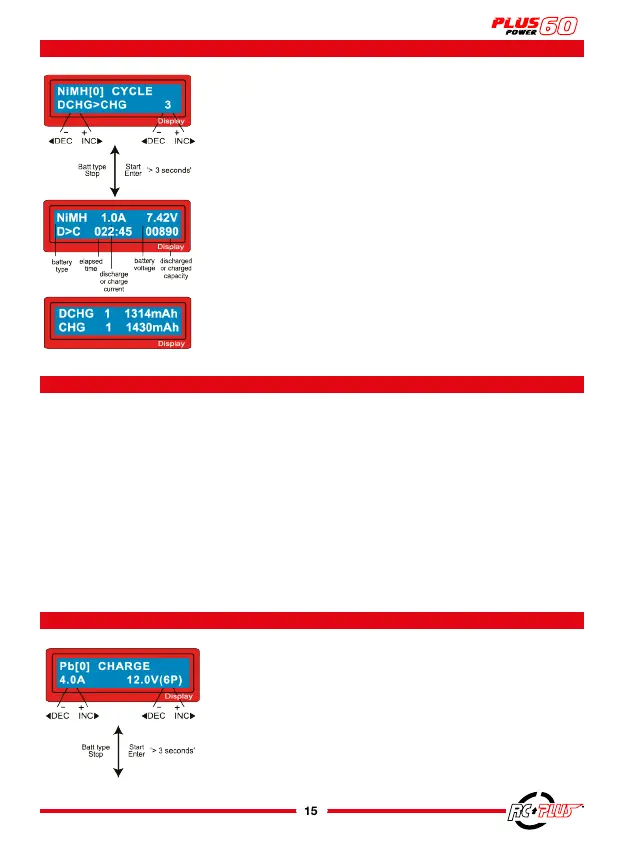
On the left you define the sequence and on the right the num-
ber of cycles. You can use this function to balance, refresh and
run-in a battery. To avoid an increase in battery temperature,
there will be a short cooling period which has already been
set in the “User setting” level after each charge and discharge
process. The number of cycles available is 1 to 5.
To stop the process, press the
BATT TYPE/STOP
button once.
You can change the discharge or charge current by pressing
the
START/ENTER
button once during the process. The audible
sound indicates the end of the process.
At the end of the process, you can see the charged or dis-
charged capacity of the battery for each cycle.
By pressing the
INC (+) OR DEC (-)
key, the display shows the
result of each cycle in order.
Set the charging current on the left and the nominal battery
voltage on the right. The charging current is between 0.1
and 6.0A. The voltage must be adapted to the battery being
charged.
Start the charging process by pressing the
START/ENTER
button
for more than 3 seconds.
This charger can also be used to charge a Pb (Lead-Acid Sulfuric Acid) battery with a
nominal voltage of 6 to 12V. Pb batteries are totally different from NiCd or NiMH batteries,
they can only provide a relatively low current compared to their capacity, and its constraints
apply in the charging process. Therefore, the optimal charging current will be 1/10 of the
capacity (e.g. a 12A battery will be charged with a charging current of Max. 1.2A). Pb
batteries cannot be charged quickly. Always follow the instructions provided by the battery
manufacturer.
When you want to change the value of a parameter in the program, press the
START/ENTER
key to make it blink and then change the value with the
INC (+) OR DEC (-)
key. The value
will be stored by pressing the
START/ENTER
key once.



 To Next Page