18
Main Menu
Picture
Sound
Preferences
Time
Setup
Helpful Hints
If the power fails, you must
reset the clock.
Time
Off Time Off
AM12:00
On Time Off
AM12:00
Channel 1
TV/CATV CATV
Clock AM10:00
Main Menu
Picture
Sound
Preferences
Time
Setup
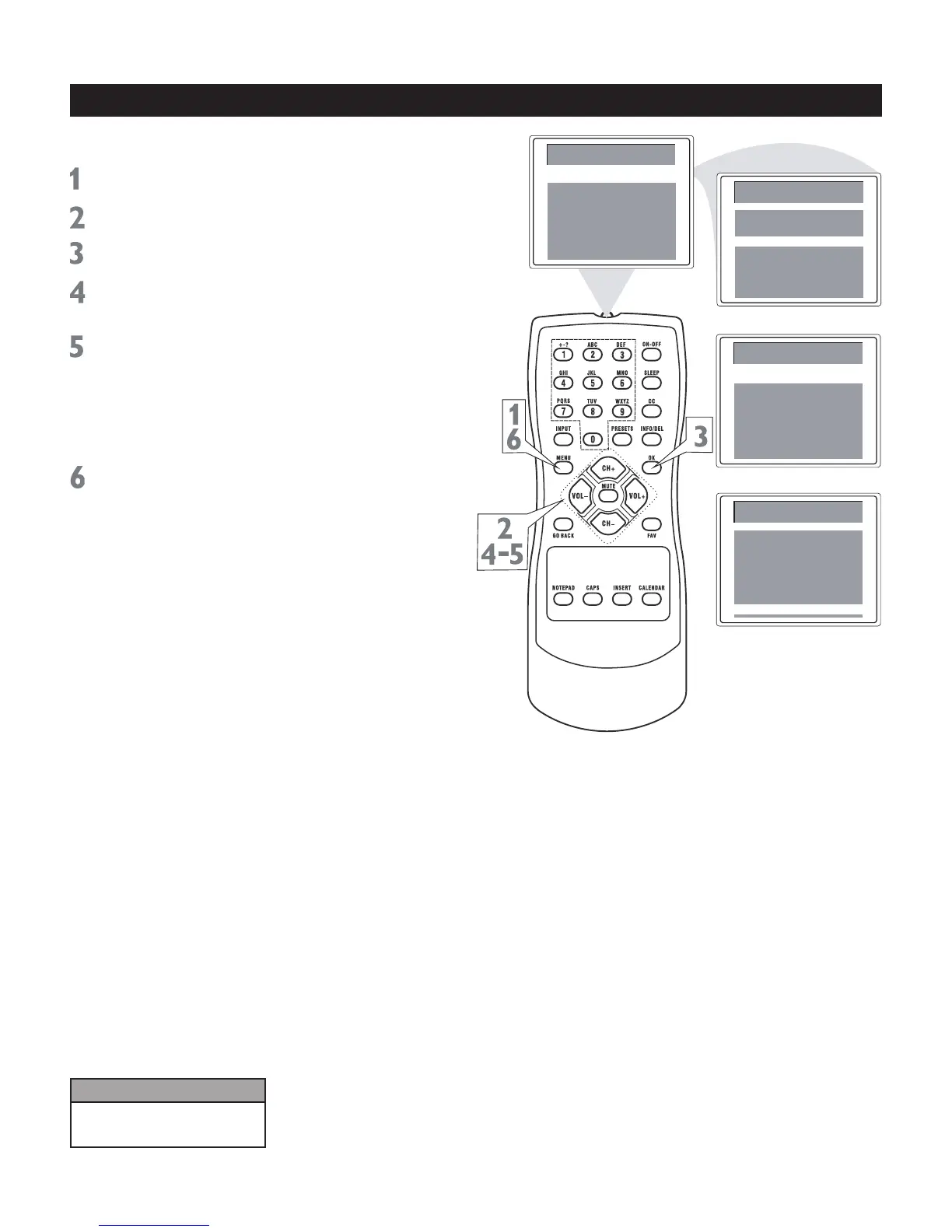
Follow these steps to set the clock.
Press MENU to see the main menu.
Press CH+ or CH- to highlight Time.
Press OK to enter the Time submenu.
Press CH+ or CH- repeatedly to
highlight Clock.
Press VOL+ or VOL- to change the time
in minutes. Press and hold VOL+ or VOL-
to change the time quickly in 10 minute
increments; press OK. The highlight
moves to the hour position.
Use VOL+ or VOL- to set the hour.
Press MENU repeatedly to exit the
menu or the menu will automatically
disappear within a few seconds if no
buttons are pressed on the remote
control.
Note: The Sound menu is only available
on some models.
Clock
Time
Off Time Off
AM12:00
On Time Off
AM12:00
Channel 1
TV/CATV CATV
Clock AM10:00



 To Next Page