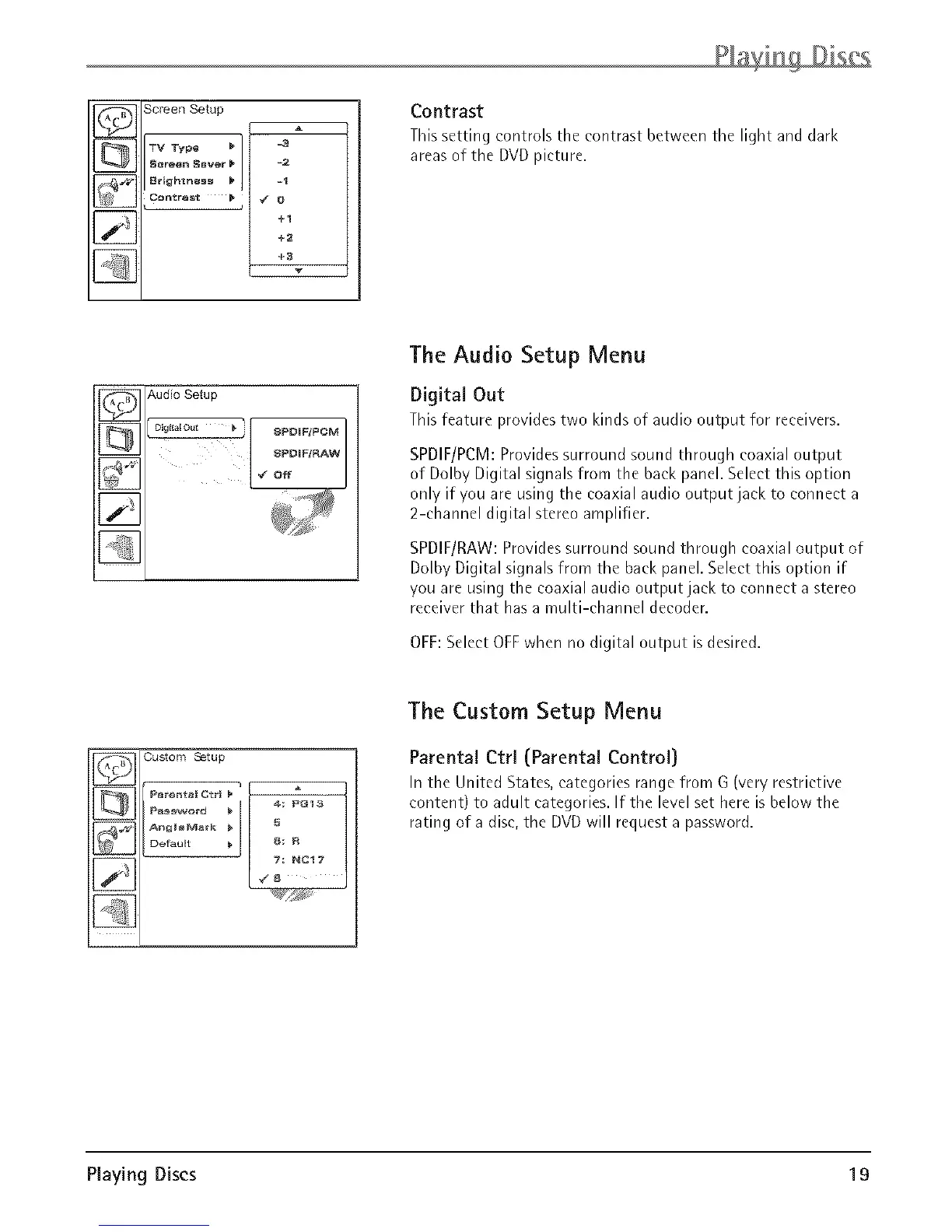
Screen Setup
_VTypo _/ -_
Sor_n SBV_r_ / -2
+1
+2
+3
Contrast
This setting controls the contrast between the light and dark
areas of the DVD picture,
i_,-. Audio Setup
II_ I 8PDIF/PCM
[] _ Off
The Audio Setup Menu
Digital Out
Thisfeature providestwo kinds of audio output for receivers.
SPDIF/PCM: Provides surround sound through coaxial output
of Dolby Digital signals from the back panel. Select this option
only if you are using the coaxial audio output jack to connect a
2-channel digital stereo amplifier.
SPDIF/RAW: Provides surround sound through coaxial output of
Dolhy Digital signals from the back panel. Select this option if
you are using the coaxial audio outputjack to connect a stereo
receiver that has a multi-channel decoder.
OFF:Select OFFwhen no digital output isdesired.
_ Custom Setup ]
Pererlt_l Otrl
P_w_rd _ m_: PG13
Default _ _ F_
7:NC17,/8
The Custom Setup Menu
Parental Ctrl (Parental Control)
In the United States, categories range from G (very restrictive
content) to adult categories. If the level set here is below the
rating of a disc, the DVD will request a password.
Playing Discs 19



 To Next Page
 Loading...