6
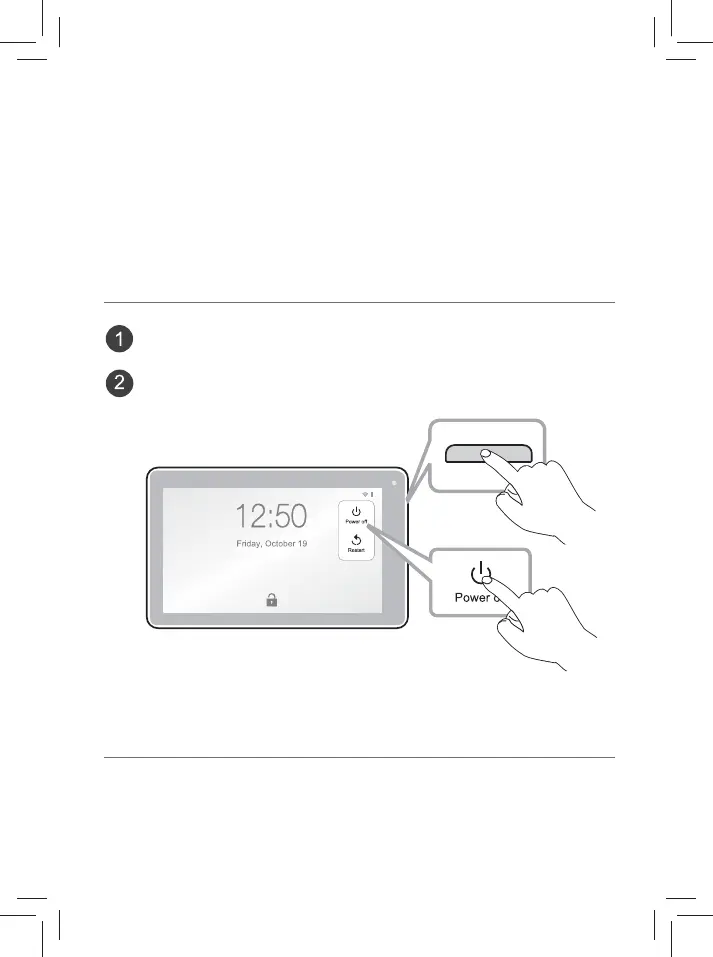
Power o your tablet
Power: DC IN 5V (operate with AC adaptor)
Speci cation
Press and hold the Power button until Power o appears and tap it.
The tablet will be completely powered o .
3. Tap a network name to connect to it, and enter a password if necessary.
4.
Alternatively, if your Wi-Fi router supports Wi-Fi Protected Setup, you can go to
the Advanced Wi-Fi screen (tap Wi-Fi preferences and select Advanced) and
select WPS Push Button, then press the WPS button on your router.
5. If your network does not broadcast its SSID, tap + Add network and enter
the Network SSID (name) of the network. If necessary, enter security or other
network con guration details.













 To Next Page