5
Connecting to a WiFi network
2. The device will scan Wi-Fi networks automatically and display the available
names.
• If the device finds a network that you connected to previously, it will
connect to it automatically.
1.
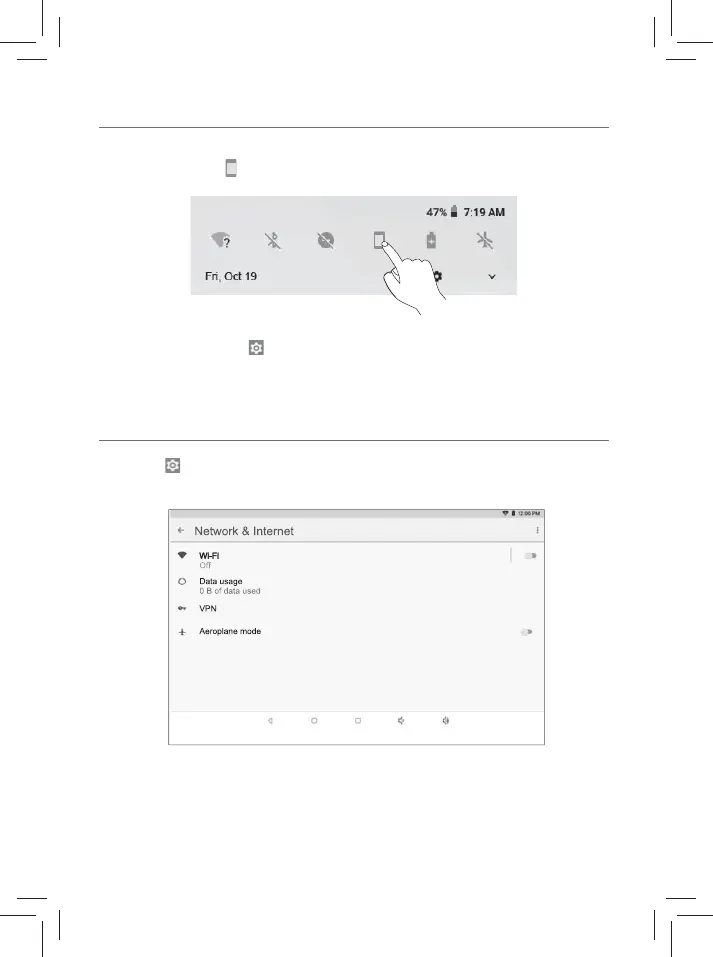
Go to Settings -> Network & Internet, tap Wi-Fi to open the Wi-Fi
screen and then tap O to turn it on.
Setting the Auto-rotate screen
1. Swipe down from the top edge of screen to launch the "Quick Settings".
2. Touch the icon " " to turn on the Auto-rotate screen.
Tip: You can also go to Settings -> Accessibility -> Auto-rotate screen and
turn it on.













 To Next Page