Step 3 Finalizing/ Erasing Recording
:_: v., l, ,_."nf;nal;z;n --I L,_=ras;n-- This is for CD-RW only. You can erase either
track by track from the end or the whole disc.
Recordings
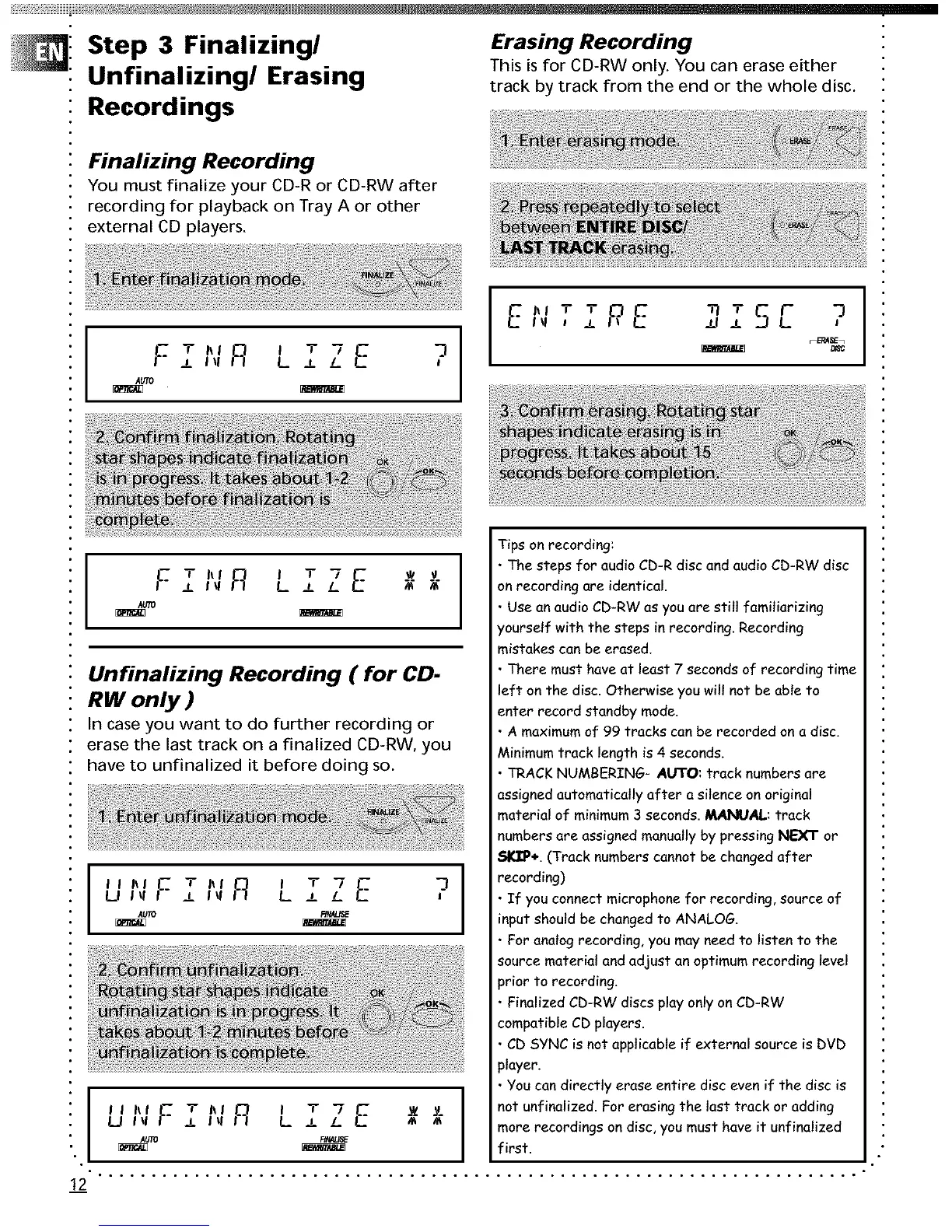
Finalizing Recording
You must finalize your CD-R or CD-RW after
recording for playback on Tray A or other
external CD players.
F T,,,_ , T 7 E n_
± ll! L ± L
,%,To
?E*,T Tp, E
I _1
Tips on recording:
w v • The steps for audio CD-R disc and audio CD-RW disc
F TI'IR I T'7 E
J. I _1 L ± L m m on recording are identical
AUTO " Use an audio CD-RW as you are still familiarizing
/ourself with the steps in recording Recording
mistakes can be erased.
Unfinalizing Recording ( for CD- • There must have at least 7 seconds of recording time
0 nh_|,.71 left on the disc Otherwise you wilt not be able toRW
enter record standby mode.
In case you want to do further recording or • A maximum of 99 tracks can be recorded on a disc.
erase the last track on a finalized CD-RW, you Minimumtrack length is 4 seconds.
have to unfinalized it before doing so. • TRACKNUMBERING- AUTO: track numbersare
assigned automatically after a silence on original
material of minimum 3 seconds MANUAL: track
numbers are assigned manually by pressing NEXT or
SI_P+. (Track numbers cannot be changed after
I = ,7-I rec°rding
,, L. ± • If you connect microphone for recording, source of
UI'IF ±
_m _u_ input should be changed to ANALOG.
• For analog recording, you may need to listen to the
source material and adjust an optimum recording level
)rior to recording.
• Finalized CD-RW discs play only on CD-RW
compatible CD players
• , CD SYNC is not applicable if external source is DVD
player.
• , You can directly erase entire disc even if the disc is
;J "' F .[ h' R L ± L more recordings on disc, you must have it unfinalized
I _! _Z v. not unfinalized For erasing the last track or adding
AUTO F_
_ First.
12


 To Next Page