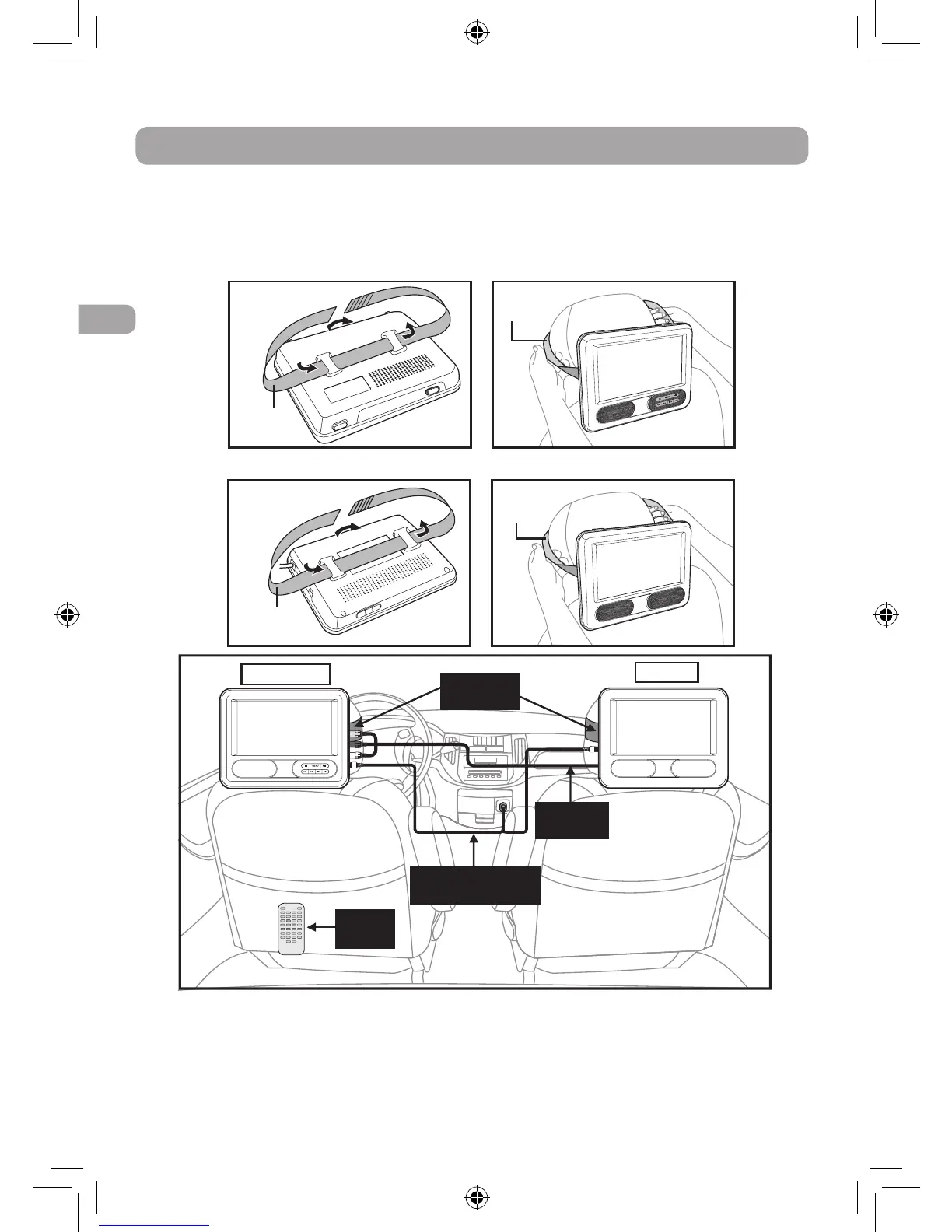
Mounting in the vehicle
Use the supplied mounting straps to install the DVD Player and the monitor on the back
of the vehicle's headrests. Tightly wrap the mounting straps around the headrest.
Placement
SAFETY WARNING!
•This unit should never be used by the
vehicle's driver or left unsecured in the
vehicle while driving.
•Ifthisunitisbeingusedinyourvehicle,
be sure that it is secured or held safely,
and does not obstruct any safety device,
including air bags or seat belts.
•All passengers should wear seat belts
when using this unit in a moving vehicle.
•Ifindoubt,pleasecontactyourvehicle
manufacturer for further advice.
Mounting the DVD Player
Mounting the Monitor
Mounting
strap
Mounting
strap
Mounting
strap
Mounting
strap
DVD Player
Monitor
Mounting
Straps
Built-in
AV cable
Car Power Adapter
with splitter
Remote
Control
DRC69707E RCA 3L MTK.indd 10 8/9/2011 14:34:30


 To Next Page