TV Display
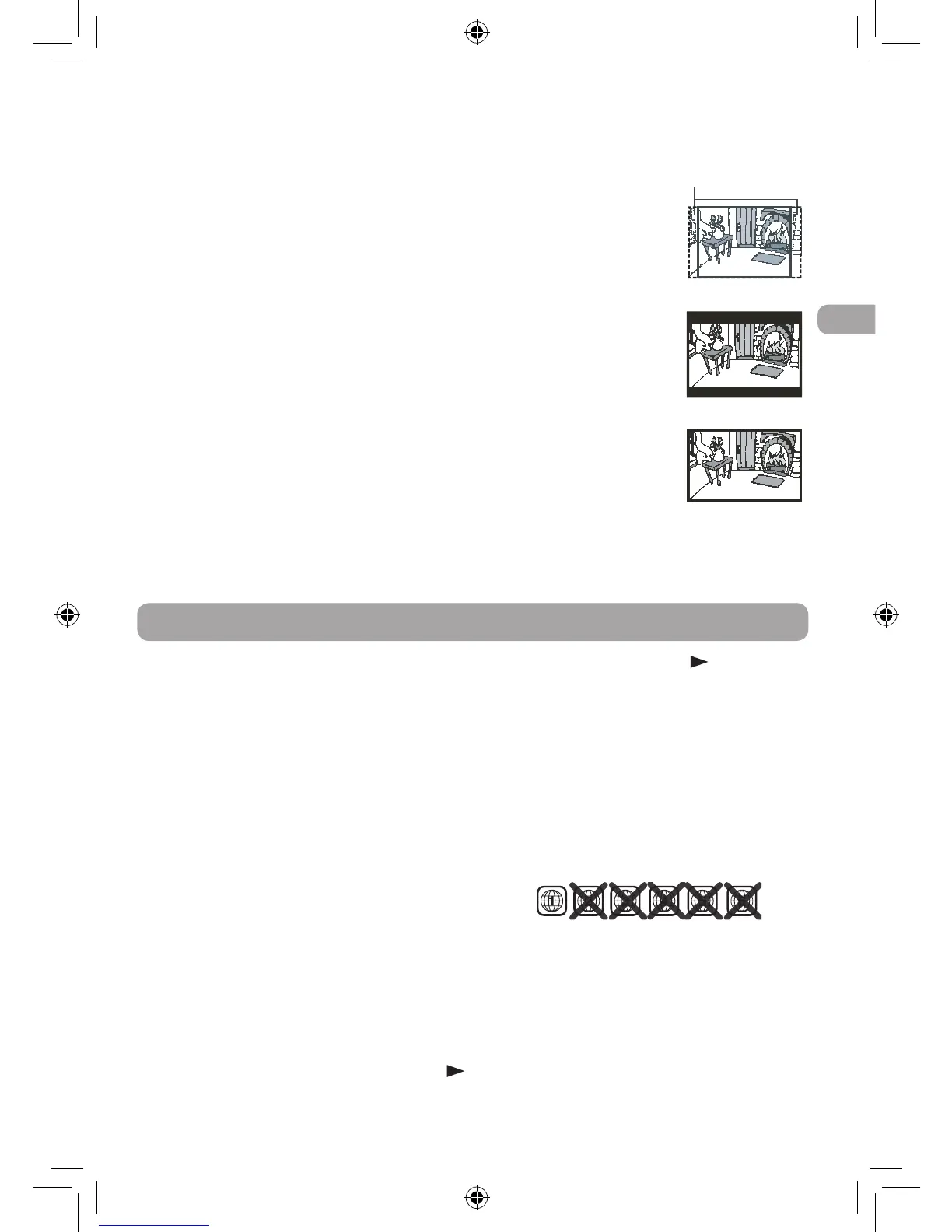
Pan Scan
• When wide-screen video is played, this
mode clips the right and left sides of
the image so that it can be viewed on a
conventional screen.
• Some wide-screen DVDs that do not
permit Pan Scan mode playback are
automatically played in letterbox mode
(black bands that appear at the top and
bottom of the screen).
Letter Box
• Whenwide-screenvideoisplayedinthis
mode on a conventional screen, black
bands appear at the top and bottom of
the screen.
Wide Screen
• This is the correct mode for playing
wide-screen videos on the unit screen or
other external wide-screens.
Note:
• Thedisplayablepicturesizeispreseton
the DVD. Therefore the playback picture
of some DVDs may not conform to the
picture size selected.
• When you play DVDs
recorded in the 4:3
aspect ratio, the
playback picture will
always appear in
the 4:3 aspect ratio
regardless of the TV
display setting.
• Select Wide Screen
to conform the LCD
screen on the unit.
Always be sure that
your TV display
conforms to the
actual TV in use if you
connect the unit to a
TV.
Default
It takes 3-5 seconds to
reset the DVD settings
to the factory default.
No power
• Ensure the car power adaptor is
connected.
• Makesurethattheunitisturnedon.
The remote control does not
function
• Makesuretheinfraredremotesensoris
not blocked.
• Make sure the plastic sheet has been
removed from the remote control.
• Pointtheremotedirectlyattheinfrared
remote sensor on the unit.
• Replace the battery in the remote
control with a new one.
No Sound or only a very low-
level sound is heard
• The volume control is located on the
side of the unit - please try adjusting
this.
• Theunitisinpausemode.Pressthe
PLAY button to return to normal play
mode.
• The unit is in fast-forward or fast-
reverse mode. Press the PLAY button
to return to normal play mode.
• Make sure the AUDIO/VIDEO output
connections are correct.
• The DTS DVD cannot be decoded to
have speaker output.
• Theunitistoohot,shutofftheunitfor
30 minutes to cool it down.
No picture
• The region number of the disc doesn’t
match the region number of this unit.
The picture is not clear
• Cleanthedisc.
• Thediscisscratched.
• AdjusttheLCD’sbrightnessandcontrast
using the VIDEO MODE button on the
remote control.
Loud hum or noise is heard
• Theplugsandjacksaredirty.Wipethem
with a cloth slightly moistened with
alcohol.
Troubleshooting
Cut off when a
wide-screen video
image is played
Pan Scan
Letter Box
Wide Screen
DRC69707E RCA 3L MTK.indd 17 8/9/2011 14:34:35


 To Next Page