EasyManua.ls Logo

RCA Home Theater Audio System - User Manual

RCA Home Theater Audio System
36 pages
Print Icon
To Next Page IconTo Next Page
Loading...
owner’s manual
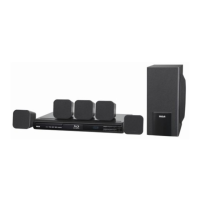
Complete 7-Piece Home Theater Audio System
with DVD Player and VCR
31-5025.fm Page 1 Wednesday, January 15, 2003 5:05 PM

Table of Contents

Other manuals for RCA Home Theater Audio System

Questions and Answers

  • C
    Crystal WrightSep 14, 2025
    How to open DVD door on RCA Home Theater System if it will not open?
    • D
      dgrahamSep 14, 2025
      If the DVD door on your RCA Home Theater System won't open, try resetting the player. Turn it off by pressing POWER, wait a few seconds, and then restart the player.
  • W
    William CarrilloAug 25, 2025
    How to fix RCA Home Theater Audio System remote that is not working?
    • N
      Natasha HowardAug 25, 2025
      If the remote for your RCA Home Theater System isn't working, try these steps: * Remove any obstacles between the remote and the player. * Move the remote closer to the player. * Point the remote at the player’s remote sensor. * Install new batteries in the remote.
  • H
    hthompsonAug 25, 2025
    How to fix no power on my RCA Home Theater Audio System Home Theater System?
    • J
      Joshua LawrenceAug 26, 2025
      If your RCA Home Theater System isn't powering on, ensure the power cord is securely plugged into the wall outlet.
  • D
    Douglas HerreraAug 26, 2025
    What to do if there is no picture on my RCA Home Theater Audio System Home Theater System?
    • M
      Melanie RamirezAug 26, 2025
      If you're not getting any picture on your RCA Home Theater System, first, make sure your TV is set to the correct video input mode to receive the DVD signal. Also, check that the video cable is securely connected to the jacks, and ensure your TV is powered on.
  • M
    Melissa BeanSep 15, 2025
    Why does my RCA Home Theater Audio System Home Theater System VCR not receive CATV channels?
    • A
      Amanda WatsonSep 15, 2025
      To fix an RCA Home Theater System VCR that does not receive CATV channels, use the CHANNEL PRESET screen to change from AIR to CATV mode.
  • B
    Brent AndradeSep 23, 2025
    Why cassettes recorded in stereo mode are not played in stereo on RCA Home Theater Audio System?
    • C
      Charles LongSep 23, 2025
      If cassettes recorded in stereo mode are not played in stereo on your RCA Home Theater System, make sure the sound was recorded in Hi-Fi stereo. Note that any stereo signals recorded on the linear track will not be played in stereo.
  • M
    Michael PerrySep 7, 2025
    Why does my RCA Home Theater Audio System sound cut off or there is no sound even though power is on?
    • D
      David ButlerSep 7, 2025
      If your RCA Home Theater System is cutting off sound or has no sound even though the power is on, the speaker impedance might be less than prescribed for this receiver. After turning off the power and then turning it on again, reduce the volume or change to the correct 6-ohm speakers.
  • M
    Michael BrownSep 8, 2025
    What to do if left/ right speakers sounds are reversed on my RCA Home Theater Audio System?
    • J
      jo19Sep 8, 2025
      If the left and right speakers sounds are reversed when listening to music in stereo on your RCA Home Theater System, the speakers are likely incorrectly connected. Check and reconnect them.
  • C
    chelseawyattSep 2, 2025
    What to do if there is low bass response on my RCA Home Theater System?
    • D
      Dylan MathewsSep 2, 2025
      If you're experiencing low bass response with your RCA Home Theater System, check all speakers for correct polarity (+/–).
  • W
    wlloydAug 31, 2025
    Why is my RCA Home Theater Audio System making a low hum or buzz sound?
    • S
      solisbrandonAug 31, 2025
      If your RCA Home Theater System is producing a low hum or buzz, it could be due to the power line of a fluorescent light or another device installed near the receiver. Place the receiver as far away as possible from electric devices that cause interference.

Summary

IMPORTANT SAFETY INSTRUCTIONS

General Operation and Installation Safety

Covers safe operation, installation, power, ventilation, and cord handling.

Service, Hazards, and Environment Precautions

Addresses servicing, attachments, lightning, overloading, and replacement parts safety.

GETTING STARTED

Connecting Your System

Guides for connecting TV, antenna, other equipment, speakers, and power.

DVD PLAYER OPERATION

VCR OPERATION

Recording Features and Timer Programming

How to record TV programs, timer functions, and audio modes.

TUNER OPERATION

CUSTOMIZING FUNCTION SETTINGS

TROUBLESHOOTING

DVD Player Issues

Common problems with DVD playback and solutions.

VCR Issues

Common problems with VCR operation and recording, and solutions.

RCA Home Theater Audio System Specifications

Player

Power IconPower
power supplyAC 120V ~ 60Hz
power consumption100 W
Operating Environment IconOperating Environment
operating temperature41 to 110 F (5 to 43 C)
operating humidity5% to 85% (no condensation)
Audio Specifications IconAudio Specifications
signal-to-noise speakerMore than 55dB
aux out70dB
audio dynamic rangeMore than 80/80dB

Speakers

Speaker System IconSpeaker System
speaker systemBass reflex
speaker unit (HWD) front/rear114 x 87 x 108 mm
speaker unit (HWD) center87 x 160 x 106.5 mm
Impedance IconImpedance
rated impedance front/center/rear8 ohms
rated impedance subwoofer6 ohms
Subwoofer Specifications IconSubwoofer Specifications
subwoofer speaker systemBass reflex
subwoofer speaker unit (HWD)330 x 174 x 320mm

VCR

Recording System IconRecording System
recording systemRotary Two-head Helical Scanning
tape width1/2 inch
tape speed SP1 5/16 Inch/second (33.35 mm/s)
Tuner Channels IconTuner Channels
vhf channels2-13
uhf channels14-69
catv channels1-125
Dimensions and Weight IconDimensions and Weight
dimensions (HWD)96 x 430 x 370 mm
weight8 Kg

Related product manuals